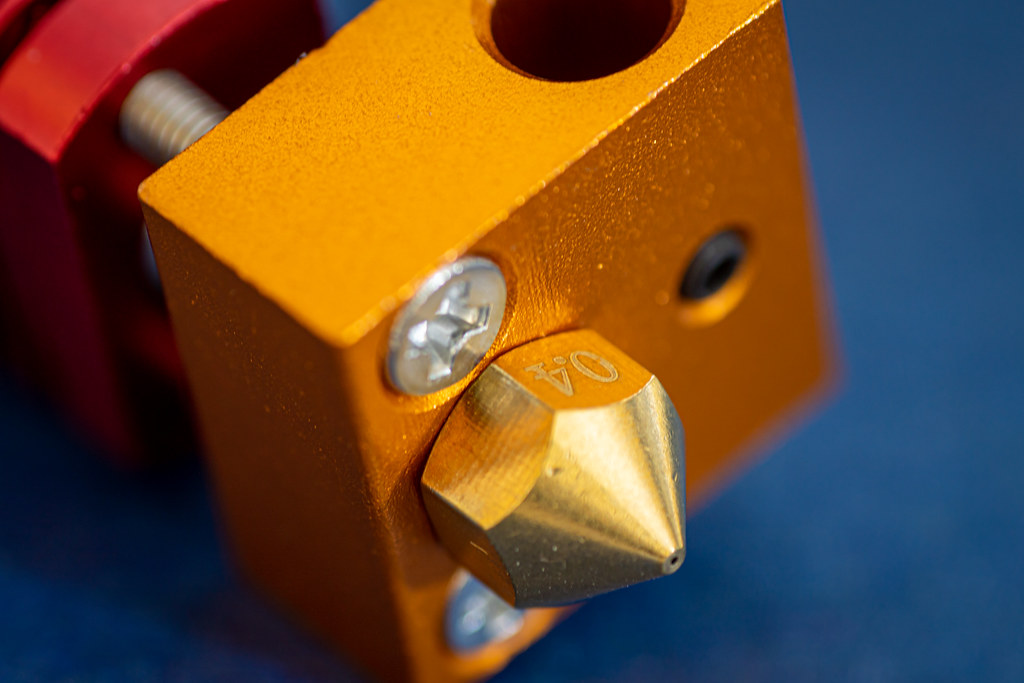
In the world of Fused Deposition Modeling (FDM) 3D printing, the hotend is an essential component, serving as the heart where the raw filament is transformed into the precise extrusions that form a 3D object. This component’s design and functionality directly influence the printer’s capability to handle different materials, the quality of the prints, and the speed of printing. Understanding the complexities of the hotend, including its construction, types, and maintenance requirements, can significantly enhance printing operations and outcomes.
The Role of the Hotend in 3D Printing
Material Melting: The hotend heats the filament to its specific melting point, allowing it to be extruded through the nozzle smoothly and consistently.
Print Quality: The stability and accuracy of the temperature control within the hotend are crucial for ensuring that the material is adequately melted and extruded, affecting the print’s quality, strength, and appearance.
Material Compatibility: Advanced hotends can reach higher temperatures and are equipped with better thermal regulation, allowing printers to work with a broader range of filaments, from basic PLA to more demanding materials like Nylon and Polycarbonate.
Components of a Hotend
Heating Element: Typically a resistor or a cartridge heater, this component raises the temperature of the hotend to the required levels for melting different types of filaments.
Thermistor: This temperature sensor provides feedback to the printer’s control system, ensuring the hotend maintains the correct temperature by making adjustments as needed.
Heat Block: The heat block is a metal block that houses the heating element and the thermistor. It is responsible for maintaining a consistent temperature and evenly distributing heat throughout the hotend.
Heat Break: This component is crucial for thermal regulation; it separates the heat block from the cooler parts of the hotend. The heat break is designed to prevent heat from creeping up to the filament before it reaches the heat block, which could cause clogs.
Nozzle: The nozzle is where the melted filament exits the hotend and is deposited layer by layer. Nozzles come in various sizes, affecting the resolution and speed of the print.
Cooling System: To prevent overheating and to ensure that the filament does not melt prematurely, the upper part of the hotend (above the heat break) often includes a cooling fan or a heat sink.
Types of Hotends
Standard Hotends: These are designed for lower-temperature materials such as PLA and ABS. They typically operate at temperatures up to about 250°C.
All-Metal Hotends: Capable of reaching higher temperatures (up to 400°C or more), all-metal hotends can handle high-temperature materials like Nylon and Polycarbonate without the risk of the heat break clogging.
Volcano Hotends: Designed for high-flow applications, volcano hotends feature an extended heat block that allows for the melting of more filament at a time, enabling faster print speeds and thicker layers.
Ruby-Tipped Nozzles: These involve a standard or all-metal hotend fitted with a nozzle that has a ruby tip, designed to resist wear from abrasive materials like carbon-fiber-filled filaments.
Maintenance and Optimization of the Hotend
Regular Cleaning: The nozzle can become clogged with burnt filament and debris, so regular cleaning is essential to maintain print quality. Techniques like “cold pulls” are commonly used to clear out clogs.
Thermal Runaway Protection: Ensuring that the printer’s firmware includes thermal runaway protection is crucial. This safety feature monitors the thermistor and automatically shuts down the heater if it detects abnormal temperature fluctuations.
Periodic Inspection: Regularly checking the tightness of the nozzle and the condition of the heating element and thermistor can prevent failures during printing. It’s also important to check for any signs of wear or damage, especially if printing with abrasive materials.
Upgrading Components: Upgrading to a more advanced hotend can significantly improve a printer’s capabilities. For example, switching to an all-metal hotend can expand the range of materials the printer can handle.
The hotend is a pivotal component in FDM 3D printing, dictating the types of materials a printer can use, the speed of printing, and the quality of the final prints. A well-maintained and appropriately chosen hotend can transform the capabilities of a 3D printer, making it a versatile tool capable of producing high-quality prints from a variety of materials. By understanding the intricacies of their hotend, users can optimize their 3D printing processes, ensuring reliable and high-quality outcomes in every print.