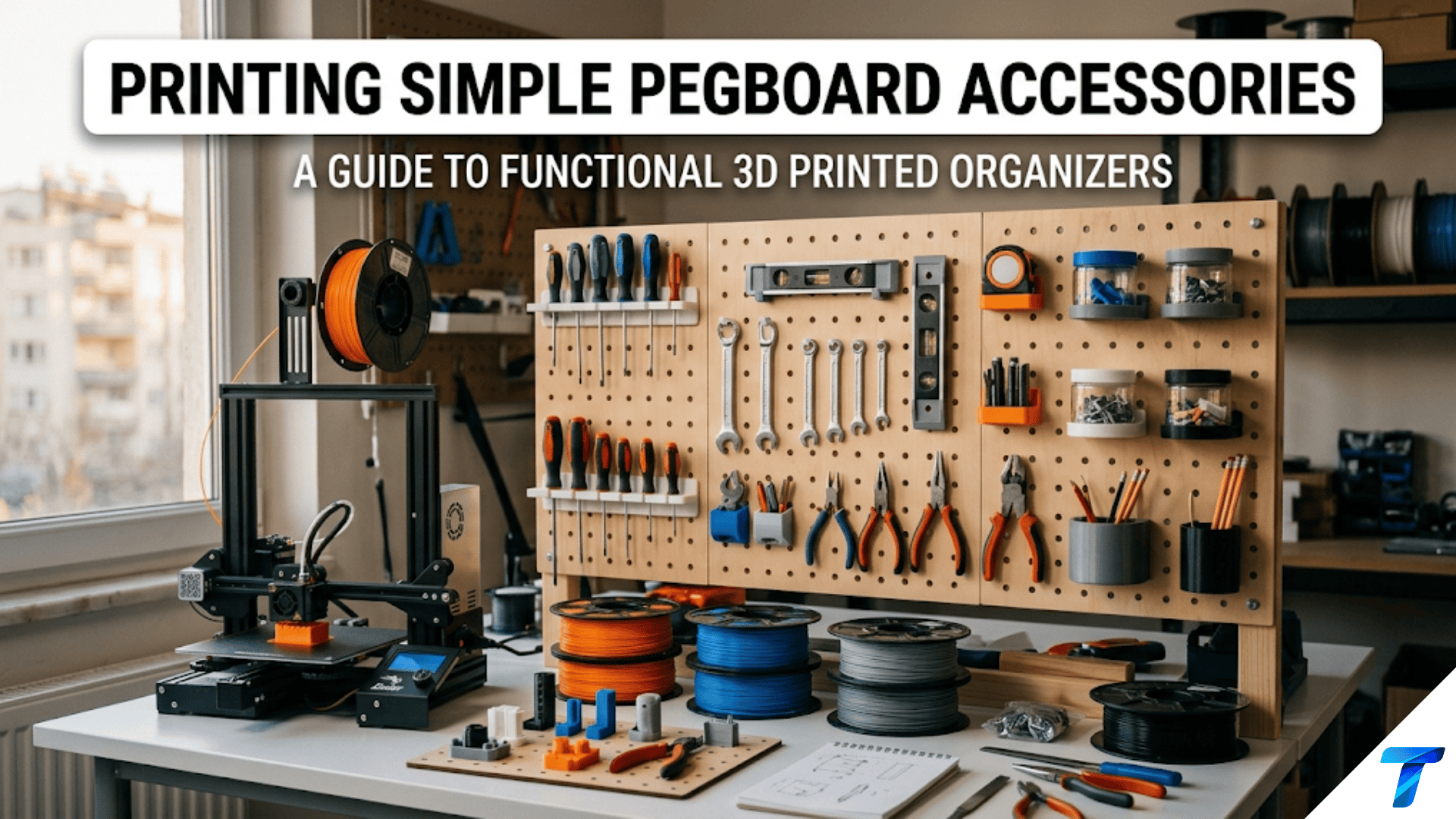

3D printed pegboard accessories are custom-designed hooks, bins, shelves, clips, and holders that mount to standard pegboard panels through the board’s regularly spaced holes, creating a flexible, rearrangeable organization system for workshops, offices, kitchens, and craft spaces. They are ideal beginner projects because standard pegboard has universally consistent hole dimensions and spacing that every printed accessory must match — teaching precise dimensional design from a fixed specification — while the modular, rearrangeable nature of pegboard means any printed piece can be repositioned instantly without tools.
Introduction: The Most Versatile Organization Surface
Pegboard is one of the oldest organization systems in workshop culture and one of the most intelligent: a flat panel perforated with regularly spaced holes that accepts hooks, bins, and shelves in any arrangement the user needs. Rearrange the tools, rearrange the accessories. Add a tool, add a hook. No drilling, no hardware, no permanent commitment.
What limits commercial pegboard is what limits all commercial organizational products: it was designed for an average user with average tools. The hooks are in fixed sizes. The bins hold fixed volumes. The shelves have standard depths. If your specific wrench, your specific bottle, your specific collection of craft supplies doesn’t fit the commercial accessories — and it often doesn’t — you’re left with compromise solutions that almost work but never quite do.
3D printing eliminates this limitation completely. A hook sized for the exact handle diameter of your specific hammer. A bin designed to hold your exact brand of spray cans. A shelf precisely deep enough for your specific router bit storage. A clip that holds the exact diameter of your particular collection of brushes or markers. Each of these is a few hours of design and printing — and each one transforms a section of pegboard from “close enough” to “exactly right.”
Pegboard accessories are also excellent learning projects for a specific reason that goes beyond their practical value: they have a shared, mandatory interface. Every piece must engage with the same 6.35mm (¼ inch) holes at the same 25.4mm (1 inch) spacing. This constraint teaches you to design within a fixed standard — a discipline that applies to every connector, mounting system, and mating interface you’ll ever design. You have creative freedom everywhere except the peg geometry, which must be exactly right.
This guide covers the complete pegboard accessory workflow: the standard specifications every peg must match, the major accessory categories worth printing, design principles for reliable pegboard engagement, material selection for workshop environments, slicer settings for small functional parts, and a range of creative pegboard systems for every room and use case.
Understanding Pegboard Standards
Before designing any pegboard accessory, understanding the physical standards is essential. The peg geometry that engages with the board must match these specifications precisely or the accessory simply won’t fit.
Standard Pegboard Hole Specifications
North American standard (most common):
- Hole diameter: 6.35mm (¼ inch)
- Hole center-to-center spacing: 25.4mm (1 inch) on a square grid
- Common board thickness: 3.2mm (⅛ inch) or 6.4mm (¼ inch)
European/metric pegboard (less common but increasingly available):
- Hole diameter: 5mm
- Hole spacing: 25mm center-to-center
Before designing, measure your specific board. While standards are consistent within a region, verify by measuring a few holes on your actual board with calipers. A 0.5mm discrepancy in the peg diameter makes the difference between a smooth-inserting accessory and one that won’t go in.
Peg Design Specifications
The peg is the element that inserts into the pegboard hole. For a reliable, non-loosening fit:
| Parameter | Specification | Notes |
|---|---|---|
| Peg diameter | 5.8–6.0mm (for 6.35mm holes) | 0.35–0.55mm clearance |
| Peg length | 18–25mm | Long enough to pass through board + provide retention |
| Retention feature | Hook or tab at peg end | Prevents the accessory from pulling straight out |
| Peg spacing | 25.4mm center-to-center | Must match the board hole grid exactly |
| Number of pegs | Minimum 2 | Single-peg accessories rotate and fall out |
The retention feature is critical. Without a retention tab, hook, or locking element at the end of the peg (on the back side of the board), the accessory simply pulls out of the board when any outward force is applied. Every functional pegboard accessory needs a retention mechanism.
Types of retention mechanisms:
- Simple hook: The peg extends past the board, then hooks downward. The hook catches on the back of the board. This is the most common mechanism and the simplest to design. Pull straight out is resisted; downward pull (from the loaded accessory) increases engagement.
- Locking tab: A small flexible tab at the peg end that deflects inward for insertion, then springs back to lock behind the board. Provides positive retention against both outward pull and vibration. Requires PETG or Nylon for the tab flexibility.
- Wedge lock: A wedge-shaped element at the peg end that jams against the back of the board when the accessory is loaded. Simple and reliable.
- Screw lock: A through-hole in the peg accepts a small screw that tightens against the back of the board after insertion. Maximum security for accessories that will never be moved.
For most applications, the simple hook retention is adequate. For workshops with vibration (near power tools), the locking tab provides better stability.
The Multi-Peg Requirement
Single-peg accessories are the most common design mistake for beginners. A single peg means the accessory can rotate freely around that peg — it hangs at whatever angle gravity dictates, which often means it tips forward and either falls off the board or hangs at an awkward, unusable angle.
Two pegs at known spacing prevents rotation entirely. With two pegs engaged in the board’s grid, the accessory is rigidly positioned — it cannot rotate, tilt, or fall. Design every pegboard accessory with a minimum of two pegs.
For wide accessories or heavy loads, three or four pegs provide additional security and distribute the load more broadly across the board.
Major Pegboard Accessory Categories
1. Single Tool Hooks
The simplest pegboard accessory: a hook that holds one specific tool. Commercial single hooks are generic — they’re designed for no specific tool diameter and fit all tools approximately. A printed hook designed for your specific tool diameter holds it firmly, at the right angle, with the right depth of engagement.
Design approach:
For a hanging hook (tools with handles or loops, like hammers, wrenches, or scissors):
- Mounting body: Contains the two pegs at 25.4mm spacing
- Hook arm: Extends from the mounting body at the right angle and length for the specific tool
- Hook opening: Sized for the specific handle or loop diameter + 3–5mm clearance
For a shelf hook (tools that rest on a horizontal surface, like chisels, files, or flat-bladed tools):
- Mounting body: Contains the two pegs
- Horizontal shelf: A flat or slightly angled platform extending from the mounting body at an appropriate height
- Lip: A small raised edge at the front of the shelf prevents tools from sliding off
Critical dimension: The hook opening must be appropriate for the tool being held. Measure the handle or hanging point of the specific tool with calipers. A hook that’s 5mm too narrow doesn’t accept the tool; 10mm too wide lets it rattle and potentially fall.
2. Multi-Tool Holder Platforms
A larger mounting plate with multiple hooks, pegs, slots, or channels for a set of related tools — all the screwdrivers, all the chisels, all the paint brushes. The platform spans multiple rows of pegboard holes and holds an entire tool category in one organized display.
Design approach:
- Mounting plate: Wide backing plate with pegs engaging a 2×3 or 3×4 grid of holes
- Multiple attachment points: Each tool has a dedicated position — a hole, a slot, a loop, or a clip
- Labeling: Optional labels (embossed or debossed) indicating which tool goes where
Specific multi-tool holder designs worth printing:
- Screwdriver bit holder: 20–30 slots, each sized for a specific screwdriver bit type and size
- Hex key fan: Angled slots in a fan arrangement for Allen keys, showing each key size at a glance
- Drill bit row: A line of angled holes for drill bits, organized from smallest to largest
- Paint brush holder: Horizontal slots of various diameters for different brush handle sizes
3. Open Storage Bins
Bins that mount to pegboard and hold loose items — small parts, consumables, supplies. The bin mounts with two or more pegs and provides an open-top container accessible from the front.
Design approach:
- Mounting section: The back of the bin, containing the pegs and mounting to the board
- Bin body: A container attached to the mounting section, sized for the intended contents
- Optional label area: A recessed area on the front face for a label or embossed text identifying contents
Standard bin sizes worth designing:
- Small (70mm × 50mm × 60mm): For screws, nuts, small hardware
- Medium (100mm × 70mm × 80mm): For larger hardware, tools, supplies
- Large (140mm × 90mm × 100mm): For bottles, bulky supplies, larger tools
The bin angle: Bins can be designed with a slight forward tilt (5–10°) so contents are visible from above when looking at the pegboard. This makes finding items faster. The peg mounting is vertical while the bin body angles forward.
4. Pegboard Shelves
Flat shelves that mount to pegboard and provide a horizontal surface for holding items that don’t have natural hanging points — bottles, containers, power tools, electronic devices.
Design approach:
- Back mounting plate: Contains the pegs, attaches to the board vertically
- Shelf surface: Extends horizontally from the mounting plate
- Front lip: A raised edge (10–15mm) prevents items from sliding off
- Side walls (optional): Contain items laterally for unstable or round-bottomed objects
Shelf depth: 80–150mm for most applications. Deeper shelves hold larger items but create more leverage at the mounting point — deeper shelves need more pegs (3–4 per shelf) and stronger mounting geometry.
Load consideration: Shelves are load-bearing in a way that hooks are not. A shelf holding a 500g bottle creates a significant bending moment at the mounting plate. Design with:
- Minimum 4 pegs (2×2 grid) for shelves over 100mm deep
- Triangular gussets between the shelf surface and the mounting plate
- PETG material for sustained load applications
5. Specialty Clips and Holders
Pegboard accessories designed for specific items that don’t fit standard hook or bin categories:
Roll of tape holder: A short horizontal rod on a mounting body, sized for standard tape roll inner diameters. The roll of tape slides over the rod and can be pulled with one hand.
Spray can holder: A semicircular cradle sized for the specific spray can diameter being stored. The can sits in the cradle at a slight angle for visibility of the label.
Extension cord organizer: A large hook or set of pins specifically sized for wrapping an extension cord in organized loops.
Level holder: A horizontal channel sized for the specific level width, with retaining clips that hold the level horizontally against the wall.
Measuring tape holder: A dedicated holder for a specific tape measure — often a hook or clip that engages the tape’s belt clip or spring housing.
Power tool battery holder: Sized for specific tool battery dimensions with a snap-fit or gravity retention system.
6. Pegboard Bins with Dividers
An open bin with internal dividers for organizing multiple categories of small items in a single bin — segregated by divider into compartments but all held in one compact pegboard unit.
Design: A standard bin with one or more interior walls creating 2–4 compartments. Each compartment can be labeled for its contents. This approach is more space-efficient than multiple individual bins and allows related items to be kept together while still being separately organized.
Designing a Pegboard Hook in Tinkercad
Here is a complete step-by-step design for a basic two-peg pegboard hook suitable for hanging pliers, scissors, or other handled tools.
Step 1: Define Your Dimensions
- Pegboard specifications: 6.35mm holes, 25.4mm spacing, 6.4mm board thickness
- Peg dimensions: 6.0mm diameter, 22mm length (15mm into board + 7mm for hook retention)
- Mounting plate: 30mm × 30mm × 8mm (covers a 2×1 hole area with adequate material)
- Hook arm: 40mm long, 8mm × 8mm cross-section, extending from mounting plate
Step 2: Create the Mounting Plate
Create a box: 30mm wide × 30mm tall × 8mm thick. This is the back plate that rests against the pegboard surface.
Step 3: Add the Pegs
Create a cylinder: 6.0mm diameter, 22mm long. Position it protruding from the back face of the mounting plate, centered horizontally and at 12mm from the bottom of the plate (lower peg position for a 2-peg vertical arrangement with 25.4mm spacing).
Duplicate and position the second peg at 12mm + 25.4mm = 37.4mm from the bottom of the plate (upper peg).
Wait — a 30mm tall plate cannot accommodate 25.4mm peg spacing while keeping adequate material above and below the pegs. Adjust: increase plate height to 45mm to accommodate both pegs with adequate material (10mm from the bottom edge to lower peg center; 10mm from upper peg center to top edge; 25.4mm spacing between peg centers = total 45.4mm plate height minimum → use 50mm height).
Revised plate: 30mm × 50mm × 8mm. Lower peg center: 12mm from bottom. Upper peg center: 37.4mm from bottom.
Step 4: Add Peg Retention Hooks
At the end of each peg (the end that will be on the back side of the board), add a small hook that will lock behind the board:
Create a small box: 8mm × 4mm × 3mm. Position it at the end of the lower peg, perpendicular to the peg (hanging downward). This forms the retention hook at the peg tip.
Repeat for the upper peg.
Important: Group the retention hooks with the pegs before grouping the pegs with the plate — this ensures the hooks are correctly associated with the peg geometry.
Step 5: Create the Tool Hook Arm
Create a box: 40mm × 8mm × 8mm. This will be the hook arm. Position it extending horizontally from the front face of the mounting plate, centered vertically on the plate.
At the end of the arm (40mm out from the plate), add an upward curve to create the hook’s retention lip. In Tinkercad, approximate this curve with a cylinder or angled box that creates a subtle upward hook at the arm’s free end. The tool’s handle slides over the arm from the side and rests in the slight upward curve.
Step 6: Radius All External Corners
Add small fillets (2–3mm radius) to all sharp external corners of the mounting plate and hook arm. This improves durability and prevents injury from sharp edges during workshop use.
Step 7: Export and Print
Export STL. In the slicer, orient the mounting plate flat against the build plate (the plate face that contacts the pegboard faces down on the print bed). This orientation:
- Provides the widest base for stability
- Puts the peg axes horizontal (they print as horizontal cylinders, which is strong)
- Puts the hook arm growing upward from the plate
Apply settings from the settings table below.
Step 8: Test Fit and Iterate
Print a test piece. Insert the pegs into your pegboard. The pegs should:
- Slide in without excessive force (if too tight, increase peg diameter by reducing it — or check your calibration)
- Not wobble excessively (if too loose, decrease peg diameter)
- Engage the retention hooks on the back of the board (verify by trying to pull the accessory straight out — it should resist)
If the peg diameter needs adjustment, only the peg dimension changes in Tinkercad — the rest of the design remains correct.
Slicer Settings for Pegboard Accessories
Pegboard accessories are small functional parts that must fit precise specifications and resist sustained workshop loads.
| Setting | Recommended Value | Notes |
|---|---|---|
| Layer Height | 0.2mm | Standard; prioritize dimensional accuracy |
| Print Speed | 40–50 mm/s | Moderate |
| Outer Wall Speed | 20–25 mm/s | Accurate peg dimensions require slow outer walls |
| Perimeters/Walls | 4–5 | Structural strength for load-bearing accessories |
| Infill | 35–45% | Gyroid for isotropic strength |
| Top/Bottom Layers | 4–5 | Solid closure |
| Support | Minimize | Orient to avoid support on peg surfaces |
| Bed Adhesion | Brim (3–5mm) | Standard for small parts |
| Minimum Layer Time | 8 seconds | Prevents heat buildup in small peg features |
| Cooling | 75–80% PETG | Reduced cooling improves PETG layer adhesion |
| Temperature (PETG) | 238–242°C | Upper range for maximum layer fusion |
Critical: Peg Diameter Accuracy
The peg diameter is the most dimensionally critical feature in any pegboard accessory. Even 0.3mm of diameter error can mean the peg won’t insert or will be too loose.
Verification process:
- Design the peg at 6.0mm diameter (for a 6.35mm board hole)
- Print just one peg as a test: a 6.0mm cylinder, 22mm tall
- Measure the printed peg with calipers
- If 5.7mm (common result): the peg is printing 0.3mm undersize — increase the designed diameter to 6.3mm
- If 6.2mm: slightly oversize — decrease to 5.9mm
- Test in the actual pegboard; adjust if needed
This verification takes 10 minutes and saves multiple iterations of full accessory prints.
Material Selection for Pegboard Accessories
| Material | Workshop Suitability | Load-Bearing | Locking Tab Flex | Recommendation |
|---|---|---|---|---|
| PLA | Poor-Moderate | Poor (creep) | Brittle | Prototype only |
| PETG | Good | Good | Acceptable | Recommended default |
| ASA | Excellent | Good | Good | Best for garage workshops |
| Nylon | Excellent | Excellent | Excellent | Premium choice; harder to print |
| ABS | Good | Good | Moderate | Acceptable; acetone sensitivity |
The Workshop Material Choice
As established in Article 75 (Printing Basic Tool Holders for Your Workshop), the workshop environment presents specific challenges that make PLA a poor choice:
- Temperature variation in uninsulated garages can reach 40°C+ in summer — approaching PLA’s softening point
- Sustained load (hanging tools) causes PLA to creep slowly, eventually deforming hooks
- Impact from dropped tools can crack PLA more readily than PETG
PETG is the minimum recommendation for any pegboard accessory in a real workshop environment. For garage workshops exposed to temperature extremes, ASA is better.
Building a Complete Pegboard System
Individual accessories are useful; a complete, coordinated pegboard system transforms workshop organization. Here’s a systematic approach to building one.
Phase 1: Audit and Plan
Before printing anything, spend 30 minutes with your pegboard:
- List every tool you want on the pegboard. For each tool note its hanging point and key dimensions.
- Sketch a layout on paper (or use a pegboard planning app — several exist online). Arrange tools logically: by category, by frequency of use, by natural workflow sequence.
- Identify what type of accessory each tool needs: single hook, bin, shelf, specialty holder.
- Note which commercial accessories already work — don’t replace what isn’t broken.
- Prioritize: Start with the 5–10 accessories that will make the biggest difference.
Phase 2: Design and Print Systematically
Print accessories in batches by type:
- Batch 1: All single tool hooks (similar geometry, batch efficiently)
- Batch 2: All bins (may need separate prints by size)
- Batch 3: Shelves and specialty items
For each batch, print one test piece first — verify peg fit and accessory function before committing to the full batch.
Phase 3: Install and Evaluate
Install all accessories per your planned layout. Load all tools. Then step back and evaluate:
- Can you reach every tool comfortably from your typical work position?
- Are frequently used tools in the easiest access positions?
- Are any tools too close together (knocking risk)?
- Are there empty zones where additional accessories could go?
Use the system for one week before making changes. Real use reveals inefficiencies that planning can’t anticipate.
Phase 4: Iterate and Expand
After a week of real use:
- Note any tools that were consistently hard to reach, fell off their hooks, or were inconvenient to use
- Redesign those specific accessories
- Add accessories for tools you found yourself needing that weren’t on the board
A pegboard system is never “done” — it evolves with your tool collection and your workflow. The printer makes this evolution inexpensive and fast.
Creative Pegboard Projects by Room
Workshop / Garage
The classic pegboard application. Key accessories:
- Hand tool hooks (hammers, screwdrivers, pliers) sized for specific handles
- Power tool battery holders for each battery pack in your collection
- Drill bit and router bit holders
- Safety equipment hooks (safety glasses, ear protection, gloves)
- Small parts bins for fasteners and consumables
- Level holders for spirit levels of different lengths
Kitchen
Pegboard is increasingly used in kitchen organization — on a wall above a counter or inside a deep pantry cabinet door. Key accessories:
- Utensil hooks for spatulas, ladles, whisks
- Pot lid holders (horizontal slots sized for specific lid diameters)
- Cookbook holder/stand
- Small bin for kitchen tools
- Tablet/phone holder for recipes
Material note: Kitchen pegboard accessories experience food splash, moisture, and cleaning chemicals. Use PETG rather than PLA for kitchen applications.
Craft Room and Art Studio
Pegboard organization for craft supplies:
- Thread spool holders (pegs sized for thread spool inner diameters)
- Ruler and template holders (horizontal channels)
- Brush and pen holders
- Roll paper holder (a rod for rolls of craft paper, tape, or ribbon)
- Scissors and cutting tool hooks
- Reference card and pattern holder (a shallow bin for flat sheets)
Home Office
Pegboard behind a desk for office organization:
- Cable management clips integrated into the pegboard system
- Small bins for office supplies
- Phone/tablet charging dock
- Reference document holder
- Headphone hook
Creative Pegboard Accessory Ideas
Modular Bin System with Labels
A set of bins in graduated sizes (small, medium, large) with a standardized label recess on the front face. Print bins in different colors by content category (hardware in grey, cleaning supplies in yellow, safety items in red). Each label recess accepts a standard-size paper card label that can be changed without reprinting the bin.
Integrated Lighting Mount
A pegboard accessory that holds a small LED strip light along its length, illuminating the pegboard area. A horizontal bar with a clip or recess for the LED strip, powered by a USB cable routed through a hole in the accessory into the wall behind the board.
Rotating Tool Holder
A pegboard accessory with a bearing or pivot mechanism allowing the attached holder to rotate — displaying the back of a multi-tool holder to access tools on both sides. More complex to design but significantly increases pegboard tool density.
Angled Display Shelf
A pegboard shelf tilted toward the viewer at a 15–20° angle — particularly useful for displaying items whose labels or fronts you want to see clearly (paint bottles, small containers, labeled items).
Magnetic Pegboard Strip
A pegboard accessory containing a row of embedded neodymium magnets that holds metal tools (chisels, blades, Allen keys) magnetically. Tools cling to the magnetic strip and can be removed with one hand. No hooks required for the tools themselves — they’re held by magnetic attraction.
Troubleshooting Common Pegboard Accessory Issues
Pegs Are Too Tight — Won’t Insert Into Board
Cause: FDM over-extrusion making the peg diameter slightly larger than designed; peg designed too close to hole diameter without adequate clearance.
Solution: Measure the printed peg with calipers. If over-designed diameter, reduce by the measured excess. Standard starting clearance is 0.35mm (peg diameter 5.95–6.0mm for a 6.35mm hole). Light sanding on the peg surface removes a small amount of material quickly.
Pegs Are Too Loose — Accessory Wobbles or Falls
Cause: FDM under-extrusion making the peg diameter smaller than designed; too much clearance in the design.
Solution: Increase peg diameter by 0.2mm. If wobble is minor, apply a thin wrap of PTFE tape around each peg before insertion — this adds friction and takes up the slack.
Accessory Spins or Tilts on the Board (Single Peg Issue)
Cause: Only one peg used — accessory can rotate freely around that peg.
Solution: Redesign with two pegs at the standard 25.4mm spacing. This is a design issue, not a printing issue — single-peg accessories always spin. Two pegs prevent rotation entirely.
Retention Hook Breaks When Inserting Accessory Into Board
Cause: The retention hook must flex slightly for insertion; PLA brittleness causes it to snap during this flex.
Solution: Switch to PETG. The retention hook is a lightly flexible feature that must absorb the insertion flex repeatedly. PLA’s low elongation at break makes it susceptible to snapping at this point. PETG’s better flexibility survives repeated insertions without fatigue failure.
Heavy-Loaded Accessory Slowly Sags Forward Over Weeks
Cause: PLA creep under sustained load from the weight of tools. The material slowly deforms under constant stress.
Solution: Replace with PETG or ASA. These materials have significantly better creep resistance under sustained load at workshop temperatures. As noted throughout this series, PLA creep is the most common long-term failure mode for load-bearing printed accessories in workshop environments.
Bins Feel Flimsy and Flex When Heavy Items Are Placed Inside
Cause: Insufficient wall thickness; low infill; PLA’s lower stiffness under load.
Solution: Increase wall thickness to 3mm minimum. Increase perimeters to 4. Increase infill to 40%. Switch to PETG. For bins that will hold heavy items (full bottles, heavy tools), add internal ribs at the base for additional floor rigidity.
Conclusion: The Pegboard That Fits Your Workflow
The pegboard is one of the most democratic organization systems ever created — simple, cheap, infinitely rearrangeable, and genuinely effective. What limited it historically was the accessories: generic hooks for hypothetical average tools, bins sized for imagined average contents, shelves designed for nobody’s specific workflow.
Your printer removes that limitation entirely. Every tool in your collection can have a dedicated holder sized for its specific dimensions. Every category of small parts can have a bin designed for exactly how many you typically stock. Every surface configuration can be arranged for exactly how your hands move in your specific workspace.
Print in PETG. Design for two pegs minimum. Verify peg diameter before committing to a full batch. Build the system incrementally — start with the highest-value accessories and add from there.
The pegboard that results from this approach is not a collection of “close enough” commercial hooks. It is a precision-organized system built specifically for your tools, your space, and your way of working.
That is what the combination of pegboard and a 3D printer makes possible: organization that actually fits.