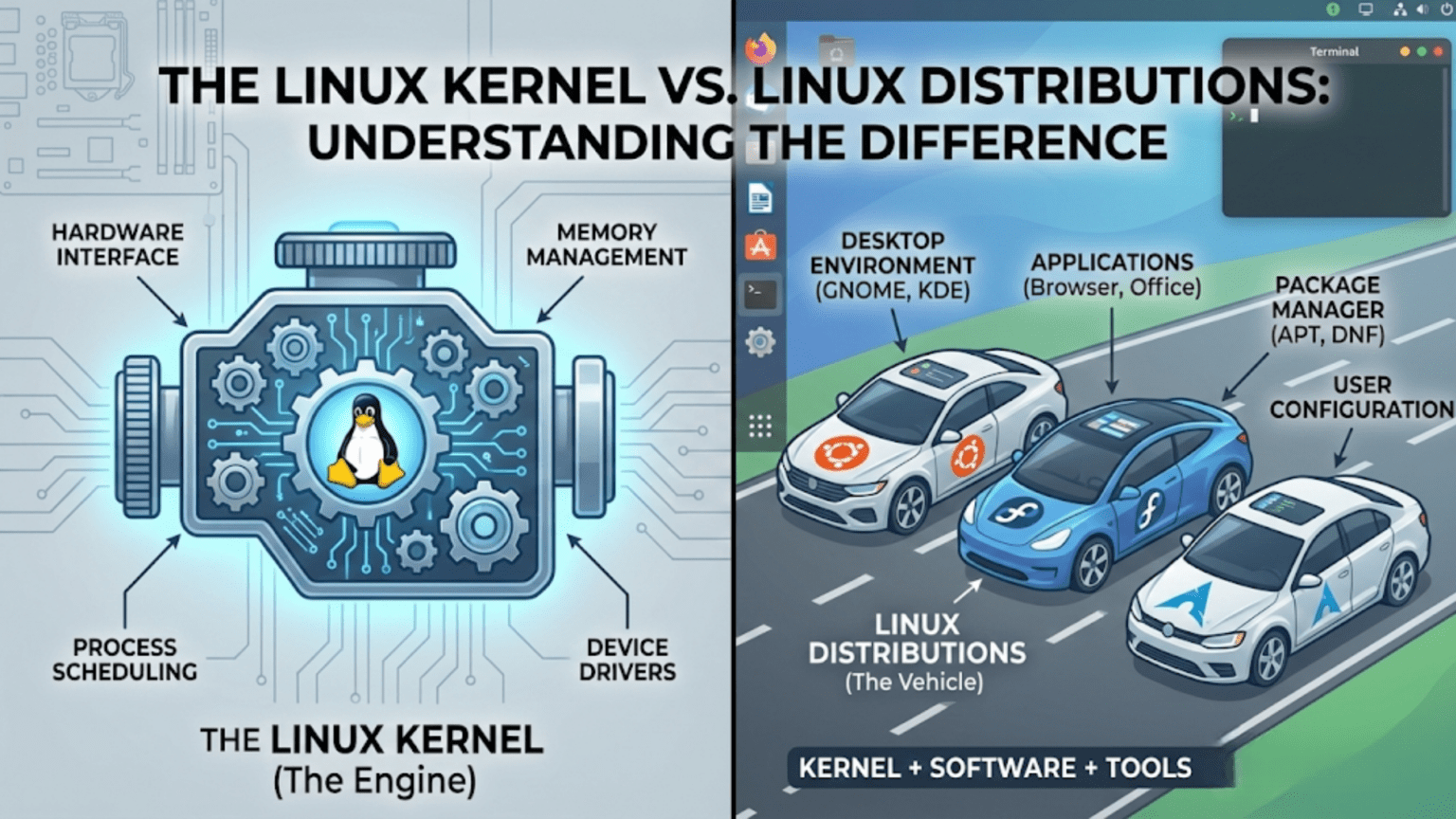
The Linux kernel is the core software component that communicates directly with a computer’s hardware, managing the CPU, memory, and devices. A Linux distribution is a complete operating system built around the kernel, combining it with system tools, software libraries, a package manager, and a user interface. In simple terms, the kernel is the engine, while the distribution is the entire vehicle built around that engine.
Introduction: One Name, Two Very Different Things
If you have spent any time exploring the world of Linux, you have almost certainly encountered a source of confusion that trips up newcomers and even some intermediate users: people use the word “Linux” to mean two quite different things. Sometimes it refers to the Linux kernel — a specific piece of software written by Linus Torvalds and maintained by thousands of contributors worldwide. Other times it refers to a complete operating system experience like Ubuntu, Fedora, or Arch Linux.
This is not merely a semantic quibble. Understanding the difference between the Linux kernel and Linux distributions is fundamental to understanding how the entire Linux ecosystem works. It explains why there are hundreds of versions of “Linux,” why a program that works on one Linux system might not work identically on another, why companies like Red Hat and Canonical exist, and why the kernel itself is developed and released separately from the operating systems that use it.
This article will take you through both concepts in depth — what the kernel is, what a distribution is, how they relate to each other, why they are developed and released independently, and what practical implications this distinction has for everyday Linux users. By the end, you will have a clear mental model that will help you navigate the Linux world with confidence.
What Is a Kernel? The Foundation of Every Operating System
To understand the Linux kernel specifically, it helps to start with the broader concept of what a kernel is and why every operating system needs one.
The Problem a Kernel Solves
Modern computers are complex machines. Inside a typical computer you will find a central processing unit that executes instructions, multiple gigabytes of RAM that temporarily store data, one or more storage drives that permanently hold files and programs, a graphics processing unit that renders images on screen, network adapters that communicate with other machines, USB controllers that manage external devices, audio hardware, and dozens of other components. Each of these components is built by different manufacturers, uses different communication protocols, and requires different instructions to control.
Application software — programs like web browsers, word processors, and games — cannot reasonably be expected to know how to communicate directly with all of this varied hardware. A web browser developer should not need to write code for every possible network adapter chipset in existence. A game developer should not need to understand the specific memory architecture of every processor their game might run on.
This is the problem the kernel solves. The kernel sits between hardware and software, providing a clean, standardized interface that application developers can use without worrying about underlying hardware details. Applications ask the kernel to perform tasks — read this file, send this data over the network, display this image — and the kernel handles the low-level communication with the appropriate hardware to make those tasks happen.
The Kernel’s Core Responsibilities
A kernel, regardless of whether it is Linux, Windows NT, or the macOS XNU kernel, performs several fundamental responsibilities.
Process management is perhaps the most critical. Modern computers appear to run many programs simultaneously, but most consumer computers have a limited number of processor cores. The kernel manages this illusion of simultaneity through rapid switching — giving each running program a tiny slice of processor time in turn, switching between them so quickly that all programs appear to run at once. This scheduling function determines which program gets CPU time, for how long, and in what order.
Memory management controls how the computer’s RAM is allocated among running programs. The kernel gives each program its own protected region of memory, preventing programs from accidentally or maliciously reading or writing each other’s data. It also manages virtual memory — the technique of using storage space to supplement physical RAM when more memory is needed than is physically available.
Device management handles communication with hardware. The kernel includes or loads device drivers — specialized pieces of code that know how to talk to specific hardware components. When a program wants to write a file to disk, the kernel’s storage driver translates that request into the specific commands the storage controller understands.
File system management provides the organized structure through which data is stored and retrieved. The kernel implements or interfaces with file system drivers that understand how data is laid out on storage devices and how to create, read, update, and delete files and directories.
System calls form the interface between the kernel and user-space programs. When an application needs the kernel to do something — read a file, allocate memory, create a new process — it makes a system call. The kernel then performs the requested operation in privileged mode and returns the result to the application. System calls are the fundamental API through which all software interacts with the kernel.
The Linux Kernel: Specifically
The Linux kernel is one specific implementation of these kernel concepts. It was created by Linus Torvalds in 1991 and has been continuously developed by a global community ever since. Understanding its particular characteristics helps clarify what it is and is not.
What the Linux Kernel Is
The Linux kernel is a monolithic kernel with dynamic module loading. This means its core components run together in a single privileged memory space for efficiency, but additional functionality — particularly hardware drivers — can be loaded and unloaded as modules while the system is running. This design gives Linux the performance benefits of a monolithic architecture alongside the flexibility to support new hardware without rebooting.
The kernel is written almost entirely in the C programming language, with small portions in assembly language for low-level hardware initialization and optimization. It is extraordinarily large by the standards of most software projects — the current kernel source code contains over 27 million lines across tens of thousands of files, organized into subsystems for networking, storage, graphics, security, and many other areas.
The Linux kernel is released under the GNU General Public License version 2, which means anyone can use, study, modify, and distribute it, provided that any distributed modifications are also released under the same license. This open license is fundamental to the Linux ecosystem — it is what allows hundreds of companies and communities to build Linux distributions without paying licensing fees.
What the Linux Kernel Is Not
Here is the crucial point that many newcomers miss: the Linux kernel by itself is not a usable operating system. If you downloaded the Linux kernel source code, compiled it, and tried to boot it on a computer, you would get a running kernel — but nothing else. There would be no way to log in, no file manager, no text editor, no web browser, no terminal application, no way to install additional software. The kernel would be running, managing your hardware, but with no user-facing software to interact with, it would be practically useless to anyone who is not a kernel developer.
The Linux kernel provides the foundation, but a complete, usable operating system requires many additional components layered on top of it. This is where Linux distributions come in.
What Is a Linux Distribution?
A Linux distribution is a complete, ready-to-use operating system built around the Linux kernel. The distribution’s creators — whether a company, a non-profit organization, or a volunteer community — take the Linux kernel and combine it with all the additional software needed to make a functional system: system libraries, user space utilities, a package management system, desktop environments, and a curated selection of applications.
Think of the relationship this way. The Linux kernel is like a car engine. An engine alone sitting in a garage is impressive engineering, but you cannot drive it anywhere. A car manufacturer takes that engine and builds an entire vehicle around it — chassis, body, seats, controls, safety systems, entertainment systems, and countless other components — to create something a person can actually use. Linux distributions are the car manufacturers of the Linux world.
The Components of a Distribution
Understanding what a distribution adds on top of the kernel illuminates why distributions differ so substantially from each other.
The C standard library is one of the most fundamental additions. The most common is glibc (the GNU C Library), which provides the basic functions that virtually all software relies on — string manipulation, mathematical operations, input/output, and crucially, the wrappers around Linux kernel system calls that allow software written in C to communicate with the kernel through a stable, standardized interface.
The init system is the first process the kernel starts when the computer boots. It is responsible for starting all other system processes and services in the correct order. Modern Linux distributions almost universally use systemd as their init system, though older and more minimal distributions may use alternatives like SysVinit or OpenRC. The choice of init system affects how services are configured, started, and monitored.
The shell is the command-line interpreter that processes text commands from users or scripts. The most common shell on Linux distributions is Bash (Bourne Again Shell), though distributions may include or default to alternatives like zsh, fish, or dash.
System utilities are the hundreds of small command-line programs that perform fundamental tasks: listing files (ls), copying files (cp), viewing processes (ps), managing users (useradd), configuring the network (ip), and thousands of others. Most of these on Linux systems come from the GNU Project, which is why the complete system is sometimes called GNU/Linux rather than simply Linux.
The package management system is one of the most important distinguishing features of a distribution. It is the software that handles installing, updating, and removing applications. Different distribution families use different package managers and package formats: Debian-based distributions use APT and .deb packages, Red Hat-based distributions use DNF and .rpm packages, and Arch-based distributions use Pacman. The package manager connects to software repositories — servers that host thousands of pre-compiled, ready-to-install packages — making software installation as simple as typing a single command.
The desktop environment, if included, provides the graphical user interface. This encompasses the window manager that draws and manages application windows, the taskbar or dock, the file manager, the settings application, and the visual theme that gives the desktop its appearance. Common desktop environments include GNOME, KDE Plasma, Xfce, and Cinnamon. Some distributions, particularly those designed for servers, include no desktop environment at all.
How a Distribution Puts It All Together
A distribution’s maintainers do not simply gather these components and dump them on a hard drive. They make hundreds of deliberate decisions that define the character of the distribution. They choose which version of each component to include, balancing new features against stability. They configure default settings that affect security, performance, and user experience. They write installation tools that guide users through the setup process. They test combinations of components together to ensure they work correctly. They maintain repositories of additional software that users can install. They publish documentation and provide (or facilitate) user support.
All of this work, layered on top of the Linux kernel, is what transforms a raw engine into a drivable vehicle. The distribution is where the vast majority of the work that creates a usable Linux system actually happens.
The Kernel Release Cycle: Independent from Distributions
One of the most important practical implications of the kernel-distribution distinction is that they operate on completely independent development and release schedules.
How the Kernel Is Released
The Linux kernel follows a time-based release model. A new major kernel version is released approximately every 10 to 12 weeks. Each release goes through a merge window period of about two weeks during which new features and code from subsystem maintainers are merged into the main development tree. After the merge window closes, the kernel enters a stabilization phase with weekly release candidates that fix bugs without adding new features. When Linus Torvalds is satisfied with stability, the final release is published.
Kernel versions are numbered with a major version, minor version, and patch level. For example, version 6.8.1 means major version 6, minor version 8, patch level 1. Unlike older software, the major version number changes are not associated with dramatic feature leaps but simply reflect ongoing development. Some kernel releases are designated Long Term Support (LTS) releases and receive security and stability patches for several years rather than the typical few months, making them suitable for use in distributions that prioritize long-term stability.
How Distributions Handle Kernel Updates
When a new kernel version is released, individual distributions decide independently how and when to incorporate it. This decision involves careful consideration of stability, compatibility with other components, and the distribution’s philosophy.
Fixed-release distributions like Ubuntu and Fedora ship with a specific kernel version that was current at the time of release. This kernel is then updated only with security patches and critical bug fixes — it does not receive new features from later kernel versions. This ensures stability: a system running Ubuntu 22.04 will keep the same kernel series throughout its support lifetime, with only essential patches applied.
Rolling-release distributions like Arch Linux take the opposite approach, continuously updating to the latest kernel versions as they are released. Users of rolling distributions always have the newest kernel, with all its latest features and hardware support, but also with the possibility that occasional instability is introduced by very recent changes.
Some distributions give users a choice. Ubuntu, for example, offers Hardware Enablement (HWE) stacks that optionally bring newer kernels to older LTS releases for users who need support for newer hardware while still wanting the LTS’s overall stability.
Key Differences: Kernel vs. Distribution at a Glance
The following table summarizes the most important distinctions between the Linux kernel and a Linux distribution:
| Aspect | Linux Kernel | Linux Distribution |
|---|---|---|
| What it is | Core software interfacing with hardware | Complete operating system built on the kernel |
| Created by | Linus Torvalds + global contributors | Companies, communities, or individuals |
| Usable alone? | No — no user-facing software | Yes — ready to install and use |
| Release schedule | Every ~10–12 weeks | Varies: fixed, rolling, or LTS |
| Examples | 6.1, 6.6, 6.8 (version numbers) | Ubuntu, Fedora, Arch, Debian, Mint |
| License | GNU GPL v2 | Kernel is GPL; other components vary |
| What it includes | Process mgmt, memory, drivers, syscalls | Kernel + shell, libraries, apps, package manager |
| Who maintains it | Linux kernel community (lkml) | Canonical, Red Hat, Arch community, etc. |
| Update frequency | Very frequent (security patches daily) | Depends on distribution policy |
Why the Separation Matters in Practice
Understanding that the kernel and distributions are separate is not just academic — it has real practical implications for Linux users.
Hardware Support and Kernel Versions
New hardware support is added to the Linux kernel, not to individual distributions. If you buy a brand new laptop with the latest Wi-Fi chipset or graphics card, support for that hardware may arrive in a kernel release before any distribution has yet incorporated it. Knowing this distinction helps you troubleshoot: if your hardware is not working, the question to ask is “does the kernel version I am running support this hardware?” rather than “does Ubuntu support this hardware?”
Users on older fixed-release distributions who need support for newer hardware may need to install a newer kernel — something many distributions allow — or upgrade to a newer distribution version. Understanding the kernel-distribution separation makes this kind of troubleshooting logical rather than mysterious.
Security Vulnerabilities
Security vulnerabilities can exist in the kernel itself or in components that distributions add on top. A kernel vulnerability affects all Linux distributions simultaneously, since they all share the kernel. When a critical kernel vulnerability is discovered, the kernel security team releases a patch, and then each distribution must incorporate and push that patch to their users. Distributions differ in how quickly they do this, which is why keeping your distribution updated — not just monitoring kernel releases — is the appropriate security practice for most users.
Conversely, a vulnerability in a specific application or library — say, a bug in the default PDF reader included in Ubuntu — does not affect other distributions that use different software, even though they share the same kernel.
Choosing Between Distributions
Because all major Linux distributions share the same kernel, choosing between them is really about choosing between the distribution-specific components and decisions layered on top. The package manager, the included software, the default desktop environment, the release model, the support lifecycle, and the community culture are what differentiate Ubuntu from Fedora from Arch, not the kernel at the bottom.
This also means that skills learned at the kernel level — understanding system calls, writing kernel modules, debugging kernel issues — transfer across all distributions. Skills learned at the distribution level — using APT versus DNF, understanding Ubuntu’s directory structure, configuring systemd services — are more distribution-specific, though the underlying concepts often transfer.
Custom Kernels
Because the kernel and distribution are separate, technically capable users can compile and install a custom kernel on any distribution. Linux enthusiasts sometimes do this to gain performance improvements, enable experimental features, add support for hardware not yet in the mainstream kernel, or apply custom patches for specific use cases. Users running the same distribution can run entirely different kernels while everything above the kernel level remains the same.
This would be impossible in an operating system where kernel and distribution are tightly fused. The separation gives advanced users a remarkable degree of control.
Real-World Examples: Seeing the Distinction in Action
Concrete examples make this concept tangible. Consider how different the same kernel looks when it appears in different distributions.
The Same Kernel, Different Experiences
Imagine the Linux kernel version 6.6 LTS. This exact kernel version forms the foundation of Ubuntu 24.04 LTS, which presents users with a polished GNOME desktop, the Snap package system, and extensive commercial support from Canonical. The same kernel version might be running in an Arch Linux installation configured with a minimal window manager, Pacman package management, and a rolling release model that keeps everything else cutting-edge. And that same kernel runs on an enterprise server configured without any graphical interface at all, providing only SSH remote access and a set of server applications.
Three completely different user experiences, built on the identical kernel. The kernel provides consistent hardware management and system call interfaces in all three cases, but everything the user actually sees and interacts with comes from the distribution layer.
Android: Linux Kernel Without a Conventional Distribution
Android provides one of the most striking illustrations of how far a Linux distribution can diverge from the conventional desktop Linux experience while still using the Linux kernel. Android uses a heavily modified version of the Linux kernel to manage hardware on smartphones and tablets. But the layers above the kernel — the runtime environment, the application framework, the user interface — are entirely different from any conventional Linux distribution. There is no GNU C library (Android uses its own called Bionic), no Bash shell by default, no traditional Linux package manager, no standard Linux file system layout.
Android demonstrates that the Linux kernel is a remarkably versatile foundation that can support radically different operating system stacks. The kernel is the constant; everything else is a choice made by the distribution builder.
Embedded Linux
In the world of embedded systems — routers, smart televisions, automotive systems, industrial controllers — Linux distributions look nothing like their desktop counterparts. A router running Linux might use a minimal BusyBox environment that compresses hundreds of standard Unix tools into a single tiny binary, configured through a web interface rather than a command line or graphical desktop. The Linux kernel beneath it handles the networking hardware, storage, and processor management, but the distribution built around it is stripped to the absolute essentials required for the device’s specific function.
How the Kernel and Distribution Communicate: The Technical Layer
For those interested in going a little deeper, understanding how kernel and distribution components interact technically reinforces why they are distinct but interdependent.
System Calls: The Fundamental Interface
The boundary between the kernel and the rest of the operating system is defined by system calls. When a user-space program needs the kernel to do something — open a file, create a process, allocate memory, send data over a network — it executes a system call. The processor switches from unprivileged user mode to privileged kernel mode, the kernel performs the requested operation, and the processor switches back to user mode with the result.
The set of system calls a kernel supports is one of its most carefully maintained interfaces. The Linux kernel maintains backward compatibility with system calls — once a system call interface is established, it is almost never changed in ways that would break existing programs. This stability is what allows software compiled years ago to continue running on modern kernels.
Distributions ship with the C standard library (typically glibc) which wraps raw system calls in more convenient C functions. A programmer writing code for Linux uses glibc functions like open(), read(), write(), and malloc(), which internally invoke the appropriate kernel system calls. This adds another layer of abstraction between application code and the kernel.
The /proc and /sys Filesystems
Linux uses two special virtual file systems — /proc and /sys — to expose kernel information and configuration to user space in a file-like interface. These file systems do not store data on disk; instead, reading from them retrieves live information from the kernel, and writing to them can modify kernel behavior.
Distribution tools use these interfaces extensively. The ps command reads process information from /proc. Network configuration tools read and write to /sys entries for network interfaces. System monitoring tools gather CPU, memory, and disk statistics from /proc/st.at, /proc/mem.info, and related files. These interfaces are part of how the distribution’s user-space tools are able to report on and control kernel behavior without needing to be compiled into the kernel itself.
Choosing a Distribution: What the Kernel-Distribution Distinction Tells You
Now that the distinction is clear, it can guide more informed decisions when choosing a Linux distribution.
Since all mainstream distributions use the same Linux kernel (or very similar versions), your choice of distribution should be based on the non-kernel components. Consider the package management system and software availability — Debian’s APT ecosystem is mature and vast, Arch’s AUR offers even broader community-maintained packages, and Fedora’s DNF tends to offer very current software versions. Consider the release model — fixed releases like Ubuntu LTS offer stability and predictability, while rolling releases like Arch or Manjaro offer the latest software at the cost of more frequent updates. Consider the desktop environment offered by default, the quality of documentation and community support, the organization’s or community’s commitment to long-term maintenance, and whether the distribution targets beginners, intermediate users, or experts.
The kernel is largely a solved problem across distributions — they all get access to the same hardware support, the same system call interfaces, the same kernel performance. The real differentiation lives in the distribution layer.
The Relationship Between Kernel Developers and Distribution Maintainers
The kernel and distribution communities overlap but are not the same. Understanding their relationship helps explain the collaborative ecosystem that keeps Linux evolving.
Upstream and Downstream
In open source terminology, the Linux kernel project is “upstream” and distributions are “downstream.” Changes flow from upstream to downstream: new kernel features and bug fixes are developed upstream in the kernel project and then adopted downstream by distributions when their maintainers choose to incorporate them.
Distributions rarely develop features intended only for their own kernel builds. When Red Hat’s engineers fix a kernel bug or add hardware support needed by their customers, they submit that fix upstream to the main kernel project first. Once it is accepted upstream, Red Hat’s distribution will pick it up in future kernel updates. This practice of “upstream first” ensures that improvements benefit all distributions, not just one.
When Distributions Patch the Kernel
Despite the upstream-first norm, distributions sometimes carry patches to the kernel that have not yet been accepted upstream. These might be fixes for bugs that are urgent for the distribution’s users but are still going through the kernel review process, hardware support for specific devices common among the distribution’s user base, or features that have been developed but not yet merged into the main kernel.
Ubuntu, for example, has historically carried patches for improved desktop responsiveness and power management. Android carries extensive patches that significantly modify the kernel for mobile use. These downstream-only patches are generally kept to a minimum and contributed upstream whenever possible, but they represent one way in which the kernel running inside a distribution can differ from the official upstream kernel.
Practical Takeaways for Linux Users
Having explored the kernel-distribution distinction in depth, here are the practical insights you can carry forward.
When you update your system using your distribution’s package manager, you are updating both kernel-level components (new kernel packages) and distribution-level components (updated applications and libraries). These are bundled together in your distribution’s update system even though they originate from different places.
When you look up documentation or ask for help, be specific about your distribution. “I am running Ubuntu 22.04” tells a helper much more useful information than “I am running Linux.” The distribution determines your package manager, default applications, configuration file locations, and many other practical details.
When you encounter a hardware compatibility problem, check both the kernel version you are running and the drivers your distribution packages. Sometimes the fix is a kernel update; sometimes it is installing a distribution-packaged driver; sometimes it requires a newer distribution version entirely.
When you read about a new Linux feature or improvement, pay attention to whether it is a kernel feature or a distribution feature. A new kernel feature (like improved power management) will eventually come to all distributions through kernel updates. A new distribution feature (like Ubuntu’s new installer design) applies only to that distribution.
Conclusion: Two Pieces, One Ecosystem
The Linux kernel and Linux distributions are two distinct layers that together create the Linux ecosystem we know. The kernel is the precise, technical foundation — the software that speaks directly to hardware, manages processor time and memory, and provides a stable interface for all software above it. Distributions are the complete, practical expressions of what Linux can be — shaped by the vision, philosophy, and engineering choices of their creators, serving audiences ranging from enterprise servers to home desktops to embedded devices.
Understanding this distinction demystifies much of the apparent complexity of the Linux world. Why are there so many “Linuxes”? Because the kernel is a shared foundation, and distribution builders have the freedom to build many different things on top of it. Why do different distributions feel so different despite sharing the same kernel? Because the distribution layer is where the user experience is actually created. Why does a kernel update require a system reboot? Because replacing the core component that manages all hardware requires starting fresh.
As you continue your Linux journey, this mental model — kernel as foundation, distribution as structure — will help you understand nearly every aspect of how Linux systems work, how they are maintained, and how to troubleshoot them. The kernel and the distribution are partners, each essential, each doing a job the other cannot.