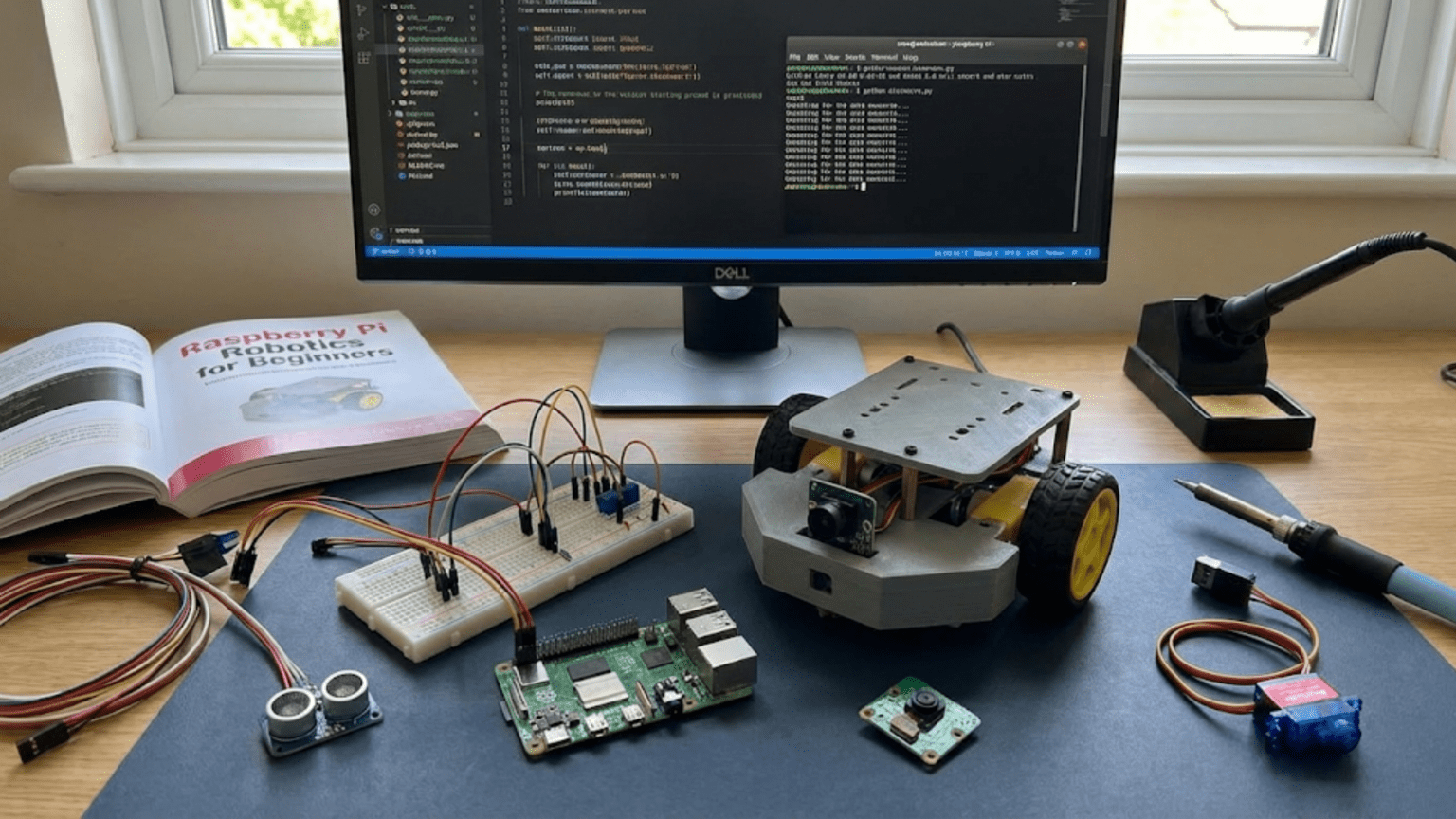
The Raspberry Pi represents a different approach to robot control compared to microcontrollers like Arduino. While Arduino excels at real-time hardware interaction with simple, fast control loops, Raspberry Pi brings full computing power to robotics through a complete Linux computer condensed into a credit-card-sized board. This computational capability opens possibilities that microcontrollers struggle with including computer vision, complex artificial intelligence, networking, multitasking, and sophisticated user interfaces. Understanding what Raspberry Pi offers and how to leverage its capabilities helps you decide when to use it for robotics and how to get started building Pi-powered robots.
Raspberry Pi democratized computing by providing capable computers at prices that made them disposable for embedded applications. Before Raspberry Pi, putting a full computer into a robot meant using industrial single-board computers costing hundreds of dollars or laptop motherboards never intended for robotic integration. Raspberry Pi changed this calculation by offering genuine computing power—processors running at gigahertz speeds, hundreds of megabytes or gigabytes of RAM, USB ports, network connectivity, and video output—for thirty-five to seventy-five dollars depending on model. This affordability meant robots could have computational resources previously reserved for desktop computers.
This article guides you through getting started with Raspberry Pi for robotics, covering what Pi offers that other platforms do not, how to choose appropriate models, initial setup procedures, programming approaches, interfacing with motors and sensors, and typical robotics applications. Whether you come to Pi from Arduino experience or start fresh in robotics with Pi as your first platform, this foundation will help you understand how to harness Pi’s computing power for increasingly sophisticated robot projects.
Understanding What Raspberry Pi Brings to Robotics
Raspberry Pi represents fundamentally different capabilities compared to microcontrollers, and understanding these differences helps you leverage Pi’s strengths while recognizing situations where simpler platforms might serve better.
Full operating system support means Raspberry Pi runs Linux, providing access to thousands of software packages developed for conventional computers. You can install computer vision libraries like OpenCV, machine learning frameworks like TensorFlow, web servers, databases, and countless other applications without worrying whether they will fit on limited microcontroller memory or whether the platform supports them. This software ecosystem dramatically expands what your robot can do because you leverage decades of software development rather than implementing everything from scratch.
Multitasking capability allows running multiple programs simultaneously. Your robot can process camera images, execute control algorithms, log data, serve web interfaces, and communicate over networks all concurrently. Linux’s multitasking handles resource allocation, letting you decompose complex robot behaviors into cooperating processes without manually orchestrating everything in a single control loop. This architectural flexibility simplifies complex systems that would require careful coordination on single-threaded microcontrollers.
Network connectivity comes built-in with most Pi models. WiFi and Ethernet enable robots to access internet resources, communicate with cloud services, accept remote commands, stream sensor data, or participate in distributed robot networks. While you can add networking to microcontrollers through shields and modules, Pi provides networking as fundamental capability with robust software support and decades of network programming experience to draw upon.
USB support means you can connect webcams, WiFi adapters, storage devices, Arduino boards, sensors with USB interfaces, and countless other peripherals without custom drivers or hardware. The USB ecosystem built for conventional computers mostly works with Raspberry Pi, dramatically expanding what devices you can integrate compared to platforms limited to specific hardware interfaces.
Processing power handles computationally intensive tasks impossible on microcontrollers. Image processing algorithms that analyze megapixel images, neural networks that recognize objects, path planning algorithms that search complex state spaces, and data analysis that processes large datasets all become feasible on Pi’s relatively powerful processors. While still modest compared to desktop computers, Pi provides orders of magnitude more computational resources than typical microcontrollers.
Storage capacity through SD cards means gigabytes of data storage for maps, training datasets, logs, and recorded sensor data. Microcontrollers measure storage in kilobytes or at most a few megabytes, severely limiting what data they can retain. Pi’s expandable storage removes these constraints, enabling data-intensive applications including long-term autonomous operation with complete logging.
Development environment familiarity helps programmers comfortable with Linux, Python, C++, or other mainstream languages immediately apply existing knowledge. Rather than learning microcontroller-specific tools and environments, you program Pi using standard development tools, languages, and workflows used for conventional software development. This familiarity reduces barriers for people with software backgrounds entering robotics.
Choosing Your Raspberry Pi Model
Multiple Raspberry Pi models exist, each with different specifications, capabilities, and prices. Selecting an appropriate model for robotics projects requires understanding these differences and matching specifications to your needs.
Raspberry Pi 4 Model B represents the most capable mainstream Pi, featuring quad-core processors running at 1.5-1.8 GHz, up to 8GB RAM in different variants, dual 4K display outputs, gigabit Ethernet, USB 3.0 ports, and dual-band WiFi and Bluetooth. This model handles demanding robotics applications including real-time computer vision, complex AI, and simultaneous multitasking. Prices range from thirty-five to seventy-five dollars depending on RAM configuration. For robots requiring substantial computational power, Pi 4 provides impressive performance.
Raspberry Pi Zero and Zero 2 W offer compact, affordable options for space and weight-constrained robots. The Zero 2 W provides quad-core processing in a tiny thirty by sixty-five millimeter board costing just fifteen dollars, including built-in WiFi and Bluetooth. While less powerful than Pi 4, Zero 2 W handles moderate computational tasks like sensor processing, simple computer vision, or control logic where size and power consumption matter more than raw performance. The original Zero lacks WiFi, requiring USB adapters for connectivity, but costs just five to ten dollars for extremely budget-conscious projects.
Raspberry Pi 3 Model B+ represents previous generation technology still widely used and available. While slower than Pi 4 and limited to 1GB RAM, Pi 3 B+ handles many robotics applications adequately and often costs less than newer models during sales or from surplus sources. If you already own Pi 3 or find deals on used units, they serve robotics projects well despite not offering cutting-edge specifications.
Compute Module variants provide Pi functionality in compact form factors designed for integration into custom designs. These modules lack standard ports and connectors, instead exposing signals through high-density connectors. Professional products and advanced hobbyist projects sometimes use Compute Modules for optimized size and integration, though most hobbyist robotics benefit from standard Pi boards with accessible connectors.
Selection criteria include computational requirements, physical size constraints, power budgets, connectivity needs, and cost limits. Computer vision and AI demand Pi 4’s processing power and RAM. Compact drones or wearable robots benefit from Zero 2 W’s minimal size. Projects requiring multiple USB devices appreciate Pi 4’s additional ports. Budget-limited educational projects might standardize on Pi 3 B+ or Zero models. Matching model to requirements prevents overspending on unnecessary capability while ensuring adequate performance for intended applications.
Initial Setup: Getting Your Pi Ready for Robotics
Setting up Raspberry Pi involves several steps before you can start building robots. While this process requires more initial work than plugging in an Arduino, the one-time setup effort enables the powerful capabilities that justify choosing Pi.
Operating system installation begins by downloading Raspberry Pi OS, the official Linux distribution optimized for Pi. Raspberry Pi Imager software simplifies writing the OS image to a microSD card, which serves as Pi’s storage medium. The Imager handles downloading the selected OS variant and writing it correctly, preventing common mistakes that occurred when manually imaging SD cards. Different OS variants exist including full desktop versions with graphical interfaces and lighter versions optimized for embedded applications. Robotics projects often start with the desktop version for easier development, potentially transitioning to lighter versions for deployed robots.
First boot configuration requires connecting a monitor, keyboard, and mouse to Pi to complete setup. The setup wizard guides you through choosing language and location, connecting to WiFi, updating software, and creating a user account. While this traditional computer setup differs from Arduino’s simpler approach, it occurs only once. After initial configuration, you can access Pi remotely without dedicated peripherals.
SSH and remote access enable programming and controlling Pi over networks without connecting monitors and keyboards. Enabling SSH during setup allows you to connect from other computers using terminal applications or SSH clients. For robots with displays, VNC remote desktop sharing lets you access Pi’s graphical desktop wirelessly. These remote access methods prove essential for robots where Pi sits inside chassis without easy access to ports or where running cables to monitors proves impractical.
Software updates and tool installation prepare the development environment. Running system updates ensures you have latest security patches and software versions. Installing Python packages, development tools, and robotics-specific libraries like GPIO Zero for hardware control or OpenCV for computer vision sets up the programming environment. Package managers simplify installing software—commands like sudo apt install python3-opencv install entire libraries with dependencies resolved automatically.
GPIO access configuration determines whether programs can control hardware. By default, GPIO pins require administrative privileges to access. Configuring your user account for GPIO access prevents needing to run robot programs as administrator, simplifying development while maintaining security. Libraries like GPIO Zero handle most permissions issues automatically, but understanding access control helps troubleshoot problems.
Power supply considerations become critical for robotics applications. Pi requires stable 5V power at 2-3 amps depending on model and accessories. Typical USB phone chargers work for desktop use but robots need power solutions handling motor currents and voltage fluctuations. Battery-powered robots often use voltage regulators converting battery voltages to stable 5V. Inadequate power causes mysterious crashes, SD card corruption, and erratic behavior—ensuring quality power prevents countless frustrating problems.
Programming Raspberry Pi for Robot Control
Raspberry Pi supports numerous programming languages and approaches. Understanding available options helps you choose appropriate tools for different aspects of robot development.
Python dominates Raspberry Pi robotics programming due to its readability, extensive libraries, and gentle learning curve. Python scripts control GPIO pins, process sensor data, implement control algorithms, and coordinate robot behaviors. Libraries like GPIO Zero simplify hardware control—blinking an LED requires just a few lines of readable code. For beginners, Python provides accessible entry into robot programming while remaining powerful enough for sophisticated applications.
GPIO access through libraries abstracts hardware complexity. GPIO Zero provides object-oriented interfaces to common hardware—sensors, motors, servos, LEDs, and buttons become Python objects with intuitive methods. Rather than manipulating registers or understanding electrical details, you create objects representing physical hardware and call methods like motor.forward() or sensor.value. This high-level approach accelerates development and makes code readable.
C and C++ offer performance advantages for time-critical operations. While Python suffices for most robotics tasks, computationally intensive algorithms or low-latency control might benefit from compiled languages. Libraries like WiringPi and pigpio provide C/C++ interfaces to GPIO with timing precision Python cannot match. Many roboticists prototype in Python then reimplement critical paths in C++ if performance requires it.
Robot Operating System (ROS) provides professional-grade robotics framework on Pi. ROS supplies tools for distributed processing, message passing between components, visualization, simulation, and countless robotics algorithms. While ROS introduces substantial complexity, it rewards that investment with powerful capabilities for sophisticated robots. Many research and commercial robots use ROS, making it valuable skill for serious roboticists. Pi 4 runs ROS adequately, though very complex ROS systems might strain Pi’s resources.
Web frameworks enable browser-based robot control interfaces. Flask or Django web frameworks written in Python create web servers on Pi that serve control interfaces accessible from any browser. This approach provides portable user interfaces without platform-specific app development. Tablets, phones, or computers on the same network can control robots through web browsers, simplifying interface development and deployment.
Node-RED provides visual programming for robotics applications. This flow-based development tool lets you wire together functional blocks representing sensors, processing, and outputs without traditional code. While less flexible than programming, Node-RED accelerates prototyping and suits users preferring visual development. Various robotics nodes exist for common hardware and protocols.
Jupyter notebooks combine code, documentation, and visualization in interactive environments perfect for algorithm development and data analysis. You can develop robot control algorithms in notebooks, visualizing sensor data and algorithm behavior interactively. Once algorithms work, you transfer code to standalone scripts for actual robot deployment.
Interfacing with Motors and Sensors
Raspberry Pi excels at high-level processing but requires additional hardware for interfacing with motors and many sensors. Understanding these interface requirements helps you design complete robotic systems around Pi.
GPIO pins provide digital input and output but limited capabilities compared to Arduino. Pi offers 26 GPIO pins on most models, supporting digital reads and writes, PWM on some pins, and various communication protocols including I2C, SPI, and serial. However, Pi GPIO operates at 3.3V rather than 5V common in robotics, and pins lack overload protection—excessive current or voltage destroys Pi. These limitations require careful interface design.
Motor control requires driver hardware between Pi and motors. Motors draw currents far exceeding Pi GPIO limits and need bidirectional control for forward and reverse motion. Motor driver boards like L298N, TB6612, or DRV8833 modules connect between Pi GPIO and motors, amplifying control signals to power levels motors require. Pi GPIO generates PWM control signals, while motor drivers handle the high currents. Some motor driver HATs (Hardware Attached on Top) designed for Pi mount directly on GPIO headers, simplifying connections.
Servo control works directly from Pi GPIO if servos draw power independently. Hobby servos accept 3.3V control signals while drawing power from separate 5-6V supplies. Pi GPIO pins can generate the PWM servo control signals while servos connect their power lines to external supplies. Libraries like GPIO Zero include servo support, letting you position servos with simple commands. Multiple servos require PWM capable GPIO pins or specialized servo controllers.
Sensor voltage level shifting protects Pi from 5V sensors. Many sensors output 5V signals that damage Pi’s 3.3V GPIO inputs. Level shifter modules convert between 3.3V and 5V logic safely. Alternatively, voltage dividers using resistors can drop 5V to 3.3V for simple digital sensors, though bidirectional level shifters work better for complex interfaces. Always verify sensor voltage compatibility before connecting to Pi.
I2C and SPI protocols enable connecting multiple sensors and devices efficiently. These serial protocols let you connect numerous sensors through shared communication lines rather than requiring individual GPIO pins for each sensor. Many robotics sensors including IMUs, distance sensors, and motor controllers support I2C or SPI. Pi’s hardware support for these protocols provides reliable high-speed communication for sensor-rich robots.
USB sensors and cameras leverage Pi’s USB ports without custom GPIO interfaces. USB webcams, microphone arrays, GPS receivers, and various sensors designed for computers connect to Pi’s USB ports and appear as standard devices. This compatibility means you can use commodity computer peripherals in robots, often at lower cost than robotics-specific sensors with GPIO interfaces.
Arduino as Pi coprocessor combines strengths of both platforms. Pi handles high-level processing, user interfaces, and networking while Arduino manages real-time motor control and sensor reading. The two communicate via USB or serial connections, with Pi sending high-level commands and Arduino executing low-level control. This hybrid architecture appears frequently in robots requiring both computational power and real-time performance.
Power Management for Mobile Robots
Battery-powered Pi robots face power challenges requiring careful design. Pi’s higher power consumption compared to microcontrollers demands attention to power supplies, voltage regulation, and battery selection.
Battery capacity requirements depend on Pi model and accessories. Pi 4 draws 600-1200 milliamps depending on activity and attachments. Pi Zero 2 W draws 100-300 milliamps. Motors, servos, and sensors add to total current draw. Calculate total expected current, then select batteries with capacity providing desired runtime. A 10,000 mAh battery bank theoretically powers a Pi 4 with modest accessories for 8-10 hours, accounting for inefficiencies and variation in draw.
Voltage regulation to stable 5V proves critical for Pi reliability. Most robot batteries output voltages different from Pi’s 5V requirement—7.4V lithium polymer packs, 12V lead acid batteries, or variable voltages from partially depleted cells. Switching voltage regulators efficiently convert these voltages to Pi’s required 5V. Linear regulators work but waste energy as heat, reducing efficiency. Quality regulators provide stable voltage despite input variations, preventing crashes from power supply issues.
Separate motor and logic power prevents motor noise from disrupting Pi. Motors generate electrical noise and voltage spikes that crash computers sharing their power supply. Using separate batteries for motors and Pi, or at least independent voltage regulators from a common battery, isolates Pi from motor electrical interference. This power separation represents robotics best practice that prevents countless mysterious problems.
USB power banks designed for charging phones work well for Pi in robots. These provide stable regulated 5V output, built-in batteries, and charging circuits. Quality power banks maintain voltage regulation despite varying loads and include protection against overcharge, over-discharge, and short circuits. While heavier than bare battery packs, power banks’ integrated regulation and protection simplifies robot power systems significantly.
Low-voltage warnings let robots detect depleted batteries and shut down gracefully. Pi includes voltage monitoring that can trigger warnings or automatic shutdowns when power drops dangerously low. Implementing low-battery detection prevents SD card corruption from unexpected power loss, allowing robots to save state and shut down cleanly before batteries fully deplete.
Power consumption optimization extends battery life. Disabling unnecessary peripherals, reducing CPU speed when full performance is unnecessary, and implementing sleep modes during idle periods all reduce power draw. While optimizing power consumption matters less for Pi than for microcontrollers in battery-critical applications, attention to power efficiency doubles runtime in some cases.
Typical Raspberry Pi Robotics Applications
Raspberry Pi’s strengths make it ideal for specific robotics applications while less suited for others. Understanding these typical use cases guides project planning and platform selection.
Computer vision projects leverage Pi’s processing power and USB camera support. Object detection, line following using camera input, gesture recognition, visual SLAM for navigation, and AR marker tracking all benefit from Pi’s capabilities. While Pi cannot run the largest neural networks in real-time, optimized models for object detection, classification, and basic image processing work adequately on Pi 4. The Pi Camera Module or USB webcams provide video input that Python OpenCV processes efficiently.
Autonomous navigation robots use Pi for mapping, path planning, and decision making. ROS-based navigation stacks run on Pi 4, enabling sophisticated autonomous behaviors. SLAM algorithms build maps from LIDAR or camera data, path planners compute routes through these maps, and behavioral layers coordinate reactive and deliberative control. While computationally demanding, modern Pi hardware handles moderate-complexity navigation for research and educational robots.
Internet-connected robots that report data, accept remote commands, or coordinate with cloud services exploit Pi’s networking. Home automation robots controlled through smartphones, telepresence robots streaming video to remote operators, and robot fleets communicating to coordinate tasks all benefit from Pi’s network capabilities and software ecosystem. The ability to run web servers, implement networked APIs, and handle secure communications makes Pi excellent for connected robotics.
Multi-sensor fusion systems combine data from cameras, LIDAR, IMUs, GPS, and other sensors to build comprehensive environmental models. Pi’s processing power and multiple interface options let you connect diverse sensors and execute fusion algorithms merging their data. While very complex sensor fusion might exceed Pi capabilities, moderate fusion supporting robust perception works well.
Machine learning and AI applications on robots benefit from Pi’s ability to run inference on pre-trained models. While training large models requires more powerful computers, deploying trained models to recognize objects, classify situations, or make decisions works on Pi. TensorFlow Lite and similar optimized inference frameworks enable real-time neural network execution on Pi 4 for many applications.
Educational robots teaching programming, electronics, and robotics concepts leverage Pi’s familiar computing environment and extensive educational resources. The platform’s Linux foundation, Python programming, and GPIO hardware access provide gentle introduction to robotics combining software and hardware. Many educational robotics kits use Raspberry Pi as their central controller for these reasons.
Prototype development for advanced robots often starts with Pi even if production versions use different platforms. Pi’s ease of programming, rich development environment, and broad hardware support accelerate initial development. Once concepts prove feasible on Pi, projects might migrate to more specialized hardware, but Pi served its purpose in rapid prototyping and concept validation.
Getting Your First Pi Robot Running
Starting your first Raspberry Pi robot project involves choosing an appropriate beginning project that teaches fundamentals while remaining achievable. Several project types provide excellent entry points.
Wheeled rover with obstacle avoidance combines hardware interfacing, sensor reading, and motor control in one package. Mount Pi on a wheeled chassis with motor driver and ultrasonic distance sensors. Write Python programs reading sensors and controlling motors to navigate while avoiding obstacles. This classic project teaches GPIO control, sensor processing, and robot behaviors comprehensibly.
Camera-based line follower demonstrates computer vision on Pi. Mount Pi Camera pointing downward at the ground, use OpenCV to detect line position from images, and control motors to follow the line. This project introduces camera interfacing and image processing fundamentals applicable to more sophisticated vision applications. Comparing camera-based line following to sensor-based approaches reveals vision’s advantages and challenges.
Telepresence bot controlled through web interface shows Pi’s networking strengths. Create Flask web application serving control interface accessible from browsers, use Pi Camera to stream video to web clients, and control motors based on button presses in the web interface. This project teaches web development, video streaming, and remote robot control relevant to many IoT and telepresence applications.
Voice-controlled assistant robot responds to spoken commands. Use USB microphone with speech recognition library to detect commands, execute corresponding actions through GPIO, and provide audio feedback. This project introduces audio processing, natural language interfaces, and multimodal interaction while producing impressive results that demonstrate Pi’s computational capabilities.
Pre-built robot kits designed for Pi simplify hardware aspects while letting you focus on programming. Kits like GoPiGo, BrickPi, or various rover platforms include chassis, motors, drivers, and sensors that connect to Pi with documented instructions. Starting with proven hardware prevents struggling with electrical integration while learning Pi programming and robotics concepts.
The Pi-Arduino Hybrid Approach
Many successful robots combine Raspberry Pi and Arduino, leveraging each platform’s strengths while compensating for weaknesses. Understanding this hybrid architecture helps you design robots benefiting from both platforms.
Architecture division typically assigns Arduino to real-time control and hardware management while Pi handles complex processing and user interfaces. Arduino reads sensors at high rates, executes control loops requiring consistent timing, and commands motors with precise PWM. Pi processes camera images, runs AI algorithms, handles networking, and coordinates high-level behaviors. The two platforms communicate via USB or serial connections.
Communication protocols between Pi and Arduino commonly use serial communication with simple text protocols. Pi sends commands like “MOTOR,LEFT,50” and Arduino parses these, translating them into motor control actions. Arduino sends sensor readings like “DIST,25.3” that Pi parses and processes. This ASCII-based protocol is human-readable for debugging and trivial to implement on both platforms.
Library support exists for Pi-Arduino communication including PySerial on Python side and Arduino Serial library on Arduino side. More sophisticated applications might use ROS Serial bridging Arduino into ROS environments, letting Arduino nodes publish and subscribe to ROS topics. This integration combines Arduino’s real-time capabilities with ROS’s sophisticated robotics framework running on Pi.
Development workflow benefits from independent platform programming. You develop and test Arduino motor control code separately from Pi vision processing. Each platform uses its native tools and languages. Once individual components work, you integrate them through the communication protocol. This separation of concerns simplifies development compared to fighting single-platform limitations.
The hybrid approach enables robots beyond what either platform achieves alone. Pi provides computational power for complex algorithms while Arduino ensures reliable real-time control. Your robot combines vision-based navigation running on Pi with stable motor control executing on Arduino, achieving robust behaviors leveraging both platforms’ strengths.
Starting Your Raspberry Pi Robotics Journey
Raspberry Pi brings computing power and software sophistication to robotics that microcontrollers alone cannot match. While requiring more initial setup and understanding of Linux computing, Pi enables applications including computer vision, artificial intelligence, complex networking, and sophisticated user interfaces that expand robotics possibilities dramatically.
Your Raspberry Pi robotics journey begins with choosing an appropriate Pi model, working through initial setup, learning Python GPIO programming, and building your first simple robot project. Start with straightforward projects that teach fundamentals, then gradually tackle more ambitious applications as your skills develop. The investment in learning Pi programming and Linux basics pays dividends through access to powerful capabilities that grow with your ambitions.
Whether you use Pi as your sole platform, combine it with Arduino in hybrid systems, or eventually transition between platforms for different projects, understanding what Raspberry Pi offers expands your robotics capabilities and opens doors to exciting applications at the intersection of computing and physical robotics. The platform’s accessibility, extensive documentation, and active community ensure you will find resources and support as you progress from beginner projects through increasingly sophisticated robotic systems powered by this remarkable credit-card-sized computer.