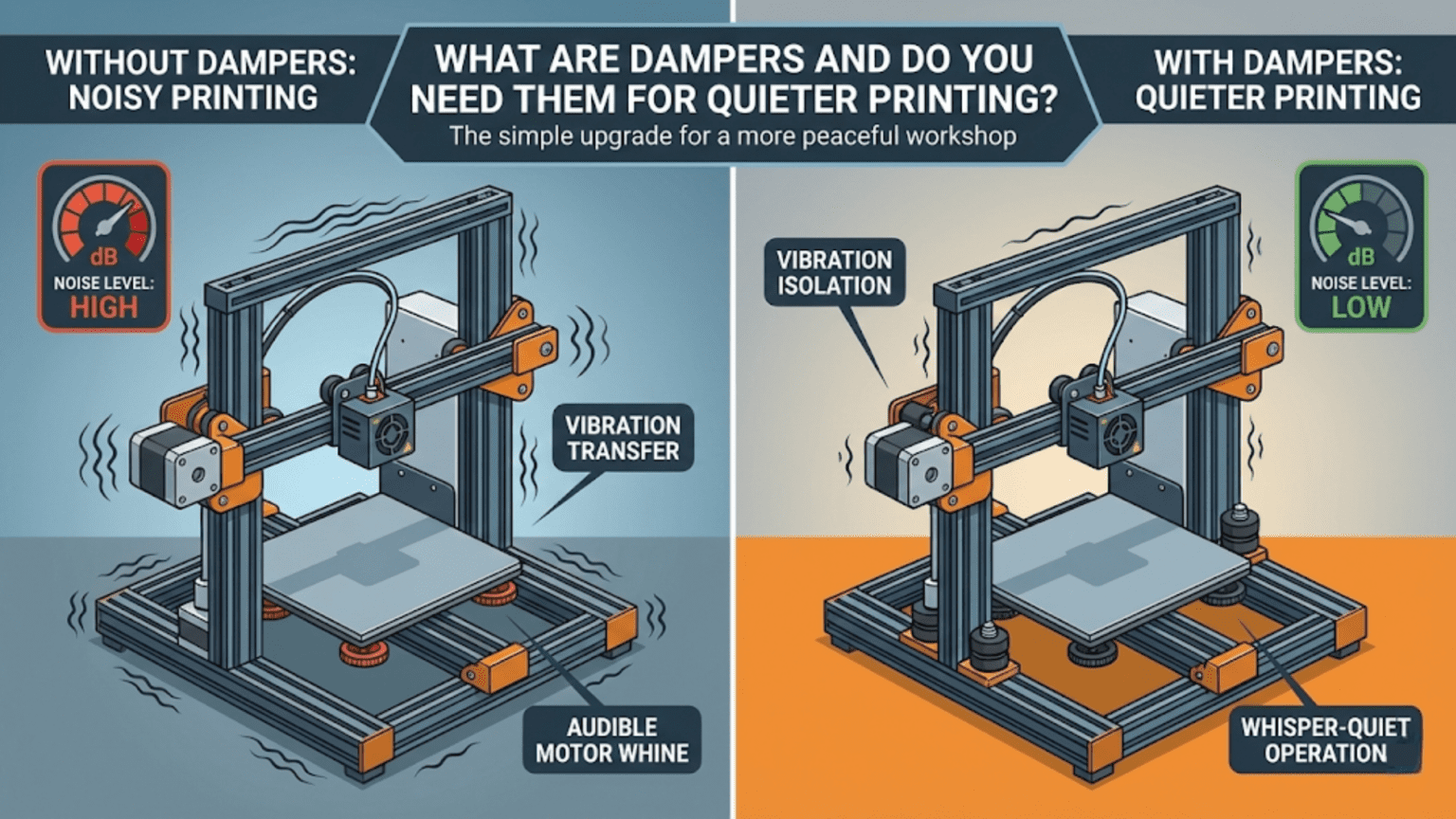
Stepper motor dampers are flexible rubber or elastomer couplings installed between stepper motors and their mounting points to absorb vibrations and reduce the mechanical noise transmitted from motors to the printer frame. These devices work by dampening the oscillations created during motor stepping, potentially reducing printer noise by 5-15 decibels depending on design, though they also introduce drawbacks including reduced precision from shaft misalignment, added cost ($5-15 per motor), increased complexity, and questionable effectiveness compared to modern alternatives like silent stepper drivers (TMC2208/2209) which address noise at its source electronically.
Introduction
Anyone who has operated a 3D printer knows they’re not silent machines. The characteristic whirring, buzzing, and occasional screeching comes primarily from stepper motors—the components creating all that precise movement. These motors don’t rotate smoothly like standard motors; they step in discrete increments, and each step creates vibration. When these vibrations transmit through the printer frame, the entire structure becomes a resonant soundboard amplifying the noise.
Stepper motor dampers promise a solution: flexible couplings that absorb vibrations before they reach the frame. Marketing claims suggest dramatic noise reduction, transforming loud printers into whisper-quiet machines. The reality is more nuanced. Dampers do reduce certain types of noise, sometimes significantly, but they’re not magic solutions and introduce their own complications.
Understanding what dampers actually do—how they absorb vibrations, what noise they effectively reduce versus what they don’t address, and what tradeoffs they create—helps you decide whether they’re worthwhile for your specific situation. Modern silent stepper drivers offer alternative noise reduction that may be more effective without dampers’ drawbacks. The decision isn’t simple, and the answer differs based on your printer, drivers, and priorities.
In this comprehensive guide, we’ll explore stepper dampers from fundamental principles through practical considerations, understanding when they help, when they don’t, and what alternatives might serve better.
What Are Stepper Motor Dampers?
Understanding construction and function:
Physical Design
Construction:
- Two rigid plates (typically steel or aluminum)
- Flexible elastomer material between plates
- Through-hole pattern matching NEMA motor mounting
- Elastomer absorbs vibrations between motor and frame
Common Sizes:
- NEMA 17: Most common, matches standard 3D printer motors
- NEMA 23: Larger motors in some industrial machines
- Thickness: Typically 8-15mm
Elastomer Materials:
- Natural rubber
- Synthetic rubber compounds
- Thermoplastic elastomers
- Silicone rubber
- Different hardnesses (durometer ratings)
Mounting:
- Damper bolts to motor faceplate
- Frame mounting bolts pass through damper to motor
- Creates flexible interface between motor and structure
- Shaft extends through damper unchanged
How Dampers Work
Vibration Isolation Principle:
- Motors vibrate during stepping
- Vibrations normally transmit directly to frame
- Elastomer layer flexes, absorbing vibrational energy
- Frame receives reduced vibration amplitude
- Less frame vibration = less radiated noise
- More effective at certain frequencies
- Motor stepping frequencies vary with speed
- Elastomer properties determine effective range
- May not attenuate all problematic frequencies equally
Energy Dissipation:
- Kinetic energy converts to heat in elastomer
- Material properties determine dissipation efficiency
- Damping coefficient affects performance
- Quality dampers use engineered elastomers
What Noise Dampers Actually Reduce
Understanding realistic expectations:
Motor Vibration Noise
What Gets Dampened:
- Mechanical vibrations from motor stepping
- Resonance amplification through frame
- Structure-borne noise transmission
- Frame acting as soundboard
Effectiveness:
- Can reduce overall noise 5-15 dB typical
- Most effective when frame is primary noise source
- Less effective if motor’s electromagnetic noise dominates
- Results vary significantly between printer designs
Best Case Scenarios:
- Printers with resonant metal frames
- Older, louder stepper drivers (A4988, DRV8825)
- Motors directly mounted to thin aluminum panels
- Speeds where motor frequency matches frame resonance
High-Frequency Buzz
Stepper Cogging:
- Motors produce higher-frequency vibrations
- Creates characteristic stepper motor “singing”
- Dampers can reduce this component
- Noticeable improvement in some cases
What Dampers Don’t Address
Understanding limitations:
Driver-Generated Noise
Electromagnetic Noise:
- Modern drivers use PWM current control
- PWM generates audible frequencies
- Occurs inside motor coils
- Dampers don’t reduce this component at all
Driver Quality Impact:
- Cheap drivers (A4988) very loud electronically
- Silent drivers (TMC2208/2209) reduce this dramatically
- Dampers can’t compensate for noisy drivers
- Driver upgrade more effective for this noise source
Fan Noise
Cooling Systems:
- Part cooling fans
- Hotend cooling fans
- Electronics cooling
- Power supply fans
Not Affected:
- Dampers only address motor noise
- Fan noise often dominates in modern printers
- Especially with silent drivers installed
- Fan upgrades needed to address this source
Belt and Pulley Noise
Mechanical Sounds:
- Belt slapping
- Pulley resonance
- Bearing noise
- Guide wheel sounds
Separate Issues:
- Require different solutions
- Belt tension adjustment
- Quality pulleys and bearings
- Not damper-addressable
Advantages of Dampers
When they provide genuine benefits:
Noise Reduction
Audible Improvement:
- Noticeable reduction in many printers
- Particularly effective with older drivers
- Can make difference between annoying and tolerable
- Subjective 20-50% perceived noise reduction possible
Specific Frequencies:
- Most effective at resonant frequencies
- Eliminates some harsh tones
- Smoother overall sound character
- Less “angry stepper motor” quality
Simple Installation
Ease of Use:
- No firmware changes required
- No electrical modifications
- Purely mechanical installation
- Reversible if unsatisfactory
Universal Compatibility:
- Works with any motor/driver combination
- No configuration needed
- Doesn’t affect electrical operation
- Compatible with all firmware
Vibration Reduction
Beyond Noise:
- Reduces vibration transmitted to surface
- May reduce ringing artifacts in some cases
- Less printer “walking” on desk
- Potentially reduced frame stress
Disadvantages and Drawbacks
Understanding the costs:
Reduced Precision
Shaft Misalignment:
- Flexible damper allows motor shaft to deflect
- Creates slight misalignment with pulley/coupling
- Can introduce positioning errors
- Particularly problematic with Z-axis lead screws
Backlash Introduction:
- Elastomer flexibility creates play
- Direction changes see slight lag
- Accumulates over distance
- Affects dimensional accuracy potentially
Severity Varies:
- Depends on damper quality
- Stiffer elastomers reduce but don’t eliminate
- More noticeable in precision applications
- May be imperceptible in hobby printing
Z-Axis Complications
Lead Screw Alignment:
- Z-motors often directly couple to lead screws
- Perfect alignment critical for Z-axis
- Dampers introduce misalignment
- Can cause Z-wobble or binding
Torque Transmission:
- Damper flexibility affects torque delivery
- Z-axis needs reliable torque for bed/gantry lifting
- Elastomer compression under load
- May struggle with heavy beds
General Recommendation:
- Avoid dampers on Z-axis motors
- X and Y motors better candidates
- Z benefits minimal anyway (less frequent movement)
- Precision loss not worth minor noise reduction
Added Height
Clearance Issues:
- Dampers add 8-15mm per motor
- May not fit in tight enclosures
- Can interfere with panels or covers
- Belt alignment may require adjustment
Mounting Complications:
- Longer mounting screws needed
- Stock screws often inadequate
- Proper length critical for security
- Finding correct lengths can be challenging
Cost Consideration
Per-Motor Expense:
- $5-15 per damper depending on quality
- 3-5 motors = $15-75 total
- Generic cheaper but lower quality
- Premium brands more expensive
Value Question:
- Compare to silent driver upgrade cost
- TMC2209 drivers ~$8-12 each
- Drivers more effective for most noise
- Dampers + old drivers vs new drivers alone
Damper Types and Quality
Not all dampers are equal:
Generic/Budget Dampers
Characteristics:
- $3-5 per damper
- Unknown elastomer composition
- Variable quality control
- Widely available (Amazon, AliExpress)
Performance:
- Inconsistent results
- Some work adequately
- Others introduce too much flex
- May degrade quickly
Risk:
- Harder to predict performance
- May need trial and error
- Possible precision loss
- Return/replacement hassles
Brand Name Dampers
Quality Options:
- Nema17Damper, SteelFlex, similar brands
- $8-15 per damper
- Engineered elastomers
- Consistent manufacturing
Benefits:
- More predictable performance
- Better documentation
- Reduced precision loss
- Longer lifespan
Still Not Perfect:
- Even quality dampers have tradeoffs
- Reduced precision still occurs
- Just better controlled
- Higher cost for marginal improvement
Alternatives to Dampers
Better solutions for many situations:
Silent Stepper Drivers
TMC Driver Family:
- TMC2208, TMC2209, TMC2130, TMC5160
- StealthChop mode nearly silent
- SpreadCycle mode for torque when needed
- Addresses noise at source
Advantages Over Dampers:
- Eliminates driver-generated electromagnetic noise
- No precision loss
- No mechanical complications
- Often more effective overall
Cost Comparison:
- ~$8-12 per TMC2208/2209 driver
- 4-5 drivers = $32-60
- Similar or less than quality dampers
- Better results for most users
Why More Effective:
- Eliminates major noise source (driver PWM)
- Modern printers’ remaining noise mostly non-motor
- Dampers can’t address driver noise at all
- Synergistic with other noise reduction
Frame Rigidity Improvements
Structural Approach:
- Stiffer frames vibrate less
- Less resonance amplification
- Quieter operation inherently
- Better print quality too
Techniques:
- Bracing and reinforcement
- Filling extrusions with foam/sand
- Vibration-dampening feet
- Structural modifications
Long-Term Benefits:
- Improves multiple aspects
- Reduces ringing artifacts
- Better accuracy
- Permanent improvement
Enclosures
Sound Deadening:
- Acoustic foam lining
- Dense panels blocking sound
- Sealing gaps
- Comprehensive noise reduction
Effectiveness:
- Can reduce perceived noise significantly
- Addresses all noise sources
- Also provides temperature stability
- Good for high-temp materials
Considerations:
- More complex than dampers
- Requires space
- Ventilation needs
- Fire safety important
Isolation Mounts
Decoupling Approach:
- Mount entire printer on isolation feet
- Prevents vibration transmission to surface
- Reduces noise amplification through desk/table
- Complementary to other methods
Simple Implementation:
- Sorbothane hemispheres
- Rubber feet
- Tennis balls (budget option)
- Purpose-built isolation platforms
Decision Framework: Should You Use Dampers?
Evaluating your specific situation:
When Dampers Make Sense
Good Candidates:
- Older printers with loud drivers you can’t replace
- Already have silent drivers but still too loud
- Frame resonance is obvious noise source
- No precision-critical work
- Budget solution without electronics modifications
Acceptable Compromises:
- Willing to accept slight precision loss
- X and Y motors only (not Z)
- Understand they’re not magic solutions
- Have realistic expectations (5-15 dB reduction)
When to Skip Dampers
Better Alternatives Available:
- Can upgrade to silent drivers (do that instead)
- Driver noise clearly dominates (dampers won’t help)
- Precision critical to your work
- Z-axis application contemplated
- Space/clearance limitations
Other Priorities:
- Improving rigidity more important
- Fan noise is actual problem
- Already adequately quiet
- Budget better spent elsewhere
The Modern Consensus
Community Wisdom:
- Silent drivers more effective for most
- Dampers were better solution before silent drivers
- Now considered optional refinement
- Not recommended as first noise solution
- X/Y only if used at all
Installation Best Practices
If you decide to install dampers:
Proper Installation
Steps:
- Remove motor from frame
- Bolt damper to motor faceplate firmly
- Install longer mounting screws through damper
- Mount assembly to frame
- Verify shaft alignment
- Check belt alignment if pulley-mounted
- Test movement for binding
Critical Points:
- Use proper screw length (too long bottoms, too short loosens)
- Tighten evenly to maintain alignment
- Verify motor shaft doesn’t contact anything through damper
- Check pulley/gear alignment carefully
Testing and Adjustment
Verification:
- Test each axis for smooth motion
- Listen for new noises (rubbing, binding)
- Check for increased backlash
- Print test object, verify dimensions
- Assess noise reduction subjectively
Adjustments:
- Realign belts if affected
- Verify no new vibrations introduced
- May need to re-level bed (Z-height changes)
- Check for any worsened artifacts
Selective Application
Strategic Use:
- Try X and Y motors first
- Avoid Z-axis completely
- Extruder motor less critical (often stationary)
- Compare with/without to judge effectiveness
Damper Comparison Table
| Factor | With Dampers | Silent Drivers (No Dampers) | Both Combined |
|---|---|---|---|
| Motor PWM Noise | No change | Eliminated | Eliminated |
| Motor Vibration | Reduced | Reduced moderately | Reduced significantly |
| Frame Resonance | Reduced | No direct effect | Reduced |
| Precision | Slightly reduced | No change | Slightly reduced |
| Cost | $15-75 | $32-60 | $47-135 |
| Installation | Easy (mechanical) | Moderate (electronic) | Moderate |
| Effectiveness | Moderate (frame-dependent) | High (most printers) | Highest (but diminishing returns) |
Conclusion
Stepper motor dampers represent one approach to reducing 3D printer noise, absorbing motor vibrations before they transmit to the frame and radiate as sound. In printers with older, loud drivers and resonant frames, dampers can provide noticeable noise reduction—often in the 5-15 decibel range—creating a more pleasant printing environment.
However, they’re not perfect solutions. The same flexibility that absorbs vibrations also introduces potential precision loss through shaft misalignment and backlash. Installation adds complexity, requires longer mounting screws, and introduces clearance challenges. Most importantly, dampers can’t address the electromagnetic noise generated by motor drivers, which often dominates overall printer noise.
Modern silent stepper drivers (TMC2208/2209 and similar) address noise at its source, eliminating the driver-generated component that dampers can’t touch. For most users, upgrading to silent drivers provides more effective noise reduction without the mechanical complications dampers introduce. The combination of silent drivers and dampers offers the quietest operation but with diminishing returns that may not justify the added cost and precision loss.
The decision ultimately depends on your specific situation. If you already have silent drivers and want every last bit of noise reduction, dampers on X and Y motors might help. If you have older loud drivers, upgrading those drivers will likely prove more effective than adding dampers. If precision matters critically, dampers introduce risks that may outweigh their benefits.
The next time you hear your printer’s characteristic stepper motor sounds, remember that multiple solutions exist. Dampers are one tool in the noise-reduction toolkit—useful in certain contexts, but not the universal solution they’re sometimes marketed to be. Understanding what they actually do, and more importantly what they don’t do, helps you make informed decisions about whether they belong in your specific printer.