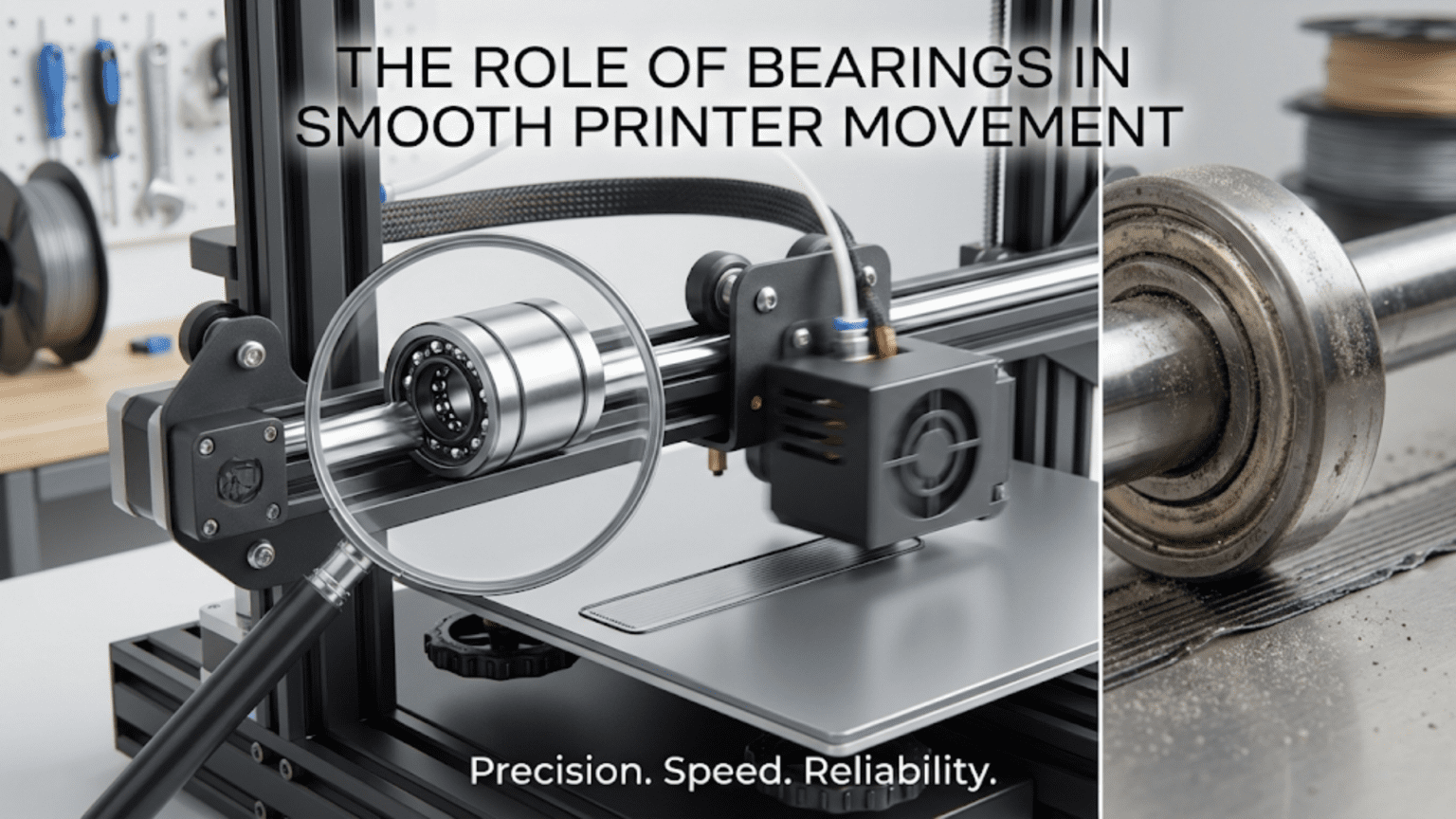
Bearings in 3D printers enable smooth, low-friction movement by providing rolling contact between moving and stationary components instead of sliding friction, appearing in multiple critical locations: linear bearings (LM8UU and similar) sliding along smooth rods or linear rails with recirculating ball bearings, idler pulley bearings guiding belts and filament paths, and motor shaft bearings supporting rotational components. Quality bearings ensure precise positioning, quiet operation, and long component lifespan by minimizing friction, reducing wear, and maintaining alignment, while bearing failures cause increased noise, binding, positioning errors, and print quality degradation.
Introduction
Every time your 3D printer moves—the print head gliding along the X-axis, the bed sliding forward and back, the Z-axis raising layer by layer—bearings make it possible. Without these precision components, the friction between moving parts would be enormous. Motors would struggle against resistance, movement would be jerky and imprecise, components would wear rapidly, and the smooth, accurate positioning essential for quality printing would be impossible.
Yet bearings work invisibly, hidden inside carriages, pulleys, and wheels. Most users never think about them until they fail. Then the symptoms become obvious: unexpected noise, rough movement, binding axes, inconsistent print quality. Understanding what bearings do, where they exist in your printer, and how to maintain them transforms these components from mysterious black boxes into comprehensible mechanical systems you can evaluate and care for.
Different bearing types serve different functions. Linear bearings enable smooth linear motion along rods or rails. Ball bearings in idler pulleys guide belts with minimal resistance. Radial bearings support rotating shafts. Each type uses the same fundamental principle—rolling contact reduces friction dramatically compared to sliding—but implements it differently for specific applications.
In this comprehensive guide, we’ll explore the various bearings in your 3D printer, understanding how each type works, where they’re used, why quality matters, and how to maintain them for reliable, smooth operation throughout your printer’s life.
The Fundamental Principle: Rolling vs. Sliding Friction
Understanding why bearings are necessary:
Friction Without Bearings
Sliding Contact:
- Direct contact between surfaces creates friction
- Friction force opposes motion
- Energy wasted as heat
- Surfaces wear from contact
Coefficient of Friction:
- Metal on metal: ~0.15-0.25 (dry), ~0.05-0.15 (lubricated)
- Significant force required to overcome
- Proportional to normal force (weight/load)
- Creates resistance motors must overcome
Problems:
- High power consumption
- Inconsistent movement (stick-slip)
- Rapid wear
- Heat generation
- Poor precision
Rolling Contact Advantage
Bearings Transform Motion:
- Rolling balls or rollers between surfaces
- Rolling friction much lower than sliding
- Typical coefficient: 0.001-0.005
- 10-50× friction reduction
Energy Efficiency:
- Less force needed for movement
- Motors work efficiently
- Less heat generation
- Lower power consumption
Precision Benefits:
- Consistent, smooth movement
- No stick-slip behavior
- Predictable positioning
- Minimal backlash
Longevity:
- Reduced wear on all components
- Longer lifespan
- Less frequent maintenance
- Better reliability
Types of Bearings in 3D Printers
Different applications require different bearing types:
Linear Bearings (Recirculating Ball)
The most common type for linear motion systems:
LM8UU Design (example, 8mm bore):
- Cylindrical housing (~15mm diameter, 24mm length)
- Precision bore fits over smooth rod
- Multiple rows of recirculating ball bearings
- Balls roll between housing races and rod surface
Recirculation Mechanism:
- Balls roll in loaded zones (supporting weight)
- Return paths allow balls to recirculate
- Continuous circulation enables unlimited travel
- Closed-loop system maintains ball supply
Common Sizes:
- LM8UU: 8mm bore (very common in 3D printers)
- LM10UU: 10mm bore (larger printers)
- LM12UU: 12mm bore (heavy-duty applications)
- Other sizes for specialized uses
Applications:
- X-axis carriage movement
- Y-axis bed movement
- Z-axis gantry on some designs
- Any linear motion along smooth rods
Quality Variations:
- Cheap bearings: Loose tolerances, rough operation, short life
- Quality bearings: Precision ground, smooth, durable
- Price range: $1-10 per bearing depending on quality
Linear Rail Carriage Bearings
Found in linear rail systems (MGN, HGR rails):
Design:
- Precision ground steel carriages
- Four rows of recirculating ball bearings
- Bearings engage rail grooves at multiple contact angles
- Preload options for rigidity
Advantages Over Rod Bearings:
- Higher load capacity
- Better moment resistance
- More compact profile
- Superior precision
- Self-contained units
Sizes:
- MGN9, MGN12, MGN15 common in printers
- Size indicates rail width
- Carriage length varies (short, medium, long)
Quality Importance:
- Precision grinding critical
- Ball quality affects smoothness
- Seals prevent contamination
- Lubrication factory-applied
Radial Ball Bearings
Support rotating shafts with radial loads:
Construction:
- Inner and outer races
- Ball bearings between races
- Cage holds balls in position
- Shields or seals protect from contamination
Common Sizes (by bore):
- 608: 8mm bore (very common)
- 625: 5mm bore (common in pulleys)
- 624: 4mm bore (smaller applications)
- Many other standardized sizes
Applications in Printers:
- Idler pulleys (belt routing)
- Filament guide pulleys
- V-slot wheels (integrated bearings)
- Motor shaft support (in some designs)
Types:
- Open: No shields, requires lubrication
- Shielded (Z): Metal shields, some protection
- Sealed (RS): Rubber seals, best protection
- Precision grades: ABEC-1, ABEC-3, ABEC-5, etc. (higher = tighter tolerance)
Thrust Bearings
Handle axial loads (along shaft axis):
Design:
- Flat race surfaces
- Balls roll between parallel races
- Resist loads pushing along shaft
3D Printer Applications:
- Lead screw thrust (Z-axis load)
- Some belt tensioner designs
- Anywhere axial load exists
Less Common:
- Not in every printer design
- Often use regular bearings with thrust capability
- Specialized applications
Bearing Locations in 3D Printers
Where bearings appear and their functions:
Linear Motion Axes
X-Axis Carriage:
- Two or more linear bearings on smooth rods
- OR linear rail carriage
- Support toolhead weight
- Allow smooth horizontal movement
- Critical for print quality
Y-Axis (Bed Movement):
- Linear bearings or rail carriages
- Support bed weight (significant on large printers)
- Constant back-and-forth movement
- High cycle count over printer lifetime
Z-Axis:
- Linear bearings or rail carriages for gantry/bed
- Often lead screw nut instead of or in addition to bearings
- Lower speed but must handle weight reliably
- Precision critical for layer height
Belt System
Idler Pulleys:
- Ball bearings allow pulley rotation
- Guide belt paths around corners
- Maintain belt tension
- Minimize friction in belt system
Tensioner Pulleys:
- Similar to idlers but spring-loaded
- Maintain constant belt tension
- Bearings must rotate freely under load
Filament Path
Filament Guide Pulleys:
- Small bearings guide filament
- Reduce friction in Bowden tubes
- Support filament path changes
- Particularly in multi-material systems
V-Slot Wheels
Integrated Bearing Design:
- Ball bearing in center of wheel
- Polyurethane tire on outside
- Bearing allows wheel rotation
- Wheel provides rolling contact on extrusion
Bearing Quality and Its Impact
Not all bearings are equal:
Quality Grades
Industrial vs. Generic:
- Industrial/OEM: Precision tolerances, quality materials, documented specifications
- Generic/Chinese: Variable quality, unknown materials, inconsistent performance
Precision Classes:
- ABEC-1: Basic precision, adequate for most 3D printing
- ABEC-3: Better precision, smoother operation
- ABEC-5/7: High precision, excellent for critical applications
- ABEC-9: Extreme precision, overkill for 3D printing
What Precision Affects:
- Smoothness of operation
- Noise level
- Runout (wobble)
- Lifespan
Material Quality
Ball Material:
- Chrome steel: Standard, good general performance
- Stainless steel: Corrosion resistant, slightly lower performance
- Ceramic: High performance, expensive, rarely needed in 3D printing
Race Material:
- Hardened steel: Standard, durable
- Stainless steel: Corrosion resistant
- Quality of hardening affects durability
Cage Material:
- Steel: Durable, slightly heavier
- Nylon/polymer: Quieter, lighter
- Brass: Traditional, good performance
Lubrication
Factory Lubrication:
- Grease: Most common, long-lasting, viscous
- Oil: Less common, thinner, may need reapplication
- Dry/sealed: Pre-lubricated and sealed for life
Importance:
- Reduces friction and wear
- Prevents corrosion
- Extends bearing life
- Maintains smooth operation
Bearing Failure Modes
Recognizing problems:
Increased Noise
Symptoms:
- Grinding, clicking, or rumbling sounds
- Noise changes with movement speed
- Particular axis affected
Causes:
- Worn races or balls
- Contamination (dust, debris)
- Inadequate lubrication
- Damaged seals allowing contamination
Impact:
- Annoying but may still function
- Indicates developing problem
- Will worsen over time
Rough Movement
Symptoms:
- Axis feels gritty when moved manually
- Resistance varies along travel
- Visible hesitation in movement
Causes:
- Bearing damage
- Dirt in bearing races
- Corrosion
- Dried lubricant
Print Quality Impact:
- Surface artifacts
- Layer inconsistencies
- Ringing or ghosting
- Dimensional inaccuracy
Binding and Seizing
Severe Failure:
- Axis difficult or impossible to move
- Motor skips steps trying to overcome resistance
- Complete movement failure
Causes:
- Catastrophic bearing failure
- Severe contamination
- Bearing separated/fallen apart
- Lubrication completely gone
Consequences:
- Print failures
- Potential motor damage (overheating)
- May damage other components
Excessive Play
Symptoms:
- Wobble or looseness in bearing
- Play detectable by hand
- Rattling during movement
Causes:
- Worn bearing races
- Bearing cage damaged
- Wrong bearing size
- Mounting issues
Effects:
- Reduced precision
- Print quality degradation
- Potential for complete failure
Bearing Maintenance
Keeping bearings functioning optimally:
Regular Inspection
Visual Checks (Monthly):
- Look for obvious damage
- Check for contamination
- Verify mounting security
- Listen for unusual sounds
Movement Test:
- Move axes manually
- Feel for smooth, consistent motion
- Note any rough spots or binding
- Compare to when new/known-good state
Cleaning
When Needed:
- Visible contamination
- Rough operation developing
- After exposure to debris
- Routine maintenance schedule
Process for Accessible Bearings:
- Remove from printer if possible
- Flush with solvent (isopropyl alcohol, mineral spirits)
- Rotate bearing while flushing
- Allow complete drying
- Apply fresh lubricant
- Reinstall
Sealed Bearings:
- Cannot be cleaned internally
- Replace if contaminated
- External cleaning only
Lubrication
Linear Bearings:
- Light machine oil or lithium grease
- Apply sparingly to rod surface
- Wipe excess (doesn’t need much)
- Frequency: Every 3-6 months or as needed
Ball Bearings:
- If serviceable, light grease or oil
- Remove shields to access if possible
- Small amount (excess attracts dirt)
- Sealed bearings don’t need external lubrication
Lubricant Types:
- Light machine oil: Good for frequent movement
- Lithium grease: Longer lasting, thicker
- PTFE/dry lubricants: Clean, but less effective
- Super Lube: Popular synthetic grease
Replacement
When to Replace:
- Roughness that cleaning doesn’t resolve
- Excessive noise
- Visible damage
- Significant play or wobble
- Preventively after heavy use
Quality Considerations:
- Worth buying quality replacements
- Cheap bearings cause more problems
- Industrial suppliers (SKF, NSK, etc.) for best quality
- Mid-range often adequate (Misumi, etc.)
Bearing Comparison Table
| Bearing Type | Common Uses | Critical Qualities | Typical Lifespan | Maintenance | Cost |
|---|---|---|---|---|---|
| Linear (LM8UU) | X/Y/Z axes on rod systems | Smoothness, durability | 1000-5000 hrs | Lubrication, cleaning | $-$$ |
| Linear Rail Carriage | X/Y/Z axes on rail systems | Precision, preload | 2000-10000 hrs | Minimal (sealed) | $$-$$$ |
| Radial Ball (608, etc.) | Idler pulleys, wheels | Smooth rotation, quiet | 5000-20000 hrs | Minimal (sealed) | $ |
| V-Slot Wheel Bearing | V-slot motion systems | Smooth, quiet, sealed | 2000-8000 hrs | None (integrated) | $ |
Upgrading Bearings
Improving printer performance:
When to Upgrade
Noisy Operation:
- Replace cheap bearings with quality alternatives
- Dramatic noise reduction possible
- Smoother operation
Seeking Better Precision:
- Higher precision bearings
- Linear rail upgrades from rod systems
- Tighter tolerances throughout
Reliability Improvements:
- Quality bearings last longer
- More consistent performance
- Fewer maintenance issues
Upgrade Paths
Rod Systems:
- Replace generic LM8UU with quality equivalents
- Misumi, Igus, SKF brands
- Noticeable improvement for modest cost
Linear Rail Conversion:
- Replace rod systems with MGN rails
- Significant upgrade in precision and rigidity
- More expensive but transformative
Bearing Quality:
- ABEC-5 or better for critical locations
- Sealed bearings for better contamination resistance
- Premium brands where smooth operation critical
Troubleshooting Bearing Problems
Noise from specific axis:
- Isolate which bearing by manual movement
- Replace suspected bearing
- May be multiple bearings if long-term neglect
Rough movement:
- Clean and lubricate first
- If no improvement, replace
- Check for other issues (bent rods, misalignment)
Inconsistent print quality:
- Check all axes for smooth motion
- Replace any questionable bearings
- Verify frame rigidity (bearing problems often blamed for frame issues)
Binding:
- Check for contamination, damage
- Verify proper bearing alignment
- Ensure no mechanical interference
- Replace if damaged
Conclusion
Bearings might be small components, but their role in enabling smooth, precise printer movement cannot be overstated. By transforming sliding friction into rolling contact, they reduce resistance by 90% or more, allowing motors to position components with precision while consuming minimal power and generating minimal wear. From linear bearings enabling smooth axis movement to ball bearings in idler pulleys guiding belts with minimal resistance, bearings appear throughout your printer performing essential functions.
Quality matters enormously. Premium bearings with precision tolerances, quality materials, and appropriate lubrication operate smoothly and quietly for thousands of hours. Cheap bearings with loose tolerances and poor materials create noise, rough movement, and shortened lifespans. The difference in performance justifies the modest cost difference, especially for critical components like linear motion bearings.
Proper maintenance—regular inspection, appropriate lubrication, and timely replacement when wear develops—extends bearing life and maintains optimal performance. The few minutes spent periodically lubricating linear bearings or checking for developing roughness prevents the hours of troubleshooting and print failures that bearing problems cause.
The next time you watch your printer’s print head gliding smoothly across the build area or the bed sliding effortlessly back and forth, appreciate the bearings making it possible. Those small steel components with their precisely manufactured races and carefully hardened balls aren’t just reducing friction—they’re enabling the smooth, precise, reliable movement that transforms your digital designs into physical reality.