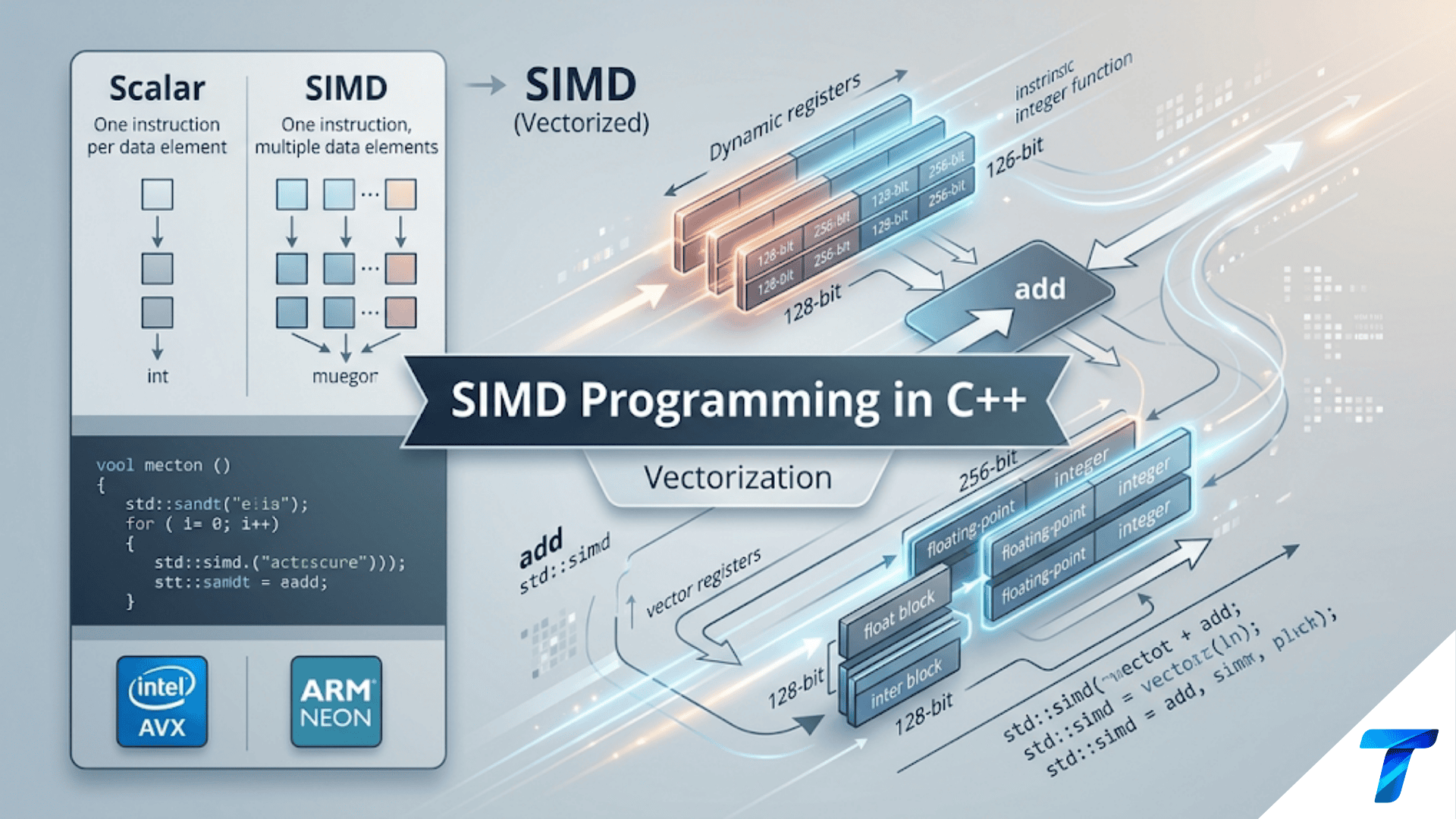

SIMD (Single Instruction, Multiple Data) programming in C++ is a performance optimization technique that allows the CPU to process multiple data elements simultaneously using a single instruction. By utilizing wide CPU registers (like 128-bit, 256-bit, or 512-bit vectors) through compiler auto-vectorization, intrinsic functions, or C++ standard library algorithms, developers can dramatically increase the throughput of data-heavy operations like mathematics, image processing, and physics simulations.
Introduction
In the early days of software engineering, developers relied on Moore’s Law and increasing clock speeds to naturally speed up their applications year after year. Today, the landscape has fundamentally changed. CPU clock speeds have largely plateaued, and hardware manufacturers have instead turned to multi-core architectures and wider instruction sets to deliver performance gains.
If you want to extract every ounce of performance from modern hardware in C++, you cannot rely solely on multi-threading. You must look inside the single core and understand SIMD (Single Instruction, Multiple Data) and Vectorization.
In this comprehensive guide, we will explore what SIMD is, how vectorization works, and the different ways you can leverage SIMD programming in C++, ranging from compiler auto-vectorization to low-level hardware intrinsics and modern C++ standard library features.
What is SIMD?
To understand SIMD, we first need to understand the traditional execution model: SISD (Single Instruction, Single Data). In a SISD model, operations are performed sequentially. If you want to add two arrays of 100 integers together, the CPU executes 100 individual addition instructions.
SIMD (Single Instruction, Multiple Data), as the name implies, allows the CPU to fetch one instruction and apply it to a “vector” of multiple data elements at the exact same time.
Modern CPUs contain specialized, ultra-wide registers designed for this purpose:
- SSE (Streaming SIMD Extensions): 128-bit wide registers (can hold 4 standard 32-bit
floats or 4ints). - AVX/AVX2 (Advanced Vector Extensions): 256-bit wide registers (can hold 8
floats or 8ints). - AVX-512: 512-bit wide registers (can hold 16
floats or 16ints). - ARM NEON: The equivalent 128-bit wide SIMD architecture found in ARM processors (like Apple Silicon and mobile devices).
When a loop is converted from processing one element at a time to processing chunks of elements simultaneously using these registers, the process is called Vectorization.
Level 1: Compiler Auto-Vectorization
The easiest way to write SIMD code is to let the compiler do it for you. Modern C++ compilers (GCC, Clang, MSVC) are incredibly smart. When you compile with optimization flags (like -O2 or -O3) and specify the target architecture (like -march=native in GCC/Clang or /arch:AVX2 in MSVC), the compiler will attempt to automatically vectorize your loops.
The Auto-Vectorization Example
Let’s look at a classic array addition example:
#include <vector>

void add_arrays(const std::vector<float>& A, const std::vector<float>& B, std::vector<float>& C) {
    // Assuming A, B, and C are the same size
    for (size_t i = 0; i < A.size(); ++i) {
        C[i] = A[i] + B[i];
    }
}
Under the hood, if compiled with -O3 -march=native on an AVX2-supported machine, the compiler won’t generate a scalar loop that processes one float at a time. Instead, it will group the floats into batches of 8, load 8 elements from A, load 8 elements from B, add them together in a single CPU cycle, and store the 8 results in C.
The Pitfalls of Auto-Vectorization
While auto-vectorization is practically free, it is notoriously fragile. The compiler will only vectorize a loop if it can mathematically prove that vectorization will not alter the program’s behavior. Two main issues often break auto-vectorization:
1. Loop-Carried Dependencies If the current iteration of a loop depends on the result of the previous iteration, the compiler cannot process them simultaneously.
// CANNOT be vectorized easily
for (size_t i = 1; i < data.size(); ++i) {
    data[i] = data[i] + data[i - 1];
}
2. Pointer Aliasing If the compiler suspects that two pointers might point to the same, overlapping block of memory, it will refuse to vectorize.
void add_pointers(float* A, float* B, float* C, size_t size) {
    // The compiler doesn't know if 'C' overlaps with 'A' or 'B'.
    // If C overlaps with A, vectorized execution might produce wrong results.
    for (size_t i = 0; i < size; ++i) {
        C[i] = A[i] + B[i];
    }
}
To fix this, you can use the __restrict keyword (a C-standard keyword widely supported as an extension in C++) to promise the compiler that the pointers do not overlap:
void add_pointers_vectorized(float* __restrict A, float* __restrict B, float* __restrict C, size_t size) {
    for (size_t i = 0; i < size; ++i) {
        C[i] = A[i] + B[i]; // Now safely auto-vectorized
    }
}
Level 2: SIMD Intrinsics (The Low-Level Approach)
When auto-vectorization fails, or when you need absolute, deterministic control over the hardware, you can use Compiler Intrinsics. Intrinsics are special functions provided by the compiler that map directly to specific CPU assembly instructions.
For x86 architecture (Intel/AMD), you include the <immintrin.h> header.
Understanding Intrinsic Naming Conventions
Intel intrinsics look intimidating, but they follow a strict naming convention: _mm<bit_width>_<operation>_<data_type>
_mm256: Operates on 256-bit registers (AVX/AVX2)._add: The operation is addition._ps: Packed Single-precision (operates onfloat)._pdwould be Packed Double,_epi32would be Extended Packed Integer 32-bit.
Example: Vector Addition using AVX2 Intrinsics
Let’s rewrite our array addition using manual AVX intrinsics. Since AVX registers are 256 bits wide, they can hold exactly 8 32-bit floats ($256 \div 32 = 8$). We will process the arrays in chunks of 8.
#include <immintrin.h>
#include <vector>
#include <iostream>

void add_arrays_avx(const float* A, const float* B, float* C, size_t size) {
    size_t i = 0;

    // Process 8 elements at a time
    for (; i + 7 < size; i += 8) {
        // 1. Load 8 floats from array A into a 256-bit vector register
        __m256 vecA = _mm256_loadu_ps(&A[i]);

        // 2. Load 8 floats from array B into a 256-bit vector register
        __m256 vecB = _mm256_loadu_ps(&B[i]);

        // 3. Perform SIMD addition
        __m256 vecResult = _mm256_add_ps(vecA, vecB);

        // 4. Store the 8 resulting floats back into array C
        _mm256_storeu_ps(&C[i], vecResult);
    }

    // Handle the remainder (the "tail")
    // If the size is not a perfect multiple of 8, we must process the rest normally
    for (; i < size; ++i) {
        C[i] = A[i] + B[i];
    }
}

int main() {
    std::vector<float> A(100, 1.5f);
    std::vector<float> B(100, 2.5f);
    std::vector<float> C(100, 0.0f);

    add_arrays_avx(A.data(), B.data(), C.data(), A.size());

    std::cout << "C[0] = " << C[0] << std::endl; // Output: 4.0
    std::cout << "C[99] = " << C[99] << std::endl; // Output: 4.0
    return 0;
}
The “Tail” Problem
Notice the second for loop in the intrinsic example. This is a critical concept in manual SIMD programming. If your array has 100 elements, you can perfectly process twelve chunks of 8 ($12 \times 8 = 96$). But what about the remaining 4 elements? You cannot load them into an 8-float vector without reading past the end of your array (which causes a Segmentation Fault). Therefore, manual SIMD code almost always requires a scalar “fallback” loop to handle the tail elements.
Memory Alignment
In the example above, we used _mm256_loadu_ps. The u stands for unaligned. Historically, SIMD instructions required memory to be strictly aligned to 16-byte or 32-byte boundaries. Loading unaligned memory would crash the program. While modern CPUs handle unaligned loads efficiently, aligned loads (_mm256_load_ps) are still marginally faster in tight loops. You can align your C++ data structures using alignas(32).
Level 3: Modern C++ Standards (The Elegant Way)
Manual intrinsics are incredibly fast, but they have a massive downside: Portability. An AVX intrinsic will not compile on an ARM processor (like a Raspberry Pi or an M1/M2 Mac). You would have to write completely separate code paths using ARM NEON intrinsics.
Modern C++ has introduced elegant ways to achieve vectorization without sacrificing portability.
C++17 Parallel Algorithms
C++17 introduced execution policies for standard library algorithms. By passing std::execution::unseq (unsequenced) or std::execution::par_unseq (parallel and unsequenced), you explicitly grant the compiler permission to vectorize the operation, effectively promising that there are no loop-carried dependencies.
#include <vector>
#include <algorithm>
#include <execution>

void add_arrays_cpp17(const std::vector<float>& A, const std::vector<float>& B, std::vector<float>& C) {
    // Perform A + B = C using unsequenced execution (Vectorization)
    std::transform(std::execution::unseq,
                   A.begin(), A.end(),
                   B.begin(),
                   C.begin(),
                   [](float a, float b) { return a + b; });
}
This code is highly portable, easy to read, and allows the compiler to generate SSE, AVX, or NEON instructions depending on the target architecture you compile for.
The Future: std::simd (Data-Parallel Types)
The C++ standardization committee has been working on a std::simd library (currently available in std::experimental::simd and slated for inclusion in C++26). This introduces a portable, type-safe wrapper around hardware SIMD registers.
With std::simd, you can declare variables that act like standard integers or floats but under the hood represent a hardware vector.
#include <experimental/simd>
#include <vector>

namespace stdx = std::experimental;

void add_arrays_std_simd(const float* A, const float* B, float* C, size_t size) {
    // std::native_simd maps to the most efficient vector size on your CPU
    using SimdFloat = stdx::native_simd<float>;
    constexpr size_t simd_width = SimdFloat::size();

    size_t i = 0;
    for (; i + simd_width <= size; i += simd_width) {
        // Load, Add, and Store - Looks exactly like scalar math!
        SimdFloat va(&A[i], stdx::element_aligned);
        SimdFloat vb(&B[i], stdx::element_aligned);
        SimdFloat vc = va + vb; // Vectorized addition via operator overloading
        vc.copy_to(&C[i], stdx::element_aligned);
    }

    // Handle the remainder tail...
    for (; i < size; ++i) {
        C[i] = A[i] + B[i];
    }
}
This represents the holy grail of SIMD in C++: hardware-accelerated performance, clean syntax utilizing operator overloading, and perfect cross-platform portability.
Pitfalls and Considerations of SIMD
While vectorization offers incredible performance boosts (often 4x to 8x speedups for compute-bound loops), it isn’t a silver bullet.
- Branching (If Statements): SIMD architectures hate branching. Because a single instruction is applied to multiple data points, you cannot easily have an
ifstatement that executes for half the vector and not the other half. When branching occurs inside a vectorized loop, the CPU usually has to execute both paths of the branch for all elements and then blend the results using bitmasks. This can severely degrade performance. - Memory Bandwidth: You can only process data as fast as you can fetch it from RAM. If your vectorized loop takes 1 CPU cycle to compute, but fetching the data from main memory takes 100 cycles, SIMD will not speed up your program. This is known as being memory-bound. SIMD is most effective on compute-bound workloads (like complex mathematics, matrix multiplication, or cryptographic hashing) that run within the CPU cache.
- Amdahl’s Law: Remember that vectorizing a single loop will only speed up the portion of the program dominated by that loop. Always profile your code (using tools like
perf, VTune, or perf-record) to identify actual bottlenecks before spending hours writing intrinsics.
Conclusion
SIMD programming is an indispensable tool in a high-performance C++ developer’s arsenal. By understanding the shift from SISD to SIMD, you unlock the ability to utilize the full width of modern CPU architectures.
For most day-to-day applications, structuring your code to be auto-vectorization friendly and utilizing C++17 execution policies is the most prudent path. It keeps your code maintainable and portable. However, in latency-critical environments—such as high-frequency trading, game engine development, audio processing, and scientific simulations—knowing how to drop down to <immintrin.h> and manually craft AVX or NEON instructions remains a highly valuable, highly sought-after skill.
As the C++ standard evolves toward std::simd, the gap between low-level control and high-level portability will continue to close, bringing vectorized performance to mainstream C++ development.