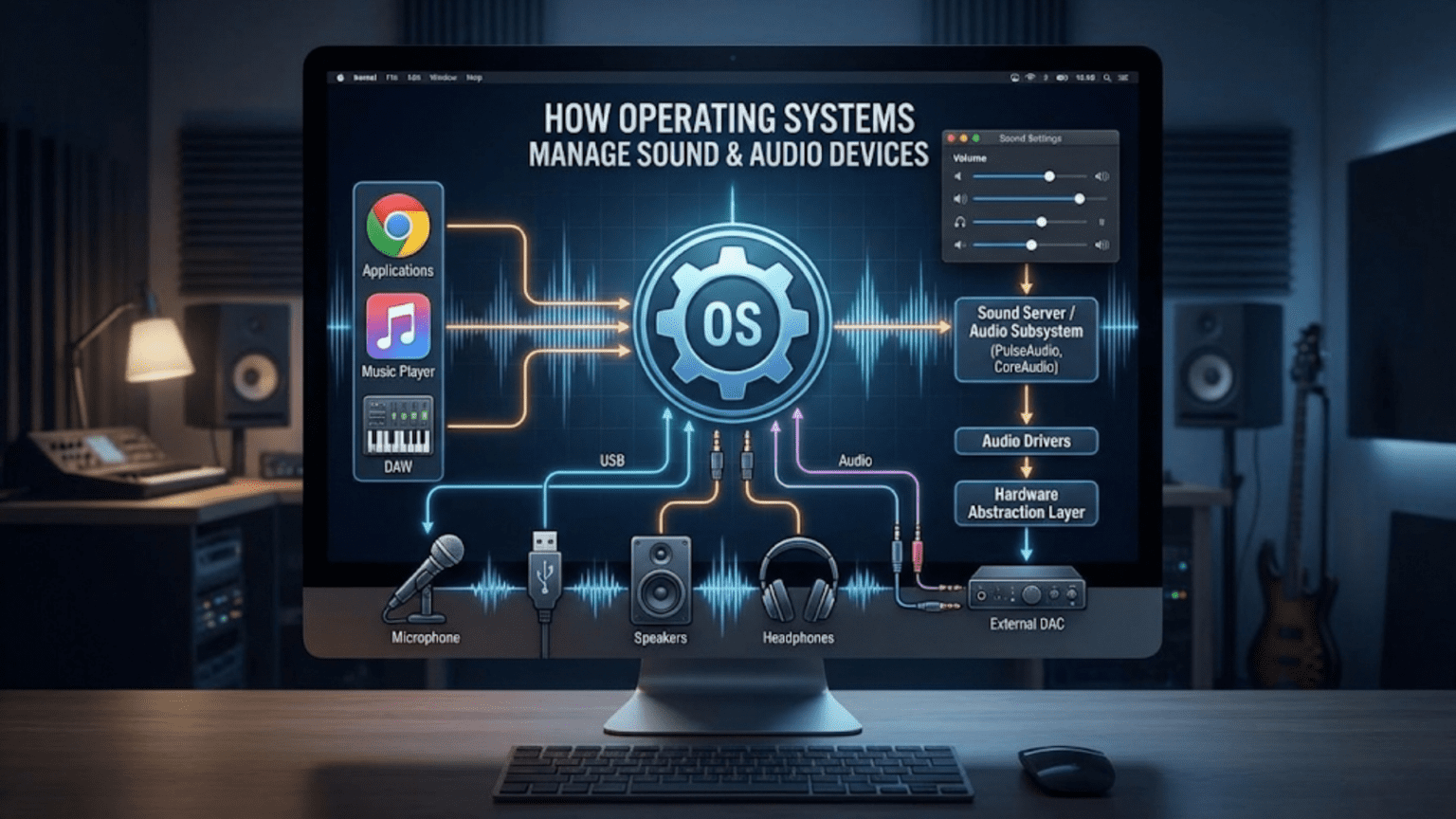
Operating systems manage sound and audio devices through a layered audio subsystem consisting of audio drivers that communicate with hardware, audio servers or mixers that route and combine audio streams from multiple applications, and programming interfaces (APIs) that applications use to play and record audio. This architecture allows multiple applications to produce sound simultaneously, controls volume and routing, and provides consistent audio access across different hardware configurations.
When you play music, watch a video, receive a notification sound, and participate in a video call all at the same time, your operating system seamlessly manages all these audio streams—mixing them together, routing them to the correct output device, and adjusting volumes—so that everything sounds correct without any application needing to coordinate with the others. This invisible but impressive feat of audio management happens through a sophisticated audio subsystem built into every modern operating system, handling everything from raw hardware communication at the driver level to high-level audio mixing and routing that applications use through standardized programming interfaces. Sound management is one of the more complex subsystems in any operating system, requiring real-time processing, strict timing, hardware abstraction across diverse audio devices, and simultaneous support for multiple competing audio streams.
Audio management in operating systems has evolved dramatically since the days when a single application had exclusive access to a sound card and had to directly program the hardware. Modern audio subsystems must handle dozens of simultaneous audio streams from multiple applications, support USB audio devices and Bluetooth headphones that connect and disconnect dynamically, provide low-latency audio for real-time applications like games and voice communications, enable professional studio-quality recording and playback, and present consistent interfaces to applications regardless of the underlying hardware. Each major operating system—Windows, Linux, and macOS—implements audio management differently, reflecting different design philosophies and technical priorities, yet all solve the same fundamental challenges. This comprehensive guide explores how operating systems manage audio devices, the architecture of audio subsystems, how audio data flows from applications to speakers, how different operating systems implement audio management, common audio concepts and terminology, and how developers and users interact with audio systems.
The Audio Management Challenge
Managing audio in an operating system presents unique challenges that distinguish it from other types of I/O management.
Timing requirements for audio are extraordinarily strict. Audio must be delivered to the hardware at precise, consistent intervals to produce intelligible sound. If data arrives too slowly, the audio buffer runs out (buffer underrun) and the hardware produces silence, clicks, or pops—audible glitches that immediately signal a problem. If data arrives too quickly, buffers overflow and data is lost. The audio system must deliver data to hardware with millisecond or sub-millisecond precision, despite the operating system simultaneously managing network packets, disk I/O, user interface events, and hundreds of other tasks. This real-time requirement makes audio management fundamentally different from most I/O—a slightly delayed disk read is invisible, but a slightly delayed audio delivery is immediately audible.
Hardware diversity is extreme in audio. Sound cards range from basic integrated audio chips on motherboards to professional audio interfaces with dozens of input and output channels. USB headsets, Bluetooth speakers, HDMI audio through video cards, USB-C adapters, Thunderbolt audio interfaces, and specialized audio hardware all present different interfaces, capabilities, and quirks. The operating system must provide a consistent interface to applications regardless of this hardware diversity, translating standardized API calls into device-specific commands for each audio device.
Simultaneous multi-application audio requires mixing. When a music player, game, video conference application, and notification system all want to produce sound simultaneously, the operating system must combine (mix) their audio streams into a single stream for the hardware. This mixing involves digital signal processing—adding waveforms together, normalizing levels, and ensuring the combined output doesn’t exceed hardware limits. Without OS-level mixing, applications would need to coordinate with each other to share audio hardware, which would be impractical.
Latency versus quality tradeoffs pervade audio system design. Larger audio buffers reduce the risk of glitches by providing more time cushion but increase latency—the delay between when audio is produced and when it’s heard. This latency matters for interactive applications: in voice communication, more than about 150ms latency causes noticeable conversation difficulties; in musical performance, latency above 10ms makes real-time playing feel unnatural. The audio system must provide appropriate latency profiles for different use cases, often supporting both low-latency modes for interactive applications and higher-latency modes for background audio.
Format conversion complexity arises because applications produce audio in various sample rates, bit depths, and channel configurations, but hardware operates at specific rates and configurations. Converting between formats (resampling from 44.1kHz to 48kHz, converting stereo to 7.1 surround, converting 16-bit to 24-bit samples) while maintaining quality requires sophisticated digital signal processing that the audio subsystem handles transparently.
Audio Subsystem Architecture
Operating system audio subsystems typically implement layered architectures that separate hardware-specific code from application interfaces, enabling portability and flexibility.
Hardware abstraction is the foundation of any audio architecture. Audio device drivers communicate directly with hardware—reading and writing registers, managing DMA transfers, handling interrupts when audio buffers need refilling—and expose standardized interfaces to the layers above. Well-designed audio drivers hide hardware quirks, presenting consistent capabilities to the audio subsystem regardless of whether the hardware is a cheap integrated chip or a professional recording interface. The driver layer translates abstract operations like “set sample rate to 48kHz” into the specific register writes or USB control transfers each device requires.
The audio server or audio daemon is a central component in many modern audio architectures. This privileged process (or kernel subsystem) accepts audio streams from applications, mixes them together, applies effects like volume control and equalization, routes streams to appropriate devices, and handles device enumeration and hot-plugging. By centralizing audio management in a dedicated server rather than having each application directly access hardware, the system achieves consistent mixing, policy enforcement, and device management. Windows uses the Windows Audio Session API (WASAPI) and the Windows Audio service, Linux commonly uses PipeWire or PulseAudio, and macOS uses CoreAudio.
Application programming interfaces (APIs) provide the layer through which applications request audio services. Well-designed audio APIs abstract hardware and mixing details, letting application developers focus on audio content rather than hardware communication. APIs provide functions for enumerating available devices, opening audio streams with specified parameters (sample rate, channels, format), providing audio data for playback, receiving audio data during recording, and controlling volume and routing. Multiple competing APIs often exist on each platform, reflecting different design priorities and historical evolution.
Plugins and modules extend audio system capabilities. Audio effects, codec decoders, virtual audio devices, and audio routing modules can be dynamically loaded. This extensibility allows users and developers to add capabilities like audio enhancement effects, virtual audio cables for routing audio between applications, or codec support for exotic audio formats without changing the core audio system.
The audio graph model, used in modern audio systems, represents audio processing as a graph of nodes connected by audio streams. Source nodes provide audio data, processing nodes transform it (applying effects, mixing, converting formats), and sink nodes consume it (writing to hardware). Applications connect to appropriate points in this graph, and the audio system processes the complete graph to produce final output. This model provides great flexibility in routing and processing audio while maintaining clear data flow relationships.
Windows Audio Architecture
Windows implements a sophisticated, layered audio architecture that has evolved significantly across versions, particularly with the introduction of WASAPI in Windows Vista.
The Windows audio stack begins at the hardware level with audio miniport drivers—kernel-mode drivers implementing hardware-specific audio functionality. Microsoft provides the Port Class Driver (PortCls) as a framework that handles common driver tasks, allowing hardware vendors to write miniport drivers implementing only device-specific behavior. Above miniport drivers, the kernel streaming layer (KS) provides a generic framework for multimedia data streaming, supporting audio, video, and other media types with a unified pipeline model.
The Windows Audio Service (AudioSrv) is a user-mode Windows service that manages audio sessions, handles audio policy decisions, and coordinates between applications and the audio driver stack. This service implements automatic gain control, loudness equalization, and speaker configuration. The Audio Endpoint Builder service discovers audio devices and creates audio endpoints—logical representations of audio inputs and outputs that applications work with rather than directly addressing hardware.
WASAPI (Windows Audio Session API) is the modern, low-level Windows audio API providing two operational modes. Shared mode allows multiple applications to use the same audio device simultaneously, with the Windows audio engine performing mixing—this is the normal mode for most applications where some latency is acceptable. Exclusive mode allows an application to take complete control of an audio device, bypassing the Windows mixing engine entirely—this provides lower latency at the cost of preventing other applications from using that device, useful for professional audio applications and games requiring minimal latency.
The Windows audio engine, running in user mode within the Audio Device Graph Isolation (audiodg.exe) process, performs audio mixing and processing for shared mode audio. When multiple applications play audio simultaneously, their streams arrive at the audio engine, which mixes them with format conversion and volume control, then sends the final mixed stream to the audio driver. Running this mixing in audiodg.exe rather than in the Audio Service process provides isolation—if an audio processing plugin crashes, it crashes audiodg.exe rather than the critical Audio Service.
Higher-level APIs build on WASAPI. The older WaveOut/WaveIn APIs, DirectSound, and DirectX Audio are still supported through translation layers that ultimately use WASAPI. The Media Foundation API provides more advanced media handling including hardware-accelerated decoding. The Windows Runtime (WinRT) audio APIs provide simpler interfaces for Universal Windows Platform applications. This layered compatibility allows older applications to continue working while newer applications use more capable modern APIs.
Audio sessions group related audio streams for policy and volume control purposes. Each application’s audio activity exists within a session, and Windows allows per-session volume control (different applications at different volumes), session state notifications, and audio policy enforcement. The sound mixer in Windows shows per-application volume because each application runs in its own audio session.
Linux Audio Architecture
Linux audio has a complex history with multiple competing systems, now mostly converging on PipeWire as the unified solution.
The kernel-level audio foundation is ALSA (Advanced Linux Sound Architecture), which replaced the older OSS (Open Sound System) as the standard kernel audio subsystem. ALSA provides kernel modules for specific audio hardware, offering a low-level API that gives direct access to audio hardware capabilities. ALSA handles basic audio operations—setting sample rates, bit depths, and channel configurations; managing hardware buffers; and transferring audio data between applications and hardware. ALSA is powerful and efficient but complex to use directly, particularly for applications needing to support multiple simultaneous audio streams.
PulseAudio was for many years the dominant Linux audio server, providing higher-level audio services above ALSA. As a user-space audio daemon, PulseAudio handles mixing multiple audio streams, network audio (allowing audio to be played or received over networks), per-application volume control, device switching (routing audio to different devices dynamically), and Bluetooth audio management. PulseAudio made Linux audio much more user-friendly by providing automatic mixing and device management that ALSA alone lacked, becoming the default audio system on Ubuntu, Fedora, and most major distributions.
JACK (JACK Audio Connection Kit) serves professional audio needs, providing extremely low-latency audio for music production, recording, and real-time audio processing. JACK uses a different model from PulseAudio—applications connect their audio inputs and outputs to a central JACK server graph, enabling flexible routing between applications (connecting synthesizer output directly to recording application input, for example). JACK’s strict timing guarantees and low latency come at the cost of more complex configuration and less automatic management compared to PulseAudio.
PipeWire is the modern Linux audio system designed to unify PulseAudio and JACK functionality while addressing their individual limitations. Developed primarily by Red Hat, PipeWire provides a complete audio and video server with PulseAudio-compatible APIs (allowing existing PulseAudio applications to work without modification), JACK-compatible APIs (supporting professional audio applications), low latency approaching JACK’s capabilities, better Bluetooth integration, improved security through containerization support, and more flexible routing. Major distributions including Fedora, Ubuntu, and Arch Linux have adopted PipeWire as their default audio system. PipeWire represents Linux audio finally having a unified solution that serves both consumer and professional needs.
The audio configuration landscape on Linux includes multiple configuration files and tools. ALSA configuration in /etc/asound.conf or ~/.asoundrc controls ALSA behavior. PulseAudio configuration in /etc/pulse/default.pa and daemon.conf controls its behavior. PipeWire configuration in /etc/pipewire/ provides comprehensive control. GUI tools like PulseAudio Volume Control (pavucontrol) and PipeWire’s pw-jack provide graphical management, while command-line tools like pactl, pw-cli, and aplay/arecord (ALSA) provide scripting capabilities.
macOS Audio Architecture
macOS uses CoreAudio, Apple’s comprehensive, deeply integrated audio architecture that provides both low-level hardware access and high-level audio services.
CoreAudio is a C-based framework providing the foundation of all audio in macOS. At its lowest level, CoreAudio communicates with audio hardware through I/O Kit audio drivers. Above the drivers, CoreAudio’s Hardware Abstraction Layer (HAL) provides consistent device access regardless of hardware type—USB audio devices, Thunderbolt interfaces, built-in audio, and Bluetooth all appear as CoreAudio devices with the same access methods. The HAL handles device enumeration, property management, and audio streaming with a callback-based model where the HAL calls application-provided functions when audio data is needed or available.
The CoreAudio Audio Unit (AU) plugin system provides modular audio processing components. Audio Units are plugins implementing specific audio functions—synthesis, effects, analysis, or format conversion. The system includes built-in Audio Units for common functions like mixing, resampling, and format conversion, while third-party developers provide effects, instruments, and processing plugins. Applications can create processing chains by connecting Audio Units, enabling sophisticated audio routing and processing within the framework.
AVAudioEngine provides a higher-level, object-oriented audio API built on CoreAudio’s Audio Units. It uses a node graph model where AVAudioPlayerNode, AVAudioMixerNode, AVAudioEnvironmentNode, and other nodes connect to build audio processing graphs. This abstraction makes common audio tasks much simpler while still providing access to underlying CoreAudio functionality when needed.
CoreAudio handles audio mixing through its I/O model. When multiple applications play audio simultaneously, CoreAudio’s HAL mixes their contributions before sending the combined signal to hardware. This mixing happens with sample-accurate timing, ensuring precise synchronization between streams. Applications can also request exclusive access to hardware for minimum-latency professional audio work.
Audio MIDI Setup is a macOS utility that exposes CoreAudio device management to users. Through this application, users can configure sample rates, bit depths, and channel configurations for audio devices; create aggregate devices that combine multiple physical audio devices into a single logical device; set up multi-output devices for playing the same audio through multiple devices simultaneously; and configure Core MIDI for musical instrument connectivity. These capabilities make macOS particularly popular for professional audio work.
The Audio Queue Services API provides a higher-level interface for recording and playback without requiring direct management of CoreAudio buffers and threads. It handles threading, buffer management, and audio session management automatically, making it appropriate for applications that need audio functionality but don’t require the lowest-level control or latency.
Audio Formats, Sample Rates, and Bit Depth
Understanding audio data formats is fundamental to understanding how operating systems process and manage audio.
Sample rate determines how many times per second audio is sampled. The standard CD quality sample rate is 44,100 Hz (44.1 kHz), meaning 44,100 individual amplitude measurements per second per channel. The professional standard is 48,000 Hz (48 kHz), used in most video production and professional audio. Higher sample rates of 88.2 kHz, 96 kHz, 192 kHz, and beyond are used in high-resolution audio production. The operating system must handle conversion between sample rates when applications or devices use different rates, using mathematical resampling algorithms that must balance quality against computational cost.
Bit depth determines the precision of each sample, directly affecting dynamic range and noise floor. 16-bit audio (CD standard) provides 65,536 possible amplitude levels, yielding approximately 96 dB of dynamic range. 24-bit audio provides 16.7 million levels and approximately 144 dB dynamic range, enabling capturing quiet sounds without noise while handling loud sounds without clipping. 32-bit float (32-bit floating-point) is commonly used internally within audio processing chains because its format can represent very large and very small values without precision loss during processing. The operating system manages conversion between bit depths as audio flows through the processing chain.
Channel configurations define how many independent audio streams are combined. Mono has one channel. Stereo has two channels (left and right). Surround sound formats include 5.1 (five full-range channels plus one low-frequency effects channel), 7.1 (seven channels plus LFE), and others for home theater. Binaural audio uses two channels with special processing creating 3D sound perception through headphones. The operating system must handle routing and upmixing/downmixing between different channel configurations—converting stereo music to 5.1 surround, for example, or combining 5.1 audio to stereo for headphone output.
Audio codecs compress audio data for storage and transmission, reducing file sizes at the cost of quality (lossy codecs) or maintaining perfect quality with less compression (lossless codecs). MP3, AAC, Vorbis, and Opus are common lossy codecs; FLAC, ALAC, and WAV are lossless or uncompressed. The operating system provides codec infrastructure—Windows Media Foundation, Linux GStreamer and PipeWire codecs, macOS CoreAudio codecs—that applications use for codec operations without implementing them independently.
PCM (Pulse-Code Modulation) is the fundamental uncompressed audio format where each sample is represented as a direct numerical value. All audio ultimately converts to PCM for hardware playback. The operating system handles this conversion transparently—a compressed MP3 file plays through an application that decodes it to PCM, which the audio subsystem processes and sends to hardware.
Interleaved versus planar format describes how multi-channel audio data is arranged in memory. Interleaved format stores samples from all channels together (L1, R1, L2, R2, …), while planar format stores each channel separately (L1, L2, L3… then R1, R2, R3…). Different APIs and hardware prefer different arrangements, so the audio subsystem performs conversion as needed.
Audio Routing and Mixing
Routing audio streams to appropriate devices and mixing multiple streams are core audio management functions.
Audio routing determines which audio device handles which streams. Simple configurations have all audio going to the default output device. Complex configurations might route music to speakers, voice communication to a headset, game audio to a surround sound system, and recorded audio from a USB microphone. Operating systems provide routing policies and user interfaces for managing these configurations. Applications can request specific devices, or the system applies default routing based on audio type and user configuration.
Software mixing combines multiple audio streams into a single output stream. When three applications play audio simultaneously, the audio server adds their waveforms sample by sample, ensuring the total doesn’t exceed hardware limits (clipping). Volume control scales individual stream amplitudes before mixing. The resulting mixed audio stream is what goes to hardware. This mixing process happens at thousands of times per second, requiring efficient real-time computation.
Virtual audio devices extend routing capabilities. Virtual sinks (output devices) that don’t correspond to real hardware allow routing audio between applications. Virtual cables pass audio output from one application as input to another—useful for recording application output, processing audio through effects in one application before it reaches another, or streaming audio to broadcasting software. Operating systems support creating these virtual devices through audio server APIs.
Device hot-plugging management handles the constant connection and disconnection of audio devices. When you plug in headphones, the operating system detects the new device, loads appropriate drivers, configures it, and may automatically switch audio routing to the new device. When headphones are disconnected, audio routing must switch back to speakers or another available device without interruption when possible. This dynamic device management requires the audio subsystem to monitor device availability and implement smooth transition policies.
Loopback recording captures audio from output devices as if it were an input. This allows recording the combined audio output of a system—everything you hear can be captured as a recording. Operating systems may provide loopback as a standard device type or through special driver configurations.
Per-application volume control is a user-facing feature that relies on the audio mixing architecture. Because the audio server receives separate streams from each application before mixing, it can scale each stream’s amplitude independently before combining them. The Windows volume mixer, macOS Sound preferences, and Linux audio control tools all expose this per-application control to users.
Low-Latency Audio and Professional Use Cases
Professional audio applications demand performance characteristics that standard consumer audio configurations don’t provide.
ASIO (Audio Stream Input/Output) is a professional audio driver standard developed by Steinberg that enables extremely low-latency audio on Windows by allowing applications to bypass most of the standard Windows audio stack and communicate more directly with audio hardware. ASIO drivers, provided by audio hardware manufacturers for professional interfaces, achieve latencies of 1-10 milliseconds compared to 100ms or more through standard Windows paths. Digital audio workstations (DAWs) and virtual studio environments use ASIO for real-time monitoring during recording and instrument performance.
Core Audio on macOS provides low-latency audio through its HAL without requiring special driver frameworks, which is one reason macOS is popular among professional musicians and audio engineers. The tight integration between CoreAudio, the operating system, and Apple hardware (particularly on Apple Silicon Macs with integrated audio components) achieves very low latencies in standard configurations.
JACK on Linux provides the professional audio server for low-latency work. By configuring JACK with small buffer sizes and appropriate scheduling priorities, Linux systems achieve competitive latencies for professional work. Many professional audio applications (Ardour, Bitwig Studio, LMMS) support JACK, and the flexible routing model allows sophisticated studio configurations.
Real-time kernel patches improve Linux audio by reducing scheduling latency. The PREEMPT_RT patch set converts the Linux kernel into a fully preemptible real-time kernel where high-priority audio threads can interrupt virtually any other kernel activity, reducing maximum latency. Many professional Linux audio distributions (AV Linux, Ubuntu Studio) include real-time kernels.
CPU governor settings affect audio performance. Modern processors dynamically adjust clock speeds for power efficiency, but frequency transitions can cause brief latency spikes in audio processing. Audio workstations often configure CPUs to run at fixed frequencies rather than scaling dynamically, trading power efficiency for consistent performance.
Buffer size and period configuration directly control latency and stability tradeoffs. Smaller buffers mean lower latency but require the audio system to refill them more frequently, increasing the risk of underruns if the system is briefly busy with other work. Larger buffers provide more cushion against timing irregularities but increase latency. Professional audio systems must tune these settings to match their specific hardware and performance requirements.
Bluetooth and Wireless Audio
Wireless audio adds complexity to OS audio management due to the additional protocols, latency characteristics, and codec negotiations involved.
Bluetooth audio requires the operating system to manage Bluetooth stacks in addition to audio subsystems. On Linux, BlueZ provides Bluetooth protocol support, integrating with PulseAudio or PipeWire for audio. On Windows, the built-in Bluetooth stack handles device pairing and the audio driver framework manages audio routing. macOS includes comprehensive Bluetooth support through its system frameworks.
Bluetooth audio codecs affect both quality and latency. Basic SBC (SubBand Codec) provides mandatory baseline compatibility but limited quality. Advanced codecs like aptX, aptX HD, AAC, and LDAC provide higher quality when both the device and transmitter support them. The operating system negotiates which codec to use based on what both ends support, selecting the best available option. These codec negotiations and the Bluetooth protocol overhead introduce latency typically ranging from 100-300ms, which affects use cases like video playback where audio-video synchronization matters.
Audio-Video synchronization compensates for Bluetooth audio latency in video playback. When audio is delayed by 200ms due to Bluetooth, video should also be delayed by the same amount so speech matches lip movements. Operating systems and applications implement audio-video synchronization that detects output device latency and adjusts video playback to match.
Battery and power management interact with Bluetooth audio quality. Some Bluetooth devices switch to lower-quality codecs when battery is low to reduce power consumption. The operating system receives notifications about these codec changes and may adjust its processing accordingly.
AirPlay (Apple) and Miracast/Cast protocols extend wireless audio to speakers and receivers on home networks. These require the audio system to encode audio to network-appropriate formats, manage network streaming with its inherent latency and variability, and handle connection establishment and teardown. Operating systems with native support for these protocols integrate them as virtual audio devices, allowing any application to send audio to compatible speakers.
Audio in Virtual Environments
Virtualization and containerization present additional audio management challenges.
Virtual machines require virtual audio devices that applications within the VM can use, with the hypervisor translating these virtual device operations to real audio system calls on the host. VMware provides VMCI-based audio, VirtualBox offers virtual audio controllers emulating AC97 or HDA hardware, and KVM/QEMU supports various audio backends. The audio quality and latency in VMs is generally worse than native operation because of the additional abstraction layers and scheduling irregularities in virtualized environments.
Container audio is challenging because containers typically share the host kernel and don’t have dedicated hardware. Applications in containers need to access the host’s audio system, typically accomplished by sharing the PulseAudio or PipeWire socket into the container environment. This allows containerized applications to produce audio through the host’s audio system while maintaining container isolation for other resources.
Remote desktop and remote session audio must transmit audio data over networks alongside video and input. RDP (Remote Desktop Protocol on Windows), VNC with audio extensions, and other remote access protocols include audio redirection that captures audio produced on the remote machine and plays it on the local machine. This requires compressing audio for efficient network transmission, handling network-introduced latency and jitter, and synchronizing audio with the remote desktop video stream.
Troubleshooting Audio Problems
Understanding audio architecture helps diagnose and resolve common audio problems.
No sound output despite audio appearing to work typically indicates routing problems. Checking which device is selected as the output, whether the correct application is unmuted in the per-application mixer, and whether the physical connection is secure resolves most cases. On Linux, conflicting audio systems (multiple running simultaneously) or misconfigured ALSA often cause issues.
Audio distortion, clicks, or pops during playback suggest buffer underruns from the system being too busy to provide audio data in time. Closing other demanding applications, increasing audio buffer sizes, reducing audio quality settings, or ensuring CPU performance settings aren’t throttling frequencies often resolves these issues. On Linux, using a real-time kernel or configuring appropriate scheduling priorities for the audio server helps.
High latency in applications requiring real-time audio indicates the audio system is using large buffers or routing through multiple processing stages. Switching to low-latency modes (ASIO on Windows, JACK on Linux, configuring CoreAudio HAL directly on macOS), reducing buffer sizes, and closing unnecessary audio applications reduces latency.
Driver problems cause a wide range of audio issues—no device detection, incorrect sample rates, limited functionality. Updating audio drivers, using manufacturer-provided drivers rather than generic OS drivers, or rolling back recent driver updates when problems appeared after updates resolves many driver-related issues.
Conclusion
Operating system audio management represents a remarkable engineering achievement that most users experience only as “sound works” without appreciating the sophisticated infrastructure making it possible. From the real-time audio delivery requirements that demand millisecond-precision scheduling, to the complex mixing of simultaneous streams from multiple applications, to the challenge of supporting every audio device ever made through a unified interface, audio management embodies many of the hardest problems in operating system design.
The layered architectures implemented across Windows, Linux, and macOS—hardware drivers at the bottom, audio servers or kernel subsystems in the middle, and standardized APIs at the top—provide both the performance needed for real-time audio and the flexibility to support diverse hardware and use cases. The ongoing evolution of Linux audio from ALSA through PulseAudio and JACK to the modern PipeWire, Windows’ transition from legacy WaveOut to WASAPI, and macOS’s continuous refinement of CoreAudio all reflect the ongoing challenge of providing audio management that serves both casual users wanting simple “it just works” experiences and professional users requiring studio-quality, low-latency performance.
Understanding how your operating system manages audio enables making better decisions about audio hardware, troubleshooting problems effectively, configuring systems for specific use cases whether casual entertainment or professional production, and appreciating the invisible infrastructure that turns digital data into the sounds that make computing experiences richer and more engaging. As audio capabilities continue expanding—spatial audio, AI-enhanced processing, increasingly seamless wireless experiences—the operating system’s role as the invisible conductor orchestrating all these capabilities remains as essential as ever.
Summary Table: Audio Architecture Comparison Across Operating Systems
| Aspect | Windows | Linux | macOS |
|---|---|---|---|
| Kernel Audio Layer | WDM (Windows Driver Model), KS (Kernel Streaming) | ALSA (Advanced Linux Sound Architecture) | I/O Kit audio drivers |
| Primary Audio Server | Windows Audio Service (AudioSrv) + audiodg.exe | PipeWire (modern), PulseAudio (legacy), JACK (pro) | CoreAudio HAL |
| Main User API | WASAPI (modern), DirectSound/WaveOut (legacy) | PipeWire API, PulseAudio API, ALSA API, JACK API | CoreAudio, AVAudioEngine, Audio Queue Services |
| Plugin System | Windows Audio Processing Objects (APO) | LADSPA, LV2, VST (via wrappers) | Audio Units (AU) |
| Low-Latency Professional | ASIO (third-party driver standard) | JACK, ALSA direct, real-time kernel | CoreAudio HAL (native low latency) |
| Per-App Volume Control | Yes (Volume Mixer in system tray) | Yes (pavucontrol, pw-volume, etc.) | Yes (native in Sound preferences + third-party) |
| Shared Mode Mixing | Windows Audio Engine (audiodg.exe) | PipeWire/PulseAudio mixer | CoreAudio mixing in HAL |
| Exclusive Mode | WASAPI Exclusive Mode | ALSA direct access, JACK | CoreAudio exclusive access |
| Bluetooth Audio | Built-in Windows Bluetooth stack | BlueZ + PipeWire/PulseAudio | Native Bluetooth stack |
| Bluetooth Codecs | SBC, AAC, aptX (hardware dependent) | SBC, AAC, aptX, LDAC (via BlueZ) | SBC, AAC, aptX (Apple devices often AAC) |
| Virtual Audio Devices | Virtual audio cable (third-party), Stereo Mix | Virtual sink/source in PipeWire/PulseAudio | BlackHole (third-party), Soundflower |
| Audio Config Tool | Sound Settings, Volume Mixer | pavucontrol (PA), pw-jack, qpwgraph | Audio MIDI Setup, Sound preferences |
| Device Hot-Plug | Automatic, configurable default device | Automatic in PipeWire/PulseAudio | Automatic |
| Typical Shared Latency | 30-100ms | 20-100ms | 15-80ms |
| Typical Low-Latency | 2-10ms (ASIO) | 1-10ms (JACK) | 1-10ms (CoreAudio HAL) |
Common Audio Formats and Specifications:
| Format | Sample Rates | Bit Depths | Channels | Typical Use Case |
|---|---|---|---|---|
| MP3 | 32, 44.1, 48 kHz | 16-bit equivalent | Mono, Stereo | Consumer music distribution, streaming |
| AAC | 8–96 kHz | Up to 24-bit equivalent | Up to 48 | Apple ecosystem, streaming (Spotify, YouTube) |
| FLAC | 1–655 kHz | 4–32 bit | Up to 8 | Lossless music storage, archiving |
| WAV (PCM) | Any | 8, 16, 24, 32 bit | Any | Studio recording, system sounds, uncompressed storage |
| Opus | 8–48 kHz | Internal 32-bit float | Up to 255 | Voice communication, video conferencing |
| OGG Vorbis | 8–192 kHz | Floating point | Up to 255 | Open-source games, streaming alternative to MP3 |
| AIFF | Any | 8–32 bit | Any | macOS/Apple professional audio |
| DSD | 2.8–22.6 MHz | 1-bit (many samples) | Stereo, multichannel | Super Audio CD, audiophile playback |