
Operators are the symbols and keywords that tell the computer what operations to perform on your data. They form the vocabulary of computation, allowing you to perform calculations, make comparisons, combine logical conditions, and manipulate data in countless ways. While variables give you places to store information, operators let you actually do something useful with that information. Understanding operators thoroughly transforms you from someone who can declare variables into someone who can write programs that solve real problems.
Think of operators as the verbs in the language of programming. Just as verbs describe actions in human language, operators describe actions that your program performs on data. When you write an expression like 5 + 3, the plus sign is an operator that tells the computer to add the two numbers together. The numbers themselves are called operands—the things being operated on. This simple concept extends to all operators in C++, though some operators work with one operand, some with two, and a few with three.
Arithmetic operators perform mathematical calculations and represent the most intuitive category of operators for most beginners. These operators work with numeric types—integers and floating-point numbers—producing new values based on mathematical operations. The five basic arithmetic operators correspond to operations you learned in elementary school, though their behavior in programming contexts includes some subtleties worth understanding deeply.
The addition operator (+) adds two values together, producing their sum:
int sum = 15 + 7;        // sum is 22
double total = 3.5 + 2.8; // total is 6.3Addition works as you’d expect for both integers and floating-point numbers. When you add values of different types, C++ performs implicit type conversion, promoting the integer to a floating-point number before performing the addition:
int whole = 10;
double fractional = 5.5;
double result = whole + fractional; // result is 15.5The subtraction operator (-) calculates the difference between two values:
int difference = 20 - 8;      // difference is 12
double deficit = 100.0 - 125.5; // deficit is -25.5Subtraction introduces the concept of negative results, which is important when working with signed integer types. Unsigned integers cannot represent negative numbers, so subtracting a larger value from a smaller one with unsigned types causes wrapping behavior rather than producing a negative result.
The multiplication operator (*) multiplies two values:
int product = 6 * 7;          // product is 42
double area = 5.5 * 3.2; // area is 17.6Multiplication in programming works identically to multiplication in mathematics, though you need to be mindful of the potential for overflow when multiplying large integers. The result of multiplying two large integers might exceed the maximum value that an int can store, leading to undefined behavior or incorrect results.
The division operator (/) divides one value by another, but its behavior depends critically on the types of the operands:
double quotient = 15.0 / 4.0;   // quotient is 3.75
int intQuotient = 15 / 4; // intQuotient is 3When both operands are integers, division performs integer division, discarding any fractional part of the result. This truncation, not rounding, simply removes everything after the decimal point. The expression 15 / 4 produces 3, not 4, even though 3.75 would round to 4. This behavior surprises many beginners and causes subtle bugs if you’re not aware of it.
To get floating-point division, at least one operand must be a floating-point type:
double result1 = 15.0 / 4;   // 3.75 - first operand is double
double result2 = 15 / 4.0;   // 3.75 - second operand is double
double result3 = 15 / 4; // 3.0 - integer division, then conversion to doubleThe third example demonstrates an important point: the division happens first using integer division, producing 3, which is then converted to the double value 3.0. The conversion happens after the division, not before, so the fractional part is already lost.
The modulo operator (%) calculates the remainder after integer division:
int remainder = 17 % 5;  // remainder is 2, because 17 = 5*3 + 2
int check = 10 % 2; // check is 0, because 10 divides evenly by 2The modulo operator only works with integer types, not floating-point numbers. It’s incredibly useful for many programming tasks. Want to determine if a number is even or odd? Use modulo 2—even numbers produce 0, odd numbers produce 1. Need to cycle through a fixed range of values? Modulo provides the wrapping behavior you need. Want to extract individual digits from a number? Modulo by powers of ten does exactly that.
The minus sign also functions as a unary operator, meaning it operates on a single value to produce its negative:
int positive = 42;
int negative = -positive; // negative is -42This unary minus shouldn’t be confused with subtraction, even though they use the same symbol. Context determines which operation you mean—when the minus appears between two values, it’s subtraction; when it appears in front of a single value, it’s negation.
Relational operators, also called comparison operators, compare two values and produce a boolean result—true or false. These operators form the foundation of decision-making in your programs. When you need your program to do one thing in some circumstances and something else in other circumstances, you’ll use relational operators to determine which circumstance applies.
The equality operator (==) checks whether two values are equal:
int a = 5;
int b = 5;
bool equal = (a == b);  // true, because 5 equals 5

int x = 7;
int y = 3;
bool same = (x == y); // false, because 7 does not equal 3Notice the double equals sign. This is critical and trips up many beginners. A single equals sign (=) performs assignment, placing a value into a variable. A double equals sign (==) performs comparison, testing whether two values are equal. Mixing these up causes bugs that can be difficult to spot:
int value = 10;
if (value = 5) {  // WRONG! This assigns 5 to value, doesn't compare
    // This code always executes because 5 is non-zero (truthy)
}

if (value == 5) {  // CORRECT! This compares value to 5
    // This code executes only if value equals 5
}Many compilers warn about assignments in conditional contexts, but understanding the distinction yourself prevents confusion and helps you recognize the problem when it occurs.
The inequality operator (!=) checks whether two values are different:
int age = 25;
bool isNotThirty = (age != 30); // true, because 25 is not equal to 30This operator is the logical opposite of the equality operator. An expression that returns true with == returns false with !=, and vice versa.
The greater-than operator (>) checks whether the left operand is larger than the right:
bool isGreater = (10 > 5);   // true
bool alsoBigger = (3 > 8); // falseThe less-than operator (<) checks whether the left operand is smaller than the right:
bool isLess = (5 < 10);    // true
bool isSmaller = (8 < 3); // falseThe greater-than-or-equal-to operator (>=) and less-than-or-equal-to operator (<=) include the possibility of equality:
bool test1 = (5 >= 5);   // true, because 5 equals 5
bool test2 = (5 > 5);    // false, because 5 does not exceed 5
bool test3 = (3 <= 7);   // true, because 3 is less than 7
bool test4 = (10 <= 10); // true, because 10 equals 10These operators are particularly useful when checking ranges or boundaries. Testing whether a value falls within a valid range typically requires two comparisons combined with logical operators.
Speaking of logical operators, these combine or modify boolean values, allowing you to create complex conditions from simpler ones. The three logical operators—AND, OR, and NOT—correspond to logical operations you use in everyday reasoning.
The logical AND operator (&&) returns true only when both operands are true:
bool hasLicense = true;
bool hasInsurance = true;
bool canDrive = hasLicense && hasInsurance;  // true

bool hasCar = true;
bool hasGas = false;
bool canTravel = hasCar && hasGas; // false, because hasGas is falseBoth conditions must be satisfied for AND to return true. If either condition is false, the entire expression is false. This matches how we use “and” in natural language—you can drive if you have a license AND insurance, not if you have only one or the other.
The logical OR operator (||) returns true when at least one operand is true:
bool isWeekend = true;
bool isHoliday = false;
bool canRelax = isWeekend || isHoliday;  // true

bool haveCash = false;
bool haveCard = false;
bool canPay = haveCash || haveCard; // false, neither is trueOnly one condition needs to be satisfied for OR to return true. Both conditions being false is the only case that produces false. This mirrors how “or” works in natural language—you can pay if you have cash OR a card.
The logical NOT operator (!) inverts a boolean value, turning true to false and false to true:
bool isRaining = false;
bool isSunny = !isRaining;  // true, because not false is true

bool isDaytime = true;
bool isNighttime = !isDaytime; // false, because not true is falseNOT operates on a single value, making it a unary operator like the minus sign we discussed earlier. You’ll often use NOT to check for the absence of a condition or to reverse logic when it makes your code clearer.
Logical operators exhibit a behavior called short-circuit evaluation that affects performance and prevents certain errors. When evaluating an AND expression, if the left operand is false, the computer knows the entire expression must be false regardless of the right operand’s value, so it doesn’t evaluate the right operand at all. Similarly, when evaluating an OR expression, if the left operand is true, the computer knows the entire expression must be true and skips evaluating the right operand:
bool result1 = false && expensiveFunction();  // expensiveFunction never called
bool result2 = true || anotherFunction(); // anotherFunction never calledThis short-circuit behavior is useful for performance when one operand is cheaper to evaluate than the other—place the cheaper test first. It also prevents errors when the second condition would crash or fail if the first condition isn’t true:
if (pointer != nullptr && pointer->isValid()) {
    // Safe: pointer->isValid() only called if pointer is not null
}If C++ evaluated both conditions regardless, the second condition would crash when pointer is null. Short-circuit evaluation prevents this by never reaching the second condition when the first is false.
Assignment operators place values into variables, and while we’ve used the basic assignment operator (=) extensively already, C++ provides several compound assignment operators that combine an operation with assignment. These operators modify a variable based on its current value, providing both convenience and clarity of intent.
The basic assignment operator (=) places the value on the right into the variable on the left:
int value = 42;
value = 100; // value now contains 100Compound assignment operators combine arithmetic operations with assignment:
int count = 10;
count += 5;   // equivalent to: count = count + 5; (count is now 15)
count -= 3;   // equivalent to: count = count - 3; (count is now 12)
count *= 2;   // equivalent to: count = count * 2; (count is now 24)
count /= 4;   // equivalent to: count = count / 4; (count is now 6)
count %= 4; // equivalent to: count = count % 4; (count is now 2)These operators don’t just save typing—they express the intent to modify a variable more clearly than writing out the full expression. When you see count += 5, you immediately understand that count is being incremented by 5. The compound form also ensures you don’t accidentally use a different variable name on the right side, which could happen when writing the full expression.
Increment (++) and decrement (–) operators provide an even more concise way to add or subtract one:
int value = 5;
value++;  // value is now 6 (postfix increment)
++value;  // value is now 7 (prefix increment)
value--;  // value is now 6 (postfix decrement)
--value; // value is now 5 (prefix decrement)The difference between prefix (++value) and postfix (value++) forms matters when you use these operators within larger expressions. The prefix form increments the value before using it in the expression, while the postfix form uses the current value in the expression, then increments afterward:
int a = 5;
int b = ++a;  // a becomes 6, then b gets the value 6

int x = 5;
int y = x++; // y gets the value 5, then x becomes 6For standalone statements like count++;, the prefix and postfix forms produce identical results. The difference only matters when the increment or decrement happens as part of a larger expression. Many style guides recommend using the prefix form by default because it can be more efficient for complex types, though for basic integer types, modern compilers optimize them identically.
Operator precedence determines the order in which operators are evaluated in expressions containing multiple operators. Just as in mathematics, multiplication happens before addition unless you use parentheses to override the default order:
int result1 = 2 + 3 * 4;      // result1 is 14 (multiplication first)
int result2 = (2 + 3) * 4; // result2 is 20 (parentheses override)C++ defines a complete precedence hierarchy for all its operators. Generally, the precedence follows mathematical conventions: multiplication and division before addition and subtraction, comparison operators before logical operators, and so on. However, memorizing the complete precedence table isn’t necessary—when in doubt, use parentheses to make your intentions explicit. Code clarity trumps brevity, and parentheses never hurt:
// Which is clearer?
bool result1 = a > b && c < d || e == f;
bool result2 = ((a > b) && (c < d)) || (e == f);The second version makes the order of evaluation obvious, preventing confusion and potential bugs from misunderstanding precedence.
Bitwise operators manipulate individual bits within integer values, treating them as sequences of binary digits. While these operators are less commonly needed than arithmetic and logical operators, they’re essential for certain types of programming, particularly systems programming, graphics, and network protocols.
The bitwise AND operator (&) performs a logical AND operation on each pair of corresponding bits:
int a = 12;  // binary: 1100
int b = 10;  // binary: 1010
int c = a & b; // binary: 1000, which is 8 in decimalEach bit in the result is 1 only if the corresponding bits in both operands are 1.
The bitwise OR operator (|) performs a logical OR operation on each pair of bits:
int a = 12;  // binary: 1100
int b = 10;  // binary: 1010
int c = a | b; // binary: 1110, which is 14 in decimalEach bit in the result is 1 if either corresponding bit in the operands is 1.
The bitwise XOR operator (^) performs an exclusive OR operation—each bit in the result is 1 if the corresponding bits in the operands are different:
int a = 12;  // binary: 1100
int b = 10;  // binary: 1010
int c = a ^ b; // binary: 0110, which is 6 in decimalXOR has interesting properties: a ^ a is always 0, and a ^ 0 is always a. This makes XOR useful for certain algorithms and bit manipulation tricks.
The bitwise NOT operator (~) inverts all bits in a value:
int a = 12;   // binary: 00001100 (assuming 8-bit for simplicity)
int b = ~a; // binary: 11110011The left shift operator (<<) shifts bits to the left, filling with zeros on the right:
int a = 5;    // binary: 101
int b = a << 2; // binary: 10100, which is 20 in decimalLeft shifting by n positions is equivalent to multiplying by 2^n, making it a fast way to perform certain multiplications.
The right shift operator (>>) shifts bits to the right:
int a = 20;   // binary: 10100
int b = a >> 2; // binary: 101, which is 5 in decimalRight shifting by n positions is equivalent to dividing by 2^n (for positive numbers), discarding any remainder.
Bitwise operators are particularly useful when working with flags—multiple boolean settings packed into a single integer. Each bit represents a different flag, allowing you to store many settings efficiently:
const int FLAG_VISIBLE = 1;    // binary: 001
const int FLAG_ENABLED = 2;    // binary: 010
const int FLAG_SELECTED = 4;   // binary: 100

int settings = FLAG_VISIBLE | FLAG_ENABLED;  // set two flags
bool isVisible = (settings & FLAG_VISIBLE) != 0;  // check if flag is set
settings ^= FLAG_SELECTED; // toggle a flagThis technique is common in graphics programming, operating systems, and anywhere you need to efficiently store and manipulate multiple boolean settings.
The conditional operator (?:), also called the ternary operator because it operates on three values, provides a compact way to choose between two values based on a condition:
int a = 10;
int b = 20;
int max = (a > b) ? a : b; // max gets the larger valueThe syntax is: condition ? valueIfTrue : valueIfFalse. The operator evaluates the condition, then returns one of the two values depending on whether the condition is true or false. While this can make code more concise, overusing it or nesting ternary operators can make code harder to read:
// Clear use case
std::string status = (age >= 18) ? "adult" : "minor";

// Harder to read when nested
int result = (a > b) ? (a > c ? a : c) : (b > c ? b : c); // maximum of three valuesFor simple cases, the ternary operator is elegant. For complex conditions, using if-else statements produces more readable code.
The comma operator (,) evaluates multiple expressions in sequence, returning the value of the last expression:
int a = (1 + 2, 3 + 4); // a is 7 (1 + 2 is evaluated and discarded)The comma operator is rarely used in modern C++ except in specific contexts like for loop initialization. In most cases where you see commas, they’re serving as separators (in function arguments or variable declarations) rather than as the comma operator.
Understanding operator associativity—the direction in which operators of the same precedence are evaluated—matters for certain operators. Most operators associate left to right, meaning expressions are evaluated from left to right:
int result = 10 - 5 - 2; // evaluated as (10 - 5) - 2 = 3, not 10 - (5 - 2) = 7Assignment operators associate right to left, allowing you to chain assignments:
int a, b, c;
a = b = c = 10; // evaluated as a = (b = (c = 10))This chains from right to left: 10 is assigned to c, the result (10) is assigned to b, and that result is assigned to a, leaving all three variables with the value 10.
Type conversions in expressions follow specific rules. When you mix types in an expression, C++ promotes values to a common type before performing the operation. Generally, narrower types are promoted to wider types (char to int, int to long, float to double), and integer types are promoted to floating-point types when mixed:
int i = 10;
float f = 5.5;
float result = i + f; // i is promoted to float before additionUnderstanding these conversions prevents surprises when expressions produce unexpected types or values. Explicit casts using static_cast make conversions explicit when you want to control exactly how conversion happens:
double d = 3.7;
int i = static_cast<int>(d); // explicitly convert, i is 3Key Takeaways
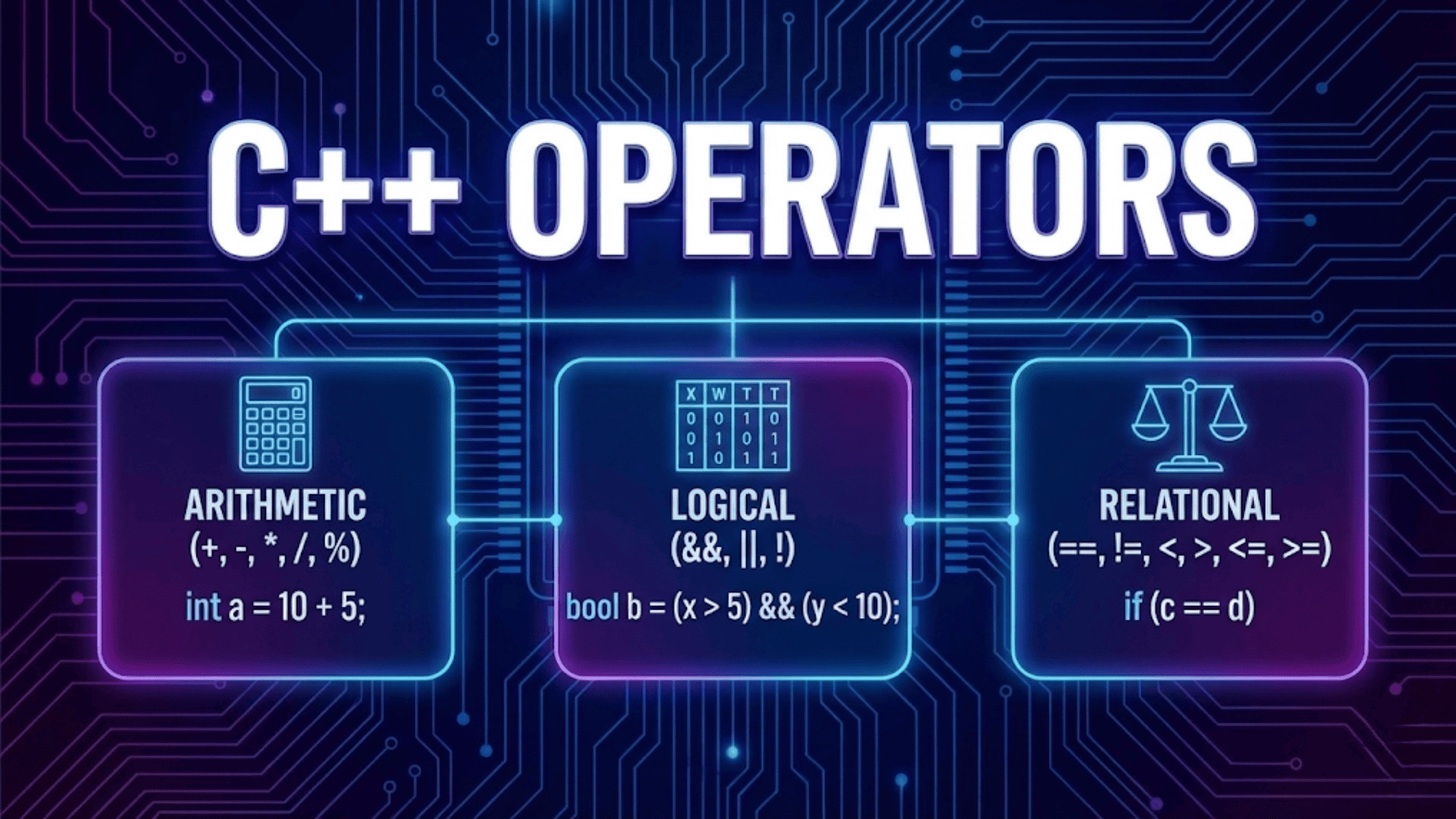
Operators are the tools that let you perform computations and make decisions in your programs. Arithmetic operators (+, -, *, /, %) perform mathematical calculations, with special attention needed for integer division and the modulo operator. Relational operators (==, !=, <, >, <=, >=) compare values and produce boolean results, forming the foundation of conditional logic. Logical operators (&&, ||, !) combine and modify boolean conditions, with short-circuit evaluation providing both performance benefits and safety features.
Assignment operators modify variables, with compound assignment operators (+=, -=, etc.) providing concise ways to update values based on their current state. Increment and decrement operators offer shortcuts for adding or subtracting one, with prefix and postfix forms that differ subtly in how they interact with larger expressions. Understanding operator precedence and using parentheses to clarify intent prevents bugs and makes code more readable.
Bitwise operators manipulate individual bits for specialized tasks, while the ternary operator provides a concise way to choose between values based on conditions. Mastering these operators transforms you from someone who can declare variables into someone who can write programs that perform meaningful calculations and make intelligent decisions based on data—the essence of programming itself.