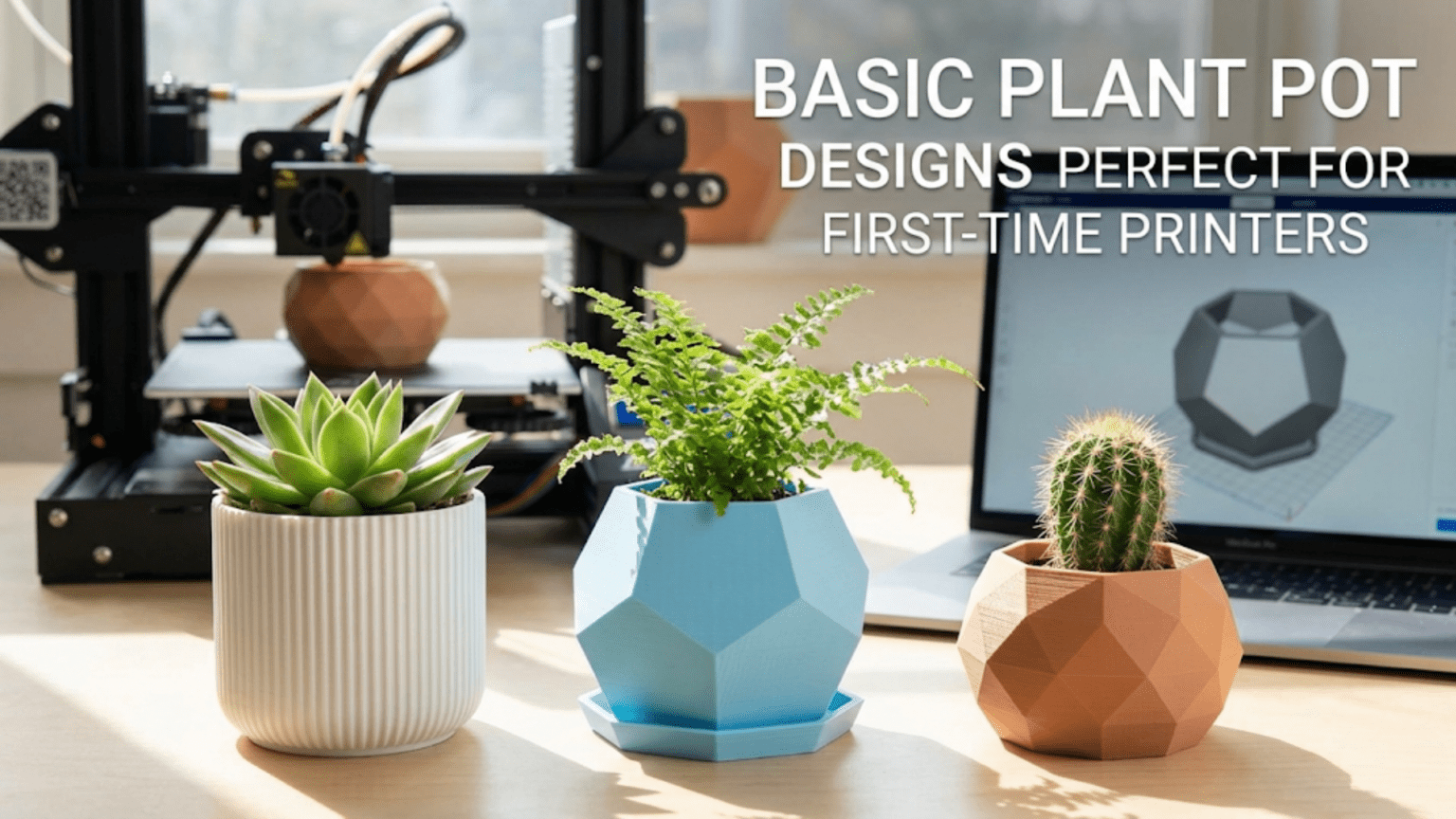
3D printed plant pots and planters are among the most popular and rewarding beginner projects because they combine visual impact with practical utility, require no supports in most designs, and introduce one of the most unique FDM printing techniques — vase mode — which produces seamless, beautiful single-wall vessels in a fraction of the normal print time. A well-printed plant pot showcases your printer’s capability in a form that guests notice and admire, while teaching you fundamental skills in surface quality, wall thickness, watertightness, and material selection for real-world use.
Introduction: Where Form Meets Function in Your First Showcase Print
Every 3D printer owner reaches a moment when they want to print something that genuinely impresses — something that makes visitors stop and ask “Did you really make that?” The plant pot is one of the earliest and most reliable ways to reach that moment.
Unlike the calibration cube (which impresses only other makers who understand what they’re looking at) or the phone stand (which is appreciated but unremarkable to most observers), a beautifully printed plant pot occupying a windowsill or desk corner is immediately striking. The layer lines that are sometimes seen as a sign of “just a 3D print” become, in the right design, an attractive texture that elevates the object. Geometric low-poly pots, organic flowing curves, intricate lattice patterns, and faceted crystalline forms are all achievable on a basic desktop FDM printer — and they all look genuinely stunning with the right plant inside.
Beyond aesthetics, plant pots are excellent learning projects for several reasons that aren’t immediately obvious to beginners.
They introduce vase mode — one of the most distinctive and elegant printing techniques in FDM, where the printer traces a continuous spiral path rather than individual layers, producing a seamless vessel with no visible seam line. Vase mode is faster than standard printing, uses less material, and often produces the most visually refined surface finish of any FDM technique.
They teach you about watertightness — the challenge of printing something that holds liquid reliably when the fundamental nature of FDM creates layer-to-layer boundaries that can be pathways for water seepage. Understanding what makes a print watertight versus porous is essential knowledge for anyone who wants to print useful containers.
They teach you about material selection in real-world environmental conditions — PLA behaves differently from PETG in a damp, occasionally-flooded pot environment, and understanding this before your pot starts degrading is better than learning it the hard way.
They teach you about scale, surface detail, and the relationship between print time and quality — a tall, large pot at high detail settings is a multi-hour print commitment, and managing that commitment thoughtfully is a skill in itself.
And perhaps most importantly, they produce something beautiful that lives in your home, catches the light throughout the day, and reminds you consistently of what your printer can do. That ongoing inspiration is genuinely motivating when you’re early in your 3D printing journey.
This guide covers everything you need to know about printing basic plant pots: design styles worth exploring, the essential vase mode technique explained in full, watertightness strategies, material selection for plant environments, drainage considerations, slicer settings, a complete step-by-step workflow, and a gallery of creative directions to pursue as your skills develop.
Understanding Plant Pot Design Styles
The variety of printable plant pot designs is staggering — literally thousands of options across dozens of design platforms. Understanding the major design categories helps you make informed choices about which styles suit your skill level, your printer’s capabilities, and your aesthetic preferences.
Style 1: Geometric and Low-Poly Pots
Low-poly (low polygon count) designs replace smooth curves with flat faceted surfaces, creating a geometric, angular aesthetic that’s become strongly associated with 3D printing as a medium. These designs look intentionally digital — like a 3D model that hasn’t been smoothed — and this quality is part of their charm. In plant pots, low-poly forms create striking geometric containers that look like they belong in a modern design studio.
Why these are great beginner prints: Flat faceted surfaces are actually easier to print cleanly than smooth curves. The flat walls require no sophisticated surface interpolation from the slicer, and the sharp edges between facets hide minor surface imperfections. A low-poly pot that has a slightly rough surface on one facet looks intentional rather than flawed.
Best for: Modern and minimalist interior styles, desktop and desk plants, small succulents and cacti that complement the geometric aesthetic.
Style 2: Classic Cylinder and Tapered Forms
Simple cylindrical or slightly tapered pot forms — wider at the top than the bottom — are the most traditional planter shape and are well-suited to vase mode printing. The continuous, smooth-walled form is elegant in its simplicity and works well at any scale.
Why these are great beginner prints: The geometry is as simple as 3D printing gets. There are no complex features, no overhangs, and no design elements that stress the printer’s capabilities. The focus is entirely on surface quality and printing technique — which is exactly the right focus for a beginner.
Best for: Any plant type, any interior style, vase mode printing practice, learning surface quality optimization.
Style 3: Organic and Flowing Forms
Organic pots have curved, asymmetric, or flowing forms that look less like geometric solids and more like handcrafted ceramic vessels. They might have slightly irregular profiles, gentle texture on the surface, or flowing curves that change direction smoothly. These designs showcase 3D printing’s ability to create complex curves that would be difficult or expensive to produce by conventional manufacturing.
Why these are great beginner prints: Organic forms are forgiving of minor print imperfections — slight variations in surface finish are harder to notice on a gently varying curve than on a flat faceted surface. They also tend to look impressive even without exceptional print quality, because the form itself carries the aesthetic interest.
Best for: Bohemian or natural interior styles, medium-sized plants, areas where the pot will be viewed from multiple angles.
Style 4: Textured Surface Pots
Some pot designs incorporate surface texture — ribbing, woven patterns, honeycomb cells, bark-like texture, hammered metal appearance, or geometric patterns applied to the surface. These textures add visual interest and tactile quality while also helping to camouflage layer lines by incorporating them into an intentional pattern.
Why these are great beginner prints: Textured surfaces are extremely forgiving of minor print quality variations, because the texture itself provides visual complexity that distracts from imperfections. A slightly rough surface reads as intended texture rather than print error. These designs also look impressive even with relatively coarse print settings (0.25–0.3mm layer height), which means they print faster.
Best for: Situations where print time needs to be minimized, beginners who want impressive results without dialing in perfect surface quality, plants that will be displayed prominently.
Style 5: Lattice and Openwork Pots
Lattice pots feature geometric holes or openwork patterns in the walls — diamond lattice, hexagonal grid, twisted column patterns, and similar geometric open structures. These designs allow air circulation to the plant roots, create beautiful shadow play on surfaces when light shines through, and use significantly less material than solid-wall pots.
Why these are a slightly more advanced beginner challenge: The openwork requires the printer to bridge small gaps and print walls that connect at points rather than continuously. This is manageable for most beginners but requires correct cooling and print speed settings to execute cleanly. As a first or second pot print, a solid-wall design is more forgiving. Return to lattice designs after you’ve gained confidence.
Best for: Succulent and cactus cultivation (excellent air circulation), decorative display without plants, areas where the shadow pattern adds to the aesthetic.
Style 6: Modular and Stackable Systems
Some pot designs are part of modular systems — components that stack, link together, or combine to create larger planting arrangements. The popular Gridfinity system has planter modules. Stacking vertical garden systems allow multiple plants to be grown in a small footprint. Interlocking planters create living walls.
Why these reward investment: Modular systems take more planning and print time upfront, but they produce results that are genuinely remarkable — organized, systematic, and scalable growing systems that commercial alternatives can’t match for customization. These are worth exploring once you’ve established comfortable baseline print quality.
Vase Mode: The Technique That Changes Everything
Vase mode is arguably the most important technique you’ll learn from printing plant pots, and understanding it in depth is worth the investment.
What Is Vase Mode?
In standard FDM printing, the printer creates objects layer by layer. Each layer is a discrete horizontal slice of the model. Within each layer, the printer traces the outer perimeters, inner perimeters, and infill in separate passes, then moves up to the next layer. Each layer has a clear start and stop point where the nozzle begins and ends its perimeter trace — and this start/stop point creates the visible “seam” that runs vertically up the side of printed objects.
Vase mode (called “Spiralize Outer Contour” in Cura and “Spiral Vase” in PrusaSlicer) replaces this layer-by-layer approach with a single continuous spiral. The nozzle traces the outer perimeter of the model continuously, gradually rising in Z height as it goes. Instead of making discrete Z hops between layers, the Z axis moves upward continuously and smoothly while the X and Y axes trace the perimeter.
The result is a vessel printed in one continuous motion from base to top, with:
- No layer seam — because there’s no discrete layer start/stop point, there’s no visible vertical seam line
- Extremely smooth surface — the continuous motion produces a more consistent surface than layer-by-layer printing
- Single-wall construction — the object is exactly one nozzle width thick throughout (about 0.4mm for a standard nozzle), making it lightweight and semi-translucent in some materials
- Faster print time — single-wall printing with no infill passes is significantly faster than standard multi-wall printing
Vase Mode Limitations
Understanding what vase mode cannot do is as important as understanding what it can:
Single-wall only: Vase mode prints exactly one extrusion width thick. There is no option for multiple walls in true vase mode. This means the vessel is thin — beautiful but fragile, and not watertight.
No infill: There is no infill in vase mode. The base is formed by the standard bottom layers before the spiral begins, but the walls are entirely single-wall.
One continuous outer surface only: Vase mode only works with models that have a single, closed outer perimeter at every layer. Models with multiple disconnected shells, holes in the walls (like lattice designs), or internal features cannot be printed in vase mode. The model must be a simple closed vessel — a vase, pot, or bowl shape.
Not watertight for direct planting: The single thin wall created by vase mode is not watertight enough for direct planting — water will seep through over time. Use a plastic nursery liner inside vase-mode pots for any plant that requires watering.
Which Designs Work in Vase Mode
Models compatible with vase mode share these characteristics:
- A single closed outer surface at every cross-section
- No internal features, walls, or structures
- No holes or perforations in the walls
- A solid closed base (or an open base if the design intends one)
- Gradual rather than sudden changes in perimeter shape
Pot designs specifically tagged “vase mode” or “spiralize” on Printables and Thingiverse are the safest starting point. Not all pot designs are compatible — a pot with a drainage hole in the bottom, for example, has an open base and needs the hole handled carefully in the slicer settings.
Vase Mode Settings in Your Slicer
In Cura:
- Search for “Spiralize Outer Contour” in the settings search box and enable it
- Enable “Smooth Spiralized Contours” for even smoother results
- The layer height setting still applies and affects the visual appearance — finer layers (0.1–0.15mm) produce a smoother spiral appearance
In PrusaSlicer:
- Go to Print Settings > Layers and Perimeters > Spiral Vase and enable it
- Ensure “Perimeters” is set to 1 (vase mode enforces this but it’s good practice)
Common to both:
- Set bottom layers to 3–5 for a solid, stable base
- Set layer height to 0.15–0.2mm for good results
- Ensure print speed is set appropriately — 40–60 mm/s is typical for vase mode
- Cooling should be at 100% for clean, solid walls
The Vase Mode Aesthetic
One of the most beautiful qualities of vase mode is how it interacts with light and color. A vase-mode pot in a semi-translucent or translucent filament (natural PLA, clear PETG, or silk PLA) allows light to pass through the thin walls, creating a glowing effect when backlit or placed in a sunny window. The continuous spiral trace is sometimes faintly visible in the surface — not as a flaw, but as a subtle record of the printing motion, similar to the throwing lines in wheel-thrown pottery.
This translucency and the spiral trace make vase mode pots look genuinely handcrafted — more like blown glass or thrown ceramics than plastic manufacturing. It’s one of the cases where the nature of the printing process enhances rather than limits the aesthetic outcome.
Watertightness: Making Pots That Actually Hold Water
Watertightness is one of the most practically important and least intuitively understood concepts in beginner 3D printing. A print that looks solid can be surprisingly porous — and a porous pot will slowly leak water onto your windowsill, which is frustrating at best and damaging at worst.
Why FDM Prints Are Not Inherently Watertight
FDM printing creates objects from stacked layers of fused plastic. The bonds between layers are created by the heat of the fresh layer partially melting the layer below — but these bonds are never as complete or as strong as the plastic itself. At the microscopic level, there are always some small voids or incomplete fusions at layer boundaries.
Additionally, the perimeter walls of a standard print are made up of multiple adjacent extrusion lines laid side by side. The interfaces between these adjacent extrusion lines are also potential pathways for water to seep through, especially under hydrostatic pressure (the weight of a column of water).
The practical result: a standard FDM print with 2–3 perimeters and 20% infill is often not watertight enough for direct planting. Water seeps slowly through the walls and base.
Strategies for Improving Watertightness
Increase perimeter count: More perimeters mean more material for water to traverse. 4–5 perimeters significantly improve watertightness compared to 2–3. With 5+ perimeters, many pots are adequately watertight for plants that don’t sit in standing water.
Increase print temperature slightly: Higher temperature produces better layer fusion and fewer microscopic voids between layers. Try printing 5–10°C above your normal temperature for pots intended to hold water. Monitor for over-extrusion signs at the higher temperature.
Use PETG: PETG tends to produce more watertight prints than PLA because it flows more smoothly and creates better layer fusion at equivalent settings. For pots that will hold soil and be watered regularly, PETG is the preferred material.
Apply a sealant: Coating the interior of the pot with a waterproof sealant is the most reliable way to ensure watertightness. Options include:
- Epoxy resin (two-part mix): Applied to the interior surfaces, fills layer-line voids completely, creates a glass-smooth water barrier. Needs 24–72 hours to cure.
- Plasti-Dip (rubberized coating spray): Creates a flexible waterproof barrier inside the pot. Easy to apply, dries in 30–60 minutes.
- Mod Podge (several coats of the outdoor waterproof formula): Less durable than epoxy or Plasti-Dip but easy to apply and adequately waterproof for light duty.
- Polyurethane varnish (outdoor formula): Good waterproofing, available in spray or brush-on form.
Use a liner: The simplest approach — and the recommended approach for vase-mode pots — is to use a small plastic nursery pot (the thin plastic pots plants come in from garden centers) as a liner inside the printed pot. The liner holds the soil and water; the printed pot is purely decorative. This approach requires no sealant, is suitable for any filament, and makes repotting easy.
Drainage Hole Considerations
Most plants benefit from — and many require — drainage holes in the bottom of their pot. Proper drainage prevents root rot by ensuring excess water can escape rather than accumulating around the roots.
For printed pots, adding a drainage hole is straightforward in the design stage: most pot designs either include a hole or can have one added. If you’re using an existing design without a drainage hole and need one, you can drill a hole in the base of the printed pot using a standard twist drill bit — PLA and PETG drill cleanly without cracking if you go slowly.
For pots with drainage holes, a drainage tray or saucer is essential to catch water that flows through. 3D-printed matching saucers are available for many pot designs, or you can find commercial plastic saucers at garden centers.
Material Selection for Plant Pots
| Material | Suitability for Pots | Key Considerations |
|---|---|---|
| Standard PLA | Acceptable for dry decorative use; limited for regular watering | Biodegradable — breaks down in soil over time; low heat resistance |
| PETG | Recommended for most plant pots | Better moisture resistance, better layer fusion, more watertight; good heat resistance |
| ASA | Excellent for outdoor planters | UV-resistant, weather-resistant, heat-resistant; harder to print |
| ABS | Acceptable but not recommended | Better heat resistance than PLA, but UV-degrades outdoors and is harder to print |
| PLA+ | Similar to PLA with modest improvements | Slightly more flexible than standard PLA; still biodegradable |
| TPU | Specialty flexible pots | Creates flexible, squeezable pots; excellent moisture resistance |
PLA for Plant Pots: The Honest Assessment
PLA is the most common filament for beginner prints, and many beginners print their first plant pots in PLA. This works fine in certain conditions — a vase-mode PLA pot used as a decorative sleeve with a plastic liner inside, kept in stable indoor conditions, will last for years without problems.
The issue arises when PLA pots are used for direct planting with regular watering. PLA is technically biodegradable — it breaks down in composting conditions over months to years. Continuous exposure to moisture and soil microorganisms accelerates this process. A PLA pot used directly for a watered plant may show discoloration, surface degradation, or structural weakening within a year or two.
For pots intended for direct planting with regular watering, PETG is a meaningfully better choice. It’s not significantly harder to print than PLA in most circumstances, it produces more watertight walls, and it doesn’t degrade in moist conditions.
For outdoor planters that will see UV exposure, rain, and temperature cycling, ASA is the right material choice. It’s more challenging to print (higher temperatures, enclosure beneficial) but produces pots that will remain in good condition for years outdoors.
Color and Filament Aesthetics
Plant pots are among the few 3D prints where filament color and finish genuinely compete with the design itself as an aesthetic element.
Earth tones (terracotta orange, warm tan, dark brown, deep green) complement most plants beautifully and evoke the traditional aesthetics of ceramic planters.
White and light grey create a clean, modern aesthetic that works particularly well with geometric and low-poly designs, and makes the plants’ colors pop visually.
Silk or metallic PLA produces a sheen that looks remarkably like glazed ceramic in finished pots — gold, copper, and bronze silk PLA are particularly striking for decorative planters.
Translucent PETG or clear PLA in vase mode creates the glowing lantern effect described earlier — beautiful when backlit by a window.
Wood-fill or stone-fill PLA produces surfaces that genuinely resemble wood grain or concrete — excellent for an organic, natural aesthetic.
Slicer Settings for Plant Pots
Plant pots need somewhat different settings depending on whether you’re printing in standard mode (for watertight, durable direct-planting pots) or vase mode (for decorative show pots). Both approaches are covered below.
Standard Mode Settings (Watertight / Direct Planting)
| Setting | Recommended Value | Notes |
|---|---|---|
| Layer Height | 0.15–0.2mm | 0.15mm for better surface quality |
| Print Speed | 40–50 mm/s | Moderate for good layer fusion |
| Perimeters/Walls | 4–5 | Critical for watertightness |
| Infill | 20–30% | Grid or Gyroid pattern |
| Top Layers | 0 (open top) | Pots are open at the top |
| Bottom Layers | 4–5 | Solid, watertight base |
| Support | None for basic pot shapes | Add if design has overhanging features |
| Bed Adhesion | Brim (5–8mm) | Larger pots benefit from wider brims |
| Hotend Temp (PLA) | 210–215°C | Slightly warm for better layer fusion |
| Hotend Temp (PETG) | 235–245°C | Upper end for better fusion |
| Cooling | 80% for better layer adhesion | Less cooling = better layer bonding |
Vase Mode Settings (Decorative / Liner Required)
| Setting | Recommended Value | Notes |
|---|---|---|
| Mode | Spiralize Outer Contour / Spiral Vase | Enable in slicer |
| Layer Height | 0.1–0.2mm | Finer = smoother spiral appearance |
| Print Speed | 40–60 mm/s | Don’t go faster than your quality allows |
| Perimeters | 1 (enforced by vase mode) | Single wall throughout |
| Infill | 0% (enforced by vase mode) | No infill in vase mode |
| Bottom Layers | 3–5 | Solid base before spiral begins |
| Smooth Spiralized Contours | Enabled (Cura) | Removes any jerk at layer transitions |
| Bed Adhesion | Brim (5mm) | Helps with first layer of thin-wall pots |
| Cooling | 100% | Important for thin single walls |
Step-by-Step: Printing Your First Vase Mode Plant Pot
Let’s walk through a complete workflow for printing your first vase-mode pot — one of the most satisfying beginner print experiences available.
Step 1: Choose a Vase Mode Compatible Design
Navigate to Printables.com and search “vase mode pot” or “spiralize planter.” Filter by “Most Downloaded.” Look for a design with:
- The “vase mode” or “spiralize” tag
- Clear user photos showing the printed result
- A simple, smooth outer surface (your first vase mode print should be straightforward)
- Reasonable dimensions — 80–120mm diameter and 100–150mm tall is a good starter size
Download the STL.
Step 2: Import and Check Orientation
Open your slicer and import the STL. The pot should sit flat-base-down on the build plate. If it’s oriented differently, use the rotation tool to correct this — the flat base must be on the build plate for vase mode to work correctly.
Step 3: Enable Vase Mode
In Cura: Search for “Spiralize Outer Contour” in the settings search and enable it. Also enable “Smooth Spiralized Contours” if available. Set bottom layers to 4.
In PrusaSlicer: Go to Print Settings → Layers and Perimeters → enable “Spiral Vase.” Set bottom solid layers to 4.
Step 4: Set Remaining Settings
Apply the vase mode settings from the table above. The key settings are:
- Layer height: 0.15mm (for a beautiful fine spiral)
- Print speed: 50 mm/s
- Cooling: 100%
- Bottom layers: 4
- Brim: 5mm
Step 5: Preview
In the layer preview, you should see:
- First 4 layers as solid bottom layers
- All subsequent layers as a single continuous line tracing the perimeter
- No infill pattern visible anywhere in the walls
- No seam position markers (there is no seam in true vase mode)
If you see multiple perimeter lines in the walls or any infill, vase mode isn’t enabled correctly — check your settings.
Step 6: Slice and Check Print Time
Slice the model and review the estimated print time. A 100mm diameter, 120mm tall vase-mode pot at 0.15mm layer height typically prints in 1.5–2.5 hours. Notably, the same pot printed in standard mode with 4 perimeters would take 3–4 hours — vase mode saves significant time.
Step 7: Print
Start the print. Watch the first layer carefully — the thin single-wall bottom layers in vase mode need good adhesion to the bed. Verify the brim is adhering cleanly all the way around.
As the print progresses into the spiral, it should be quiet and consistent. The smooth, continuous motion of vase mode often produces a noticeably different sound from standard printing — steadier, more rhythmic, less stop-and-start.
Step 8: Admire (Then Insert Your Liner)
Once printed and cooled, peel off the brim and hold your vase-mode pot up to a light source. The light transmission through the thin single wall is often beautiful — especially in translucent or silk filaments.
Place a small plastic nursery pot inside as a liner. If the nursery pot is slightly larger than your printed pot, trim its rim or choose a smaller one. The liner holds the soil and water; the printed pot holds the liner and provides the aesthetic.
Drainage Tray Printing: Completing the System
A plant pot without a drainage tray is a messy proposition — water drains through the drainage hole and pools on whatever surface the pot sits on. Printing a matching drainage tray completes the system and is usually a much simpler, faster print than the pot itself.
Most pot designs on Printables and Thingiverse either include a matching tray file or link to one. For pots where no matching tray is provided, a simple flat disc with a raised rim (to contain water) can be designed in Tinkercad in minutes and printed in under 30 minutes.
Drainage tray printing tips:
- Print solid (100% infill) or with very high bottom layers (5–6) so the tray doesn’t leak
- Make the rim at least 5–8mm tall to contain the water from a typical watering
- Match the material and color of your pot for a cohesive aesthetic
- Add a small brim to prevent warping — flat discs with raised edges are prone to corner lift
Troubleshooting Common Plant Pot Issues
Vase Mode Walls Have Gaps or Holes
Cause: Under-extrusion in vase mode creates gaps in the single wall.
Solution: Increase print temperature by 5°C. Reduce print speed to 40 mm/s. Increase flow rate slightly (try 103–105%). Ensure your filament is dry — moisture causes intermittent under-extrusion. For PETG specifically, reduce cooling slightly (80%) to allow better layer flow.
Pot Is Leaking Through the Walls
Cause: Insufficient perimeters (for standard mode) or inadequate layer fusion creating microscopic channels.
Solution: Increase perimeter count to 5–6. Increase print temperature slightly. Switch from PLA to PETG. Apply an interior sealant (epoxy, Plasti-Dip, or polyurethane). Use a plastic liner instead of direct planting.
Large Pot Warping Off the Bed
Cause: Thermal contraction of large flat surfaces during cooling causes corner or edge lifting.
Solution: Increase brim width to 10–15mm for large pots. Increase bed temperature by 5°C. Use a PEI sheet for better adhesion. For PETG, a thin layer of glue stick on the bed helps significantly. Print in a draft-free environment — air currents accelerate uneven cooling.
Vase Mode Shows a Visible Seam or Scar
Cause: If vase mode is working correctly, there should be no seam. A visible scar indicates either vase mode isn’t fully enabled, or there’s a Z-seam artifact at the point where vase mode begins.
Solution: Enable “Smooth Spiralized Contours” in Cura, which blends the transition from the solid bottom layers into the spiral. In PrusaSlicer, ensure the spiral vase setting is properly enabled. Check that the model has no overlapping or intersecting geometry that might confuse the slicer.
Pot Cracks After a Few Weeks of Use
Cause: PLA degradation from moisture exposure in direct-planting applications, or a structural weakness at a thin point in the design.
Solution: Switch to PETG for direct-planting pots. Use a liner to protect the PLA from moisture. For structural cracking at specific points, redesign or find an alternative design with more material at that location.
Bottom Layers Are Uneven or Show Infill Pattern Through Top Surface
Cause: Insufficient bottom layers creating a thin base where the infill pattern is visible or the base isn’t flat and even.
Solution: Increase bottom layer count to 5–6. For vase mode, also ensure the solid bottom layers setting is at least 4. If the base is visibly uneven, ensure your bed is level and your first-layer settings are correct.
Creative Plant Pot Directions Worth Exploring
Matching Pot Sets
Print a family of pots in graduated sizes — small, medium, and large — in the same design and color for a coordinated shelf or windowsill display. Three matching low-poly pots in terracotta-orange PLA arranged at different heights create a designer-quality vignette.
Personalized Name Pots
Pots with the plant’s name or owner’s name embossed or debossed into the surface. Search “name planter” or use Tinkercad to add text to a basic cylinder. These make excellent personalized gifts for plant-loving friends.
Self-Watering Pots
More advanced designs that incorporate a water reservoir in the base — the plant sits in the upper section, and wicking material draws water up from the reservoir below. These require careful design for the wicking mechanism but produce genuinely functional smart planters.
Hanging Planters
Pots designed with integrated hooks or hanging points for suspension from ceiling hooks, curtain rods, or plant hangers. These are excellent for trailing plants like pothos and string-of-pearls.
Vertical Wall Planters
Flat-backed pot designs that mount flush against a wall surface, creating a living wall of plants. Modular systems allow multiple pots to be arranged in grid patterns on a fence, wall, or balcony railing.
Themed and Character Pots
Pots shaped like animals, skulls, robots, geometric creatures, or other characters. The plant grows from the character’s head, creating the impression of wild, out-of-control hair. These are enormously popular on social media and make excellent conversation pieces.
Seasonal Planters
Pots in seasonal shapes — a pumpkin planter for fall, a snowflake-textured pot for winter, a flower-embossed pot for spring. Seasonal planters create opportunities to print something new each year and rotate your collection through the seasons.
Building a Plant Display With 3D Printed Accessories
The plant pot is often just the beginning of a broader plant display system that your printer can support. Consider pairing your printed pots with:
Printed plant stands and risers — small platforms in geometric shapes that elevate pots to different heights, creating layered, visually dynamic plant arrangements without expensive commercial stands.
Printed plant labels — small stake-mounted labels that identify plant species, care requirements, or personalized names. Particularly useful for herb gardens and vegetable seedlings.
Printed watering can nozzles — compatible replacement nozzles or extensions for commercial watering cans, allowing more precise watering of small pots.
Printed drip trays — matched drainage saucers in the same design and color as your pots for a cohesive aesthetic.
Printed macramé ring alternatives — geometric printed hanging rings that suspend pots in mid-air, replacing traditional macramé in a more modern, geometric aesthetic.
Each of these accessories is a simple, fast print that builds on the skills developed printing the pots themselves, and together they create a complete, personalized plant display system.
Conclusion: Growing Things and Growing Skills
There’s something uniquely satisfying about the intersection of 3D printing and gardening. Both involve patience, attention to detail, an understanding of materials and conditions, and a willingness to iterate when things don’t go perfectly. Both produce results that grow and change over time. And both reward the practitioner with something beautiful and alive at the end of the process.
Your first 3D-printed plant pot is the beginning of a journey that goes far beyond printing. It leads to learning about plant care, about design aesthetics, about material science, and about the remarkable creative latitude that a 3D printer gives you in personalizing your living space.
Print your first pot. Fill it with a succulent that needs minimal care and maximum sunshine. Place it where you can see it every day. And let both the plant and your 3D printing skills grow together from there.